M0201AJB Era
™
Medium Power Carrier Access Point Installation Guide
© October 2018 CommScope, Inc. Page 41
Installing CAP Ms
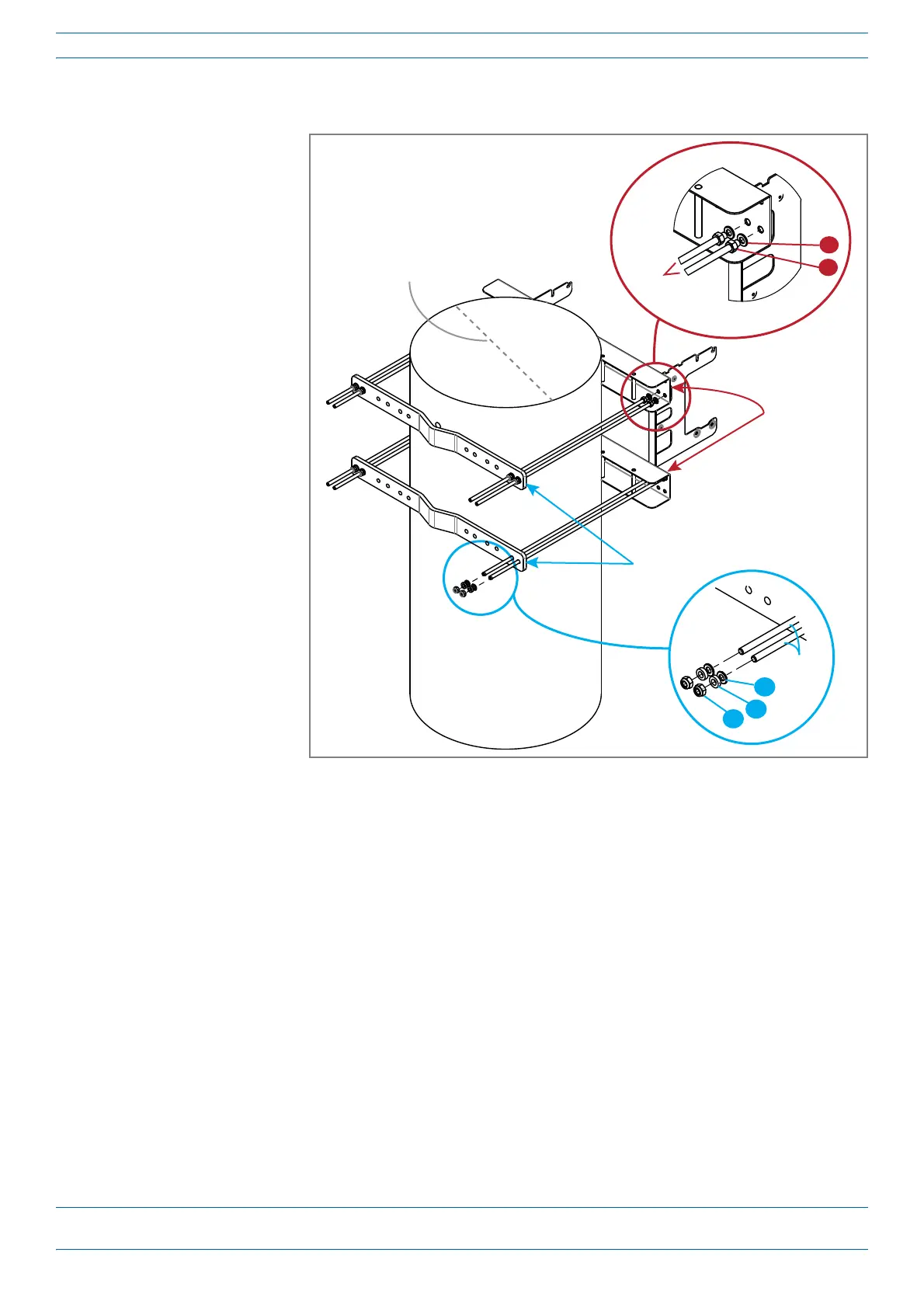
9 AttachfourofthethreadedboltstothesideofthetopPole-MountingBracketthatwillfacetowardthe
pole(insidethePole-MountingBracket).InstalltheM8nutandwashersintheordershown.
a SlideoneM8plain
washer(9A)toone
endofeachofthefour
threadedbolts.
b SlideanM8Hexagon
Nut(9B)nexttothe
M8plainwasher.
c TorquetheM8
HexagonNutto27
N-m.
10 RepeatStep9,butthis
timeattachfourofthe
threadedboltstothe
bottomPole-Mounting
Bracket.
11 Oneinstallershouldnow
holdthePole-Mounting
Bracketsthatyou
assembledin
Step7
throughStep10against
inthepoleattheposition
atwhichtheCAP
Misto
beattachedtothepole.
Theeightthreadedbolts
willprotrudetotheother
sideofthepile.
12 Thesecondinstaller
shouldnowattachoneof
theBracketstothetop
fourthreadedboltsthatprotrudepastthepole.InstalltheM8nutandwashersintheordershown.
a SlideoneM8plainwasher(12A)tooneendofeachofthefourthreadedbolts.
b SlideanM8split-lockwasher(12B)nexttotheM8plainwasher.
c UseanM8nut(12C)toscrewtheendofthethreadedbolts(withthenutandwasher)tothewelded
nutsontheinnersideofthetopPole-MountingBracket.
d TorquetheM8HexagonNutto27N-m.
13 RepeatStep12,butthistimeattachthesecondBrackettothebottomfourthreadedbolts.
14 TomounttheCAPMtothepole-mountingkit,followthestepsin"MountaCAPMUsingaSingleMounting
Bracket”onpage25or"MountTwoCAPMsUsingaDualMountingBracket”onpage31,asappropriate
forthisinstallation.
Bracket
Threaded
bolts
9A
9B
Pole
Mounng
Bracket
12C
Threaded
bolts
12A
12B
4" to 18"
(10.2 cm to 45.8 cm)










 To Next Page