35D-Link DCS-935L User Manual
Section 4 - Conguration
Audio and Video
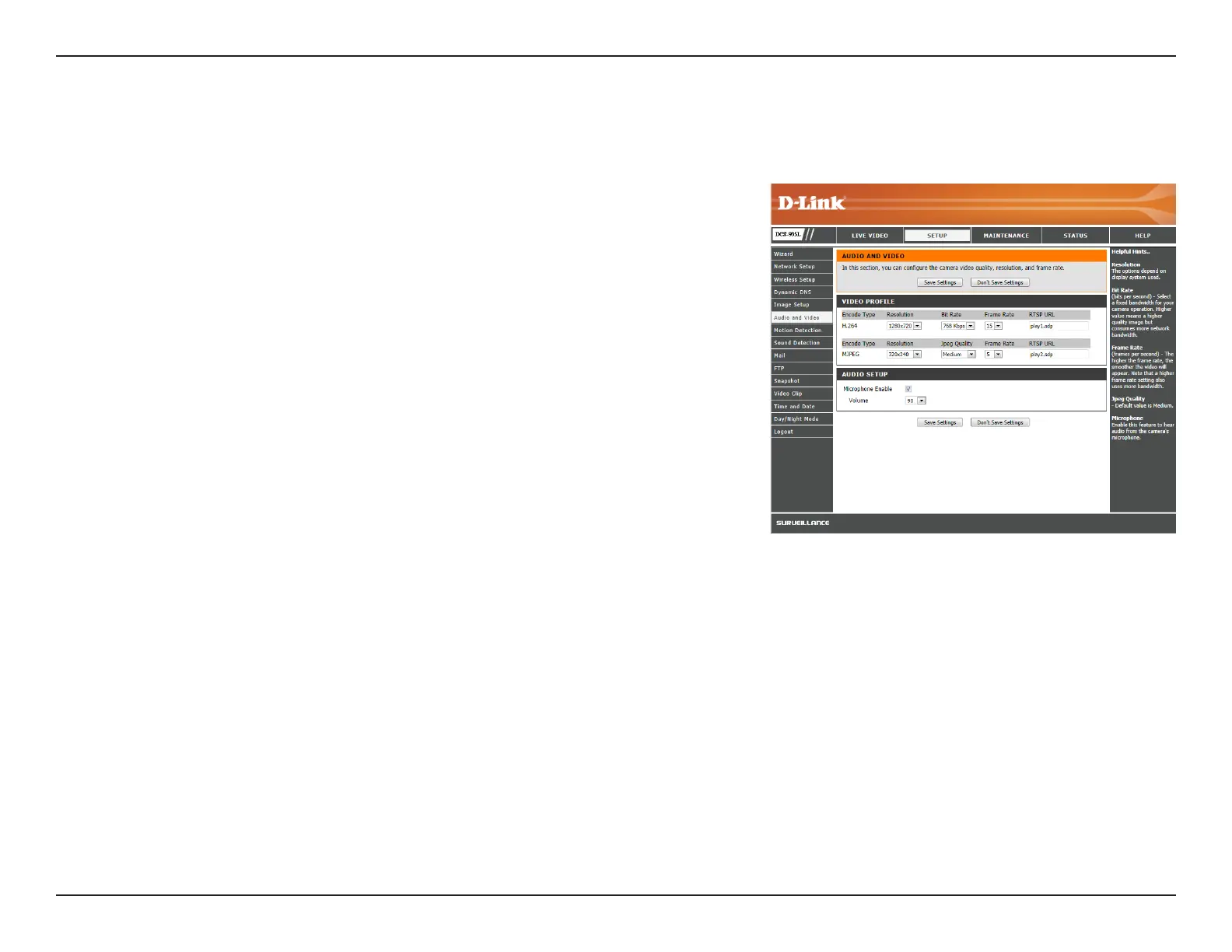
Thissectionallowsyoutocreateavideoprolebyadjustingtheaudioandvideosettingsforyourcamera.
Encode Type:
Resolution:
Bit Rate/JPEG
Quality:
Frame Rate:
RTSP URL:
Microphone
Enable:
Volume:
YourcamerahasseparatesettingsfortheH.264andMJPEGvideoencodetypes.
Selectthedesiredvideoresolutionfrom1280x720,800x600,720x480,640x480,
and320x240.Highersettingsoerbetterquality,butrequiremorebandwidth
to stream.
SelecttheBit Rate (H.264)orJPEG Quality (MJPEG)forthevideostream.Higher
bitratesandJPEGqualityrequiresmorebandwidth.
Selecttheframerate(framespersecond)touseforthevideostream.HigherFPS
oersbetterquality,butrequiresmorebandwidthtostream.
TheURLusedtoconnecttothecamerawhenviewingstreamingmediafrom
QuickTimeoramobiledevice.
ChecktheboxbyMicrophone Enabletohearaudiofromthecamera’smicrophone.
Selectanumberfromthe Volume drop-downmenutoadjustthevolumeofthe
audio from the camera.
Click Save Settings to save your changes.




 To Next Page