39
GATE SETUP
Setup Wizard
This funcon automacally programs the open and closed gate limits. The Setup Wizard will run auto-
macally aer the rst power up of a new operator or aer a gate factory reset (see Use Factory
Sengs). The Setup Wizard can be run anyme the limits need to be relearnt. Follow the prompts to
complete.
To run the Setup Wizard it is required that the Terms and Condions are agreed to, these are available in
this manual. Ensure that these are read and understood as non acceptance will prevent the commission-
ing of the operator.
Safety Sengs
Closing Force (10 - 100%)
This funcon sets the maximum torque that the gate operator will exert on the gate while closing. A
heavy gate, or one that does not move easily, will require a higher torque seng than a light gate.
This seng also determines the force the gate will exert on an object if it obstructs it’s path when
closing, referred to as Collision Sensing. If the seng is too high the gate will strike the object with
high force and may cause damage or injury to the obstrucng object. If it is too low however, the
gate may stop as a result of small interferences such as a pebble or dirt on the track. It is important
to set the Closing Force to a level that suits the specic site when commissioning the operator.
Opening Force (10 - 100%)
This funcon is the same as Closing Force except that it sets the maximum torque that the gate oper-
ator will exert on the gate while opening.
An-Crush Gap (0 - 0.5m)
This is a safety feature to prevent the entrapment of people or animals by the gate while closing. By
enabling this feature the controller will see any trigger received as an Open trigger if the gate was
stopped within the An Crush Gap while the gate was closing. Only once the gate is outside the An
Crush Gap will the controller accept a Close trigger.
Dynamic Adjust (10-100%)
Dynamic Adjust is an addional safety seng to prevent the operator from exerng too much force
on an obstrucon. While The Opening Force and Closing Force funcons set a xed maximum force
limit, this funcon automacally adjusts, as a percentage oset, from the current running force of
the gate while it is running. This means that any unexpected changes in force are detected sooner
than if the controller were to wait for the maximum force to be exceeded, as set in the Opening and
Closing Force sengs. Dynamic adjustment is by default enabled but may be disabled in the Run
Prole menu.
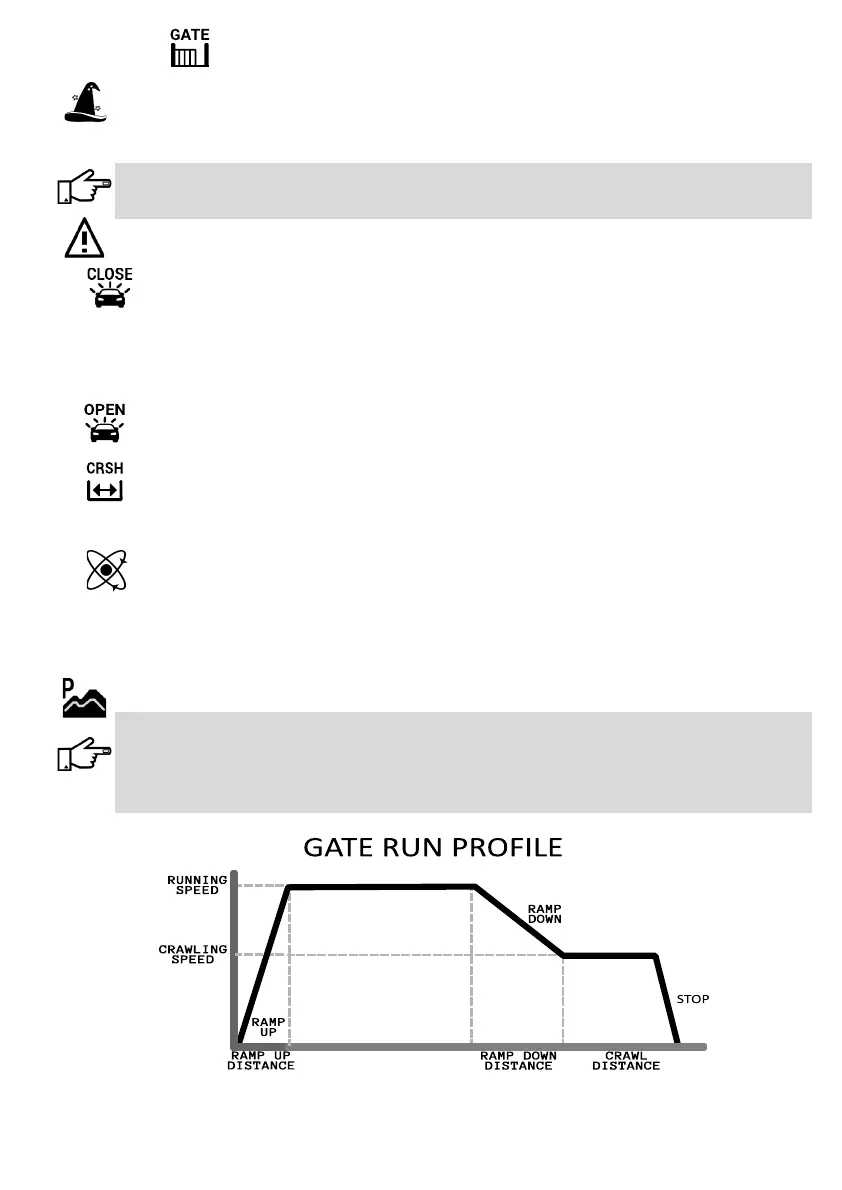
Run Prole
During a standard open or close operaon, the gate follows the running prole as indicated below. The
operator will increase the gate speed during the Ramp Up phase unl it reaches its Running Speed. When
it approaches its end posion, the gate will rst Ramp Down and then Crawl unl it reaches its end
posion. Many of these speeds and distances may be adjusted to suit a specic installaon. For instance,
in a high pedestrian trac area it may be required to have longer Crawl distance while in a high security
area it may be required to have no crawling distance at all.
Connues……...



 To Next Page