DF4910HD-DN | DDF4910HDV-DN-IM/-SM
www.dallmeier.com 64
10.5 Encoder Settings
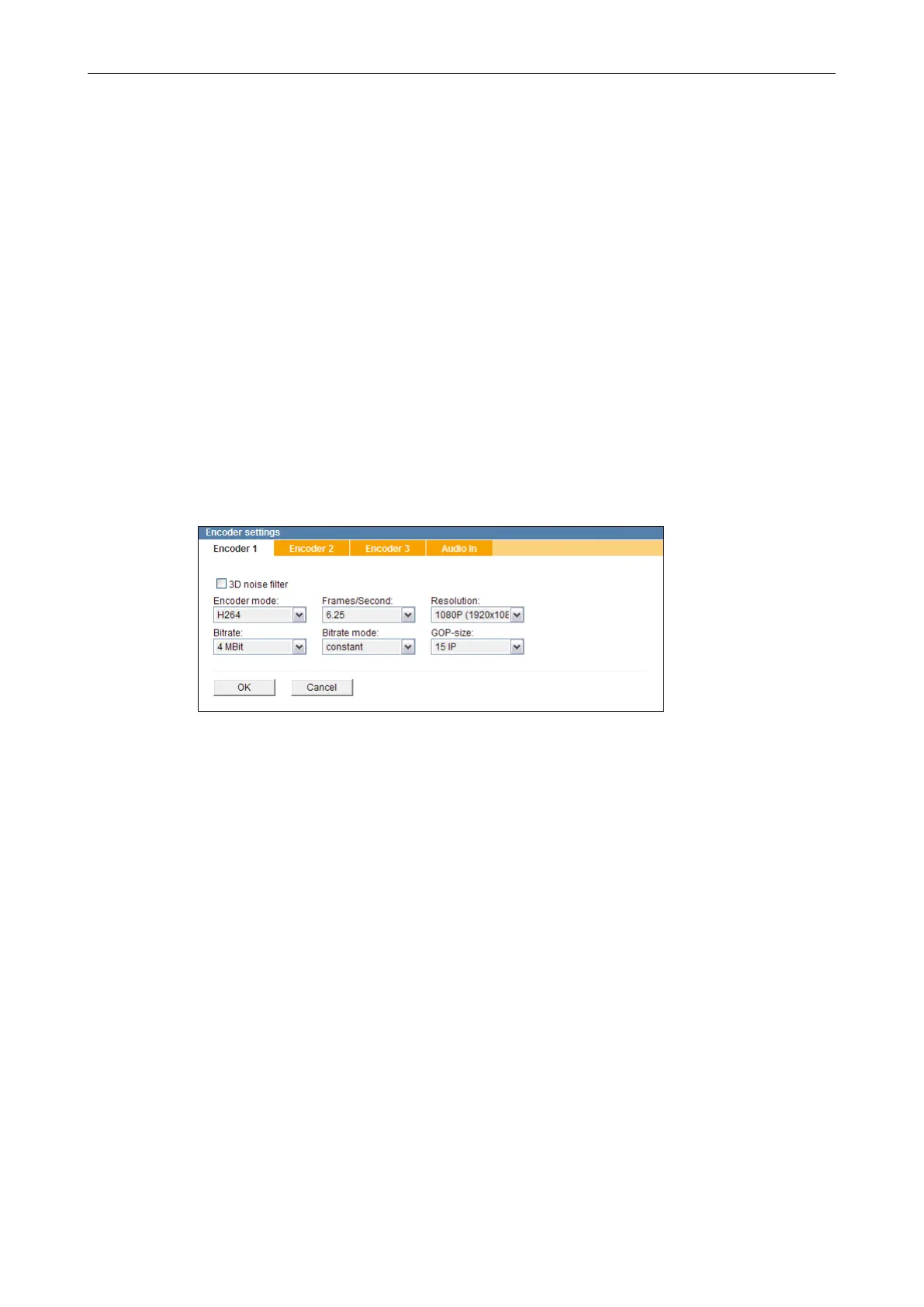
The audio and video encoding is congured in the Encoder settings dialogue.
This dialogue may be locked by external devices/applications.
Note that the produced camera images can be recorded in the “Motion” recording mode
(image comparison) by Dallmeier recorders of the DMS and VNB series (as of version
7.1.1).
For this, the Encoder 1, which has to be set to H.264 encoding, is used.
Encoder 2 and 3 are then automatically disabled.
In addition to the recording, a second stream from Encoder 1 can be used for the live
display if Encoder 1 is set to a bit rate not higher than 6 MBit.
10.5.1 Encoder 1
Open the Encoder settings dialogue via Video > Encoder settings ....
The Encoder 1 tab is displayed.
Fig. 10-7
Note the explanations below.
Activate the 3D noise lter if required.
Select the encoding standard from the drop-down list Encoder mode.
Select the frame rate from the drop-down list Frames/Second.
Select the Resolution (width × height in pixels).
Select the Bitrate.
Select the Bitrate mode.
Select the GOP-size (only with H.264).
Finally, conrm with OK.



 To Next Page