44
Xtium-CLHS PX8 Reference Xtium-CLHS PX8 User's Manual
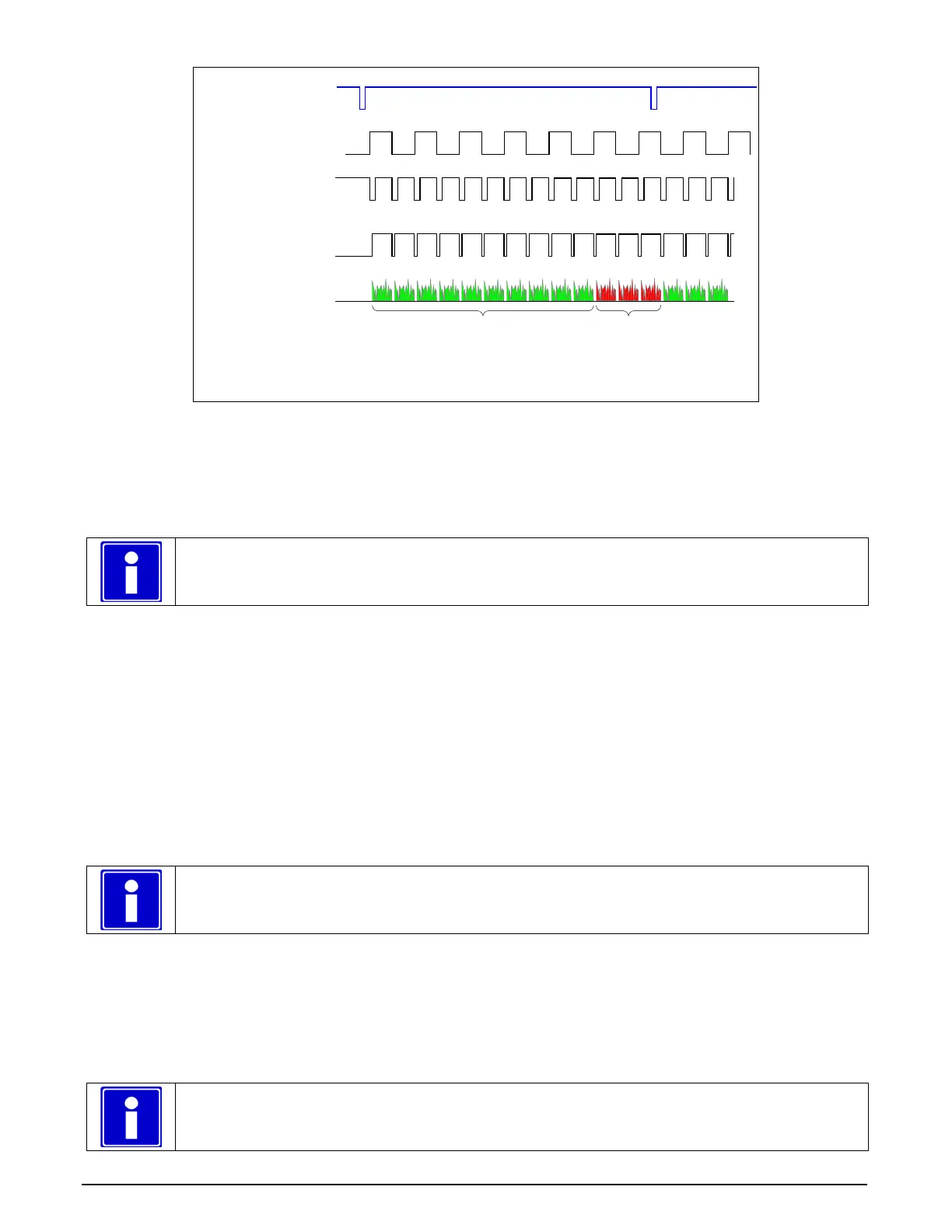
LVAL
Notes:
• In this example -- 10 lines are acquired
• The Maximum frame rate = Max. Line Rate / nb lines (Hz)
• In / Out signal reference is relative to frame grabber
Video Line
Camera
Control
Shaft Encoder
Virtual Frame
Trigger
In
In
In
In
Out
10 Lines
Acquired
n Lines
Ignored
Figure 18: Synchronization Signals for a 10 Line Virtual Frame
CVI File (VIC) Parameters Used
The VIC parameters listed below provide the control functionality for virtual frame reset. Sapera
applications load pre-configured CVI files or change VIC parameters during runtime.
Note: Sapera camera file parameters are easily modified by using the CamExpert program.
External Frame Trigger Enable = X, where: (with Virtual Frame Trigger enabled)
• If X = 1, External Frame Trigger is enabled
• If X = 0, External Frame Trigger is disabled
External Frame Trigger Detection = Y, where: (with Virtual Frame Trigger edge select)
• If Y= 1, External Frame Trigger is active low
• If Y= 2, External Frame Trigger is active high
• If Y= 4, External Frame Trigger is active on rising edge
• If Y= 8, External Frame Trigger is active on falling edge
• If Y= 32, External Frame Trigger is dual-input rising edge
• If Y= 64, External Frame Trigger is dual-input falling edge
Note:. For dual-input triggers, Trigger Input #1 signals the start of the frame trigger, Trigger
Input #2 signals the end of the frame trigger.
External Frame Trigger Level = Z, where: (with Virtual Frame Trigger signal type)
• If Z = 1, External Frame Trigger is a TTL signal
• If Z = 2, External Frame Trigger is an RS-422 signal
• If Z = 8, External Frame Trigger is a 24V signal
• If Z = 64, External Frame Trigger is a 12V signal
Note: For information on camera configuration files, see the Sapera Acquisition Parameters
Reference Manual (OC-SAPM-APR00).



 To Next Page