RS.8D.M1.22 AK2-SC 255 Reference Manual 167
sensor to a fixed value if for instance, a sensor has
failed and you are awaiting a service replacement.
To set a manual value, select the M from the list box,
then enter the desired value in the Current field,
which becomes a label field as soon as the M is
entered. At the same time, when the M is entered,
the Offset and Input fields no longer appear.
Offset (Label field) A field where you can enter an offset to
adjust the sensor’s reading when calibrating with
actual temperature as read from a refrigeration
thermometer.
If you change an offset from a negative to a positive
value, the sign will not change until you enter the first
numeral from the keypad.
You can only offset a real sensor; you cannot enter
an offset for a reading being received from another
controller. And you cannot use a large offset to
“fake” a missing sensor.
Input The sensor’s current electrical value in volts or
ohms, for comparison with a table of standard
values.
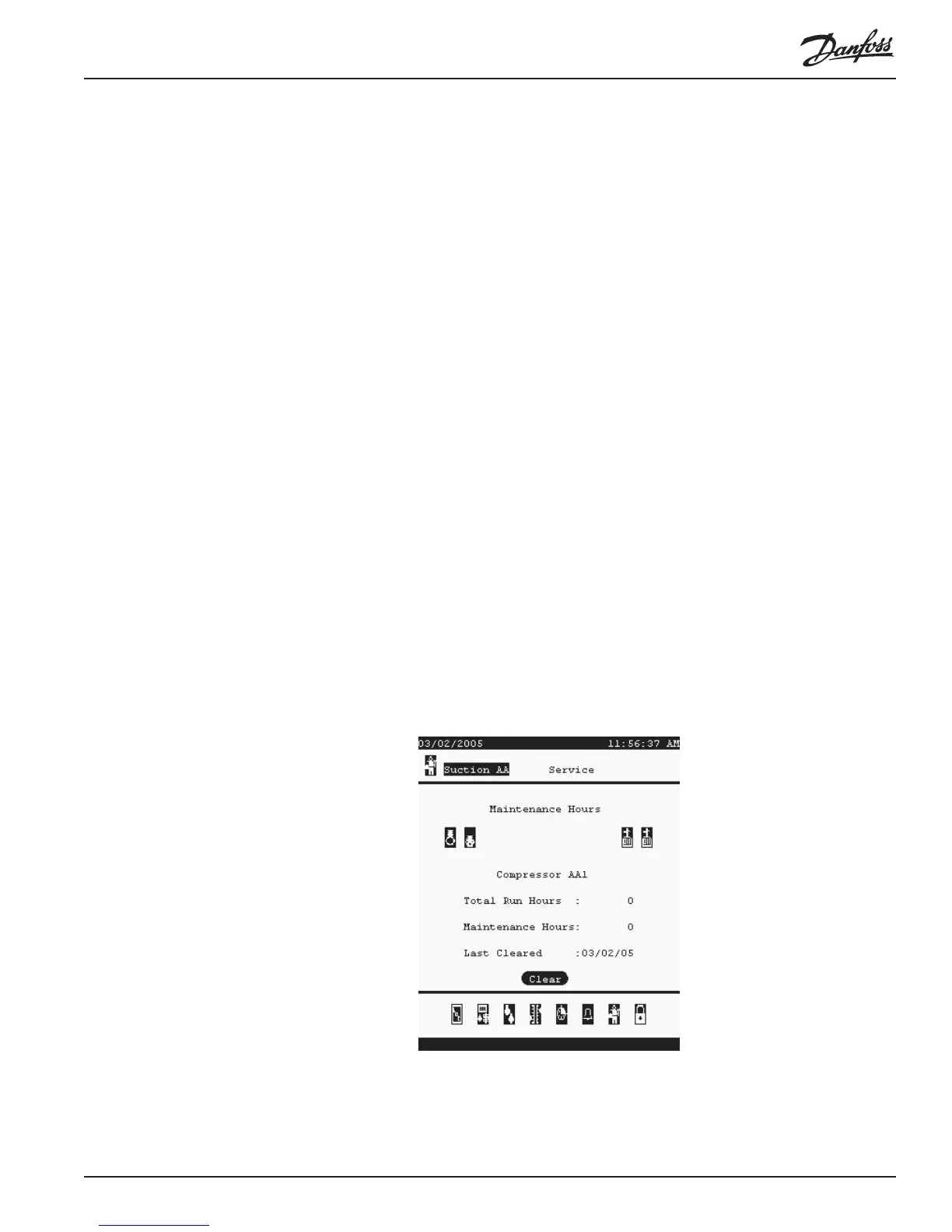
Maintenance Hours The Maintenance hours service screen maintains Total Run Hours for each device
or lighting zone (since its first start after configuration), and Maintenance Hours, a
counter that you can reset to zero using the <Clear> button at the bottom of the
screen. The date of last clearing is also displayed.
Bd/Pt Locations This screen is identical in function to the Board & Points screens described in Part I,
Section 1.2, “Configuring Board & Points.”





 To Next Page