20
Connectible Devices Installation
Connectible Devices
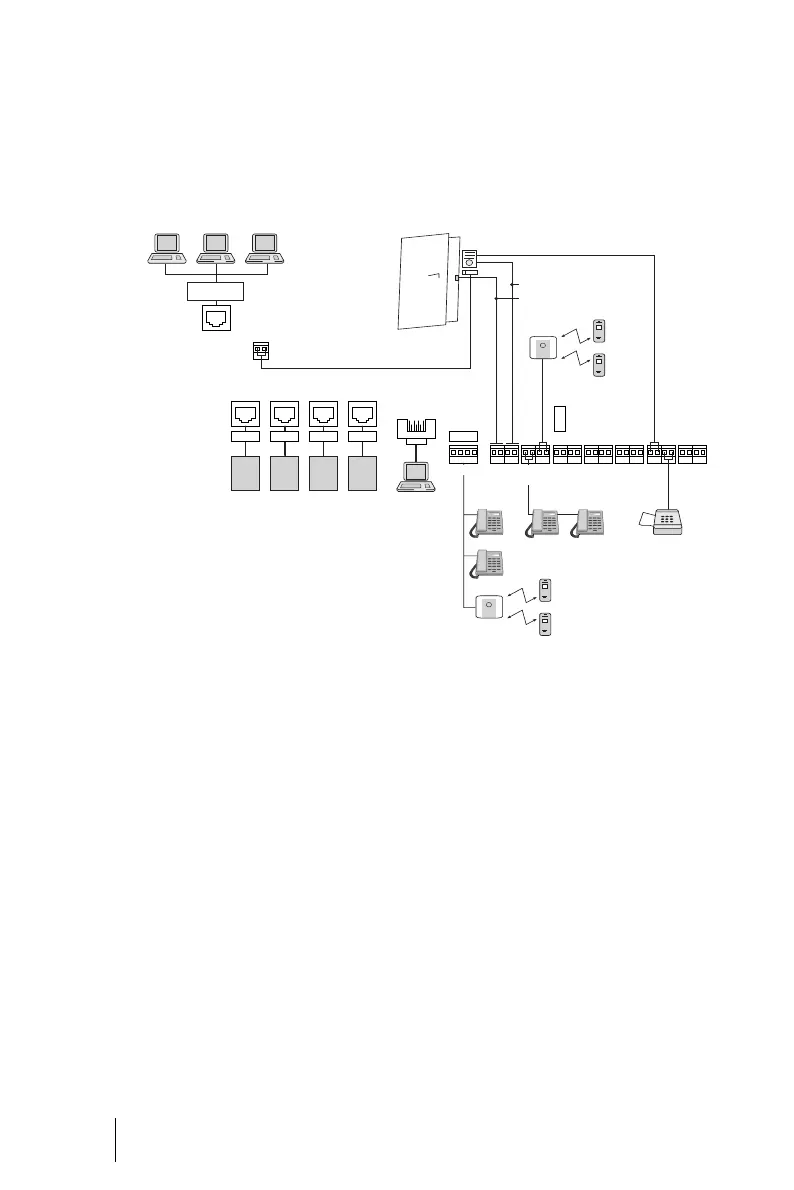
The OpenCom 100 ports offer a large
number of possibilities for connect-
ing devices.
One of the many possible configu-
rations is shown in the following
figure:
Example of port assignment of the OpenCom 110 with terminals
Internal/External
S
0
Ports
The S
0
ports
■ S
0
2 and S
0
3 (OpenCom 105)
■ S
0
3 and S
0
4 (OpenCom 110)
■ S
0
1 to S
0
6 (OpenCom 120)
can be connected either externally
(i.e. to ISDN network terminators) or
internally. Simultaneous use of both
is not possible.
Besides the S
0
3 internal and S
0
4 in-
ternal ports, the OpenCom 110 has a
further port available, the S
0
5, which
can only be used internally.
Up to eight devices (ISDN tele-
phones, ISDN faxes, ISDN base sta-
tions, ISDN cordless telephones,
ISDN adapters for the PC) per bus
can be connected by means of twin-
pair cables to the internal buses. The
U
pn
3/4
U
pn
5/6
U
pn
7/8
a/b
1/2
a/b
3/4
Actor
1 + 2
S
0
3 ext S
0
4 ext
Sensor
Intercom/Door opener
S
0
2 ext
LAN
S
0
1 ext
NTBA NTBANTBA NTBA
R
E
Hub
RRR R
COM
U
pn
1/2
S
0
5 int
Intercom/Relay





 To Next Page