52
Application Examples Team Functions
cal signal on one’s own telephone
(flashing trunk key LED).
The parallel telephone will indicate
calls only by an optical signal.
If required, time-delayed acoustic
signalling can be configured for
TrK 10 on the secretary’s telephone.
If the executive, for example, does
not answer a call within 10 seconds,
the secretary’s telephone will start
to ring.
If the executive activates a substi-
tute function with the secretary as
the substitute, calls for call number
10 will be indicated on the execu-
tive’s telephone by an optical signal
only, but signalled acoustically on
the secretary’s telephone. The secre-
tary can also activate a substitute
function. Calls for call number 11 are
then signalled acoustically on the
executive’s telephone, and indicated
by an optical signal on the parallel
telephone and the secretary’s tele-
phone.
Three-Member Team
The three-member team described
here is an example of a team config-
uration within a project group, e.g.
the Export Sales Department.
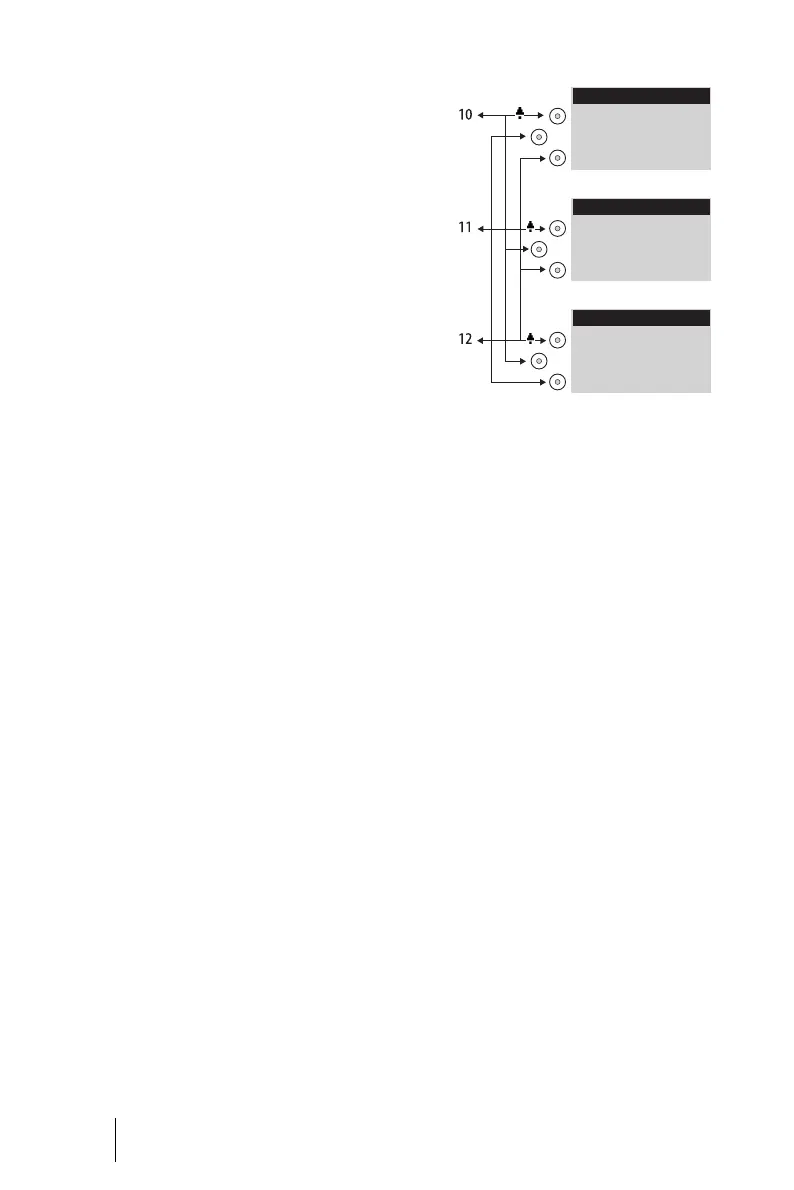
Each team member has one Open-
Phone 63 system telephone with all
call keys programmed as line or
team keys.
Example: Three-member team
Line Seizure
Each team member’s call number,
e.g. call number 10 for Miller, has
been programmed as a trunk key on
each member’s own telephone.
On the other telephones in the team,
this call number is programmed as a
team key (e.g. TK 10 on Johnson’s
and Smith’s telephones). The team
members can thus see which call
number a call is for and can answer it
by pressing the appropriate team
key.
The team members can call each
other via the team keys. For exam-
ple, Miller can call number 12 by
pressing TK 12; the call is then sig-
nalled to Smith’s telephone on
TrK 12.
Johnson
Trk 11: Johnson
TK 10: Miller
TK 12: Smith
Smith
TrK 12: Smith
TK 10: Miller
TK 11: Johnson
Miller
TrK 10: Miller
TK 11: Johnson
TK 12: Smith





 To Next Page