53
Team Functions Application Examples
Line Busy Indication
If a line is busy, e.g. TrK 11 Johnson,
the team keys 11 on Miller’s and
Smith’s telephones will indicate this.
Call Signalling
In this example, calls via the trunk
keys are signalled acoustically. Calls
via the team keys are indicated by an
optical signal (flashing team key
LED).
Unified Team
The unified team described here is
an example of a team configuration
within a department in which calls
are to be managed quickly (e.g. Sup-
port Department).
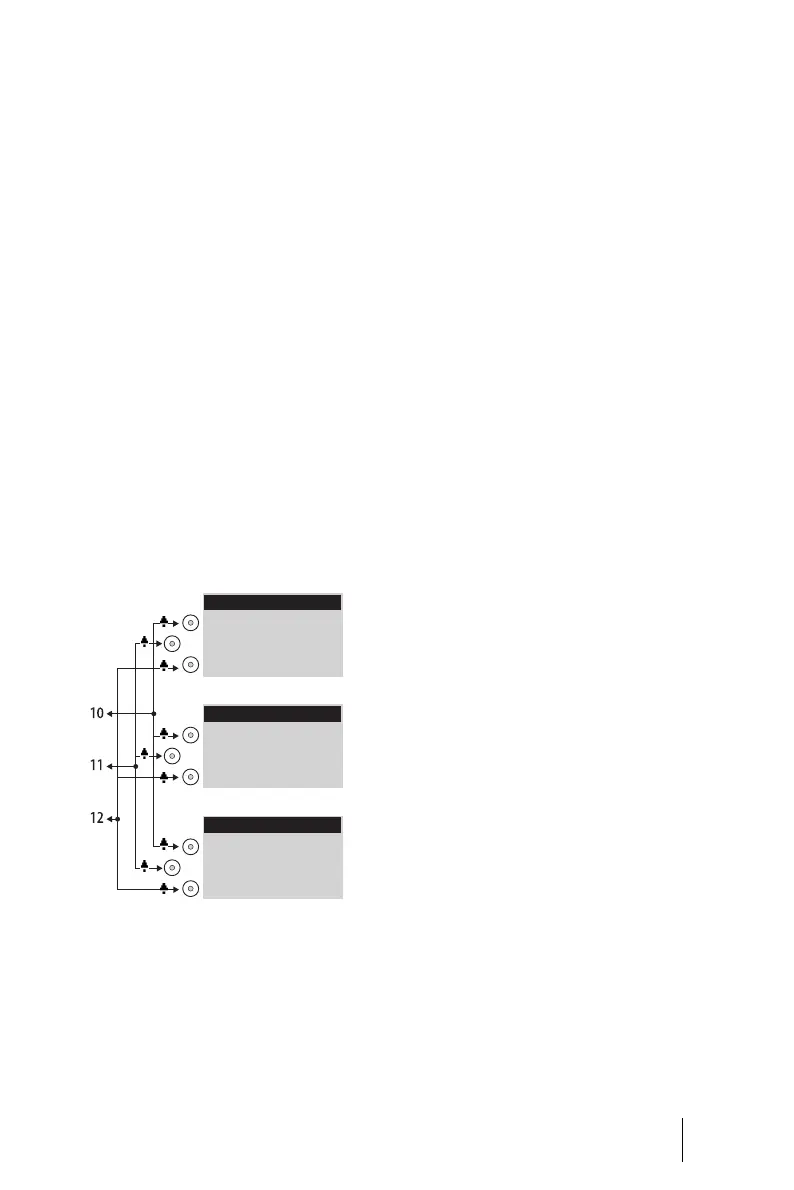
Example: Unified team
Each team member has one Open-
Phone 63 system telephone with all
call keys programmed as trunk keys.
Line Seizure
Call numbers 10, 11 and 12 are
programmed as trunk keys on each
team member’s telephone (TrK 10
to TrK 12.
All team members can use these call
numbers (for answering as well as
making calls).
Tip: In this team configuration it is
useful to program one of the func-
tion keys on each telephone with the
“Hold” function. A call, e.g. for
TrK 11, can then be put on hold by
pressing the function key. If another
team member then presses trunk
key TrK 11 on his telephone, he can
accept the call.
For further information on function
keys, please refer to the “OpenPhone
61, 63, 65” user guide.
Line Busy Indication
If a line is busy, e.g. TrK 11 Johnson,
the trunk keys on the other team
telephones will indicate this.
Call Signalling
In this example, calls via all trunk
keys are signalled acoustically.
Tog gle Tea m
The toggle team described here il-
lustrates how a large number of call
numbers can be managed efficiently
with the help of team functions.
Miller
TrK 10: Support 1
TrK 11: Support 2
TrK 12: Support 3
Johnson
TrK 10: Support 1
TrK 11: Support 2
TrK 12: Support 3
Smith
TrK 10: Support 1
TrK 11: Support 2
TrK 12: Support 3





 To Next Page