58
Easy Access Configuration Guide
Easy Access
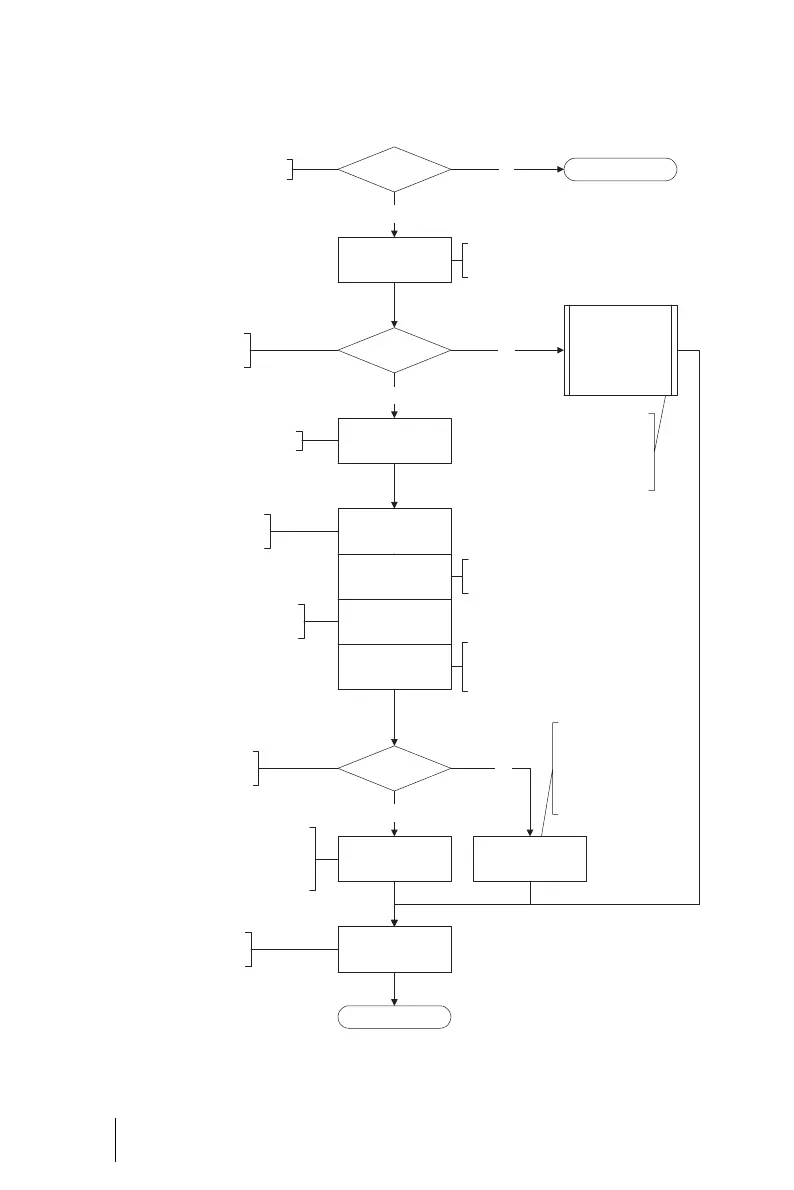
Flowchart: Configuring Easy Access
Finished
Assign a name to
the OpenCom.
Specify the IP address of the OpenCom
under “Domain Name Server”. This is
transferred as the DNS server to the
client computers via DHCP.
LAN
Host name
DHCP
DNS
OpenCom DHCP server
IP address
Network mask
PPP addresses
Finished
Ye s
No
Ye s
OpenCom as DNS server Register internal DNS
No
Ye s
No
Do you have a DNS server
in your network?
Enter the Ethernet-IP con-
figuration for the OpenCom.
Activate the OpenCom DHCP server.
Do you have a DHCP
server in your network?
Do you have a computer network?
Enter the address range
for the RAS accesses.
Gateway address
DHCP asdresses
Domain name
Client computers are informed of this
gateway address via DHCP as a gateway.
Enter the address range of the client
computers in your network.
Enter the domain name. This name is
transferred to the client computers as
the domain via DHCP.
Specify the IP address of
your internal DNS server
under “Domain Name
Server”. This is transferred
as the DNS server to the
client computers via DHCP.
The OpenCom takes
the settings from your
DHCP server
Ask your network administrator for the
address range for the RAS accesses. For
this purpose, your administrator must
reserve an IP address range for the RAS
accesses.





 To Next Page