54
Application Examples Team Functions
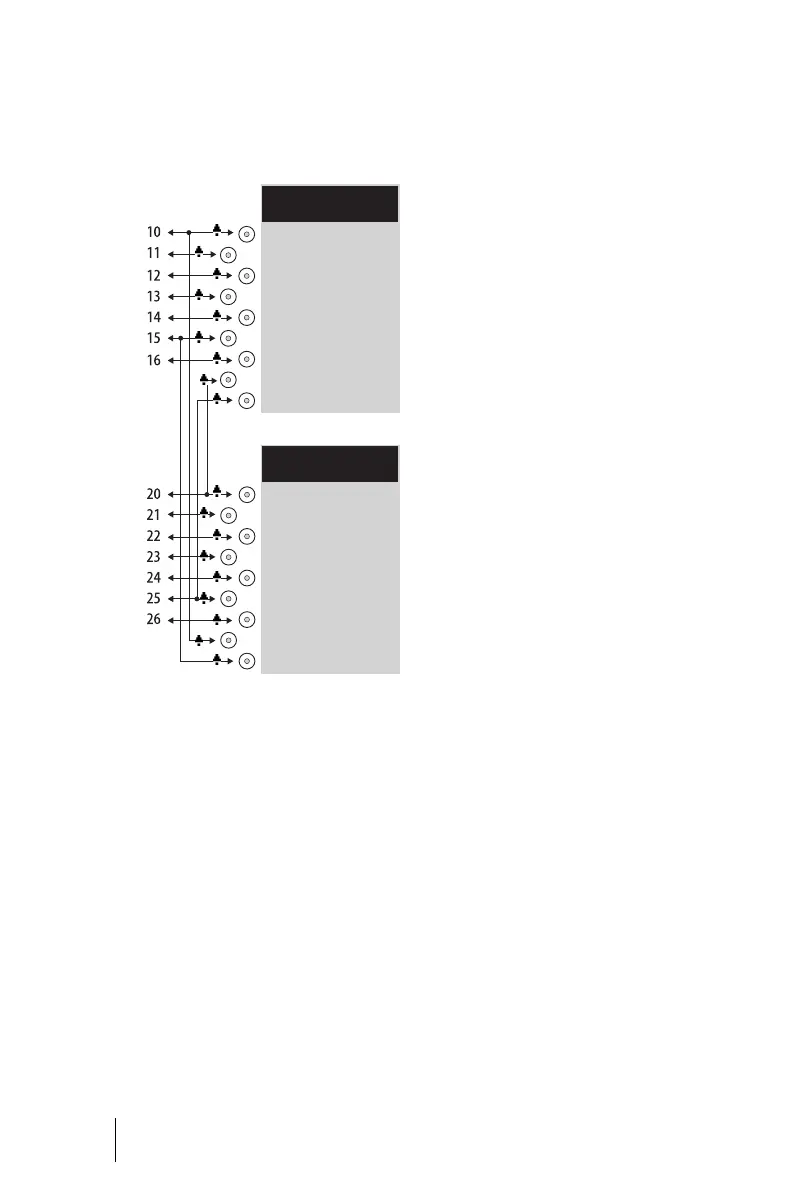
Each team member has one
OpenPhone 65 with all call keys pro-
grammed as line or team keys.
Example: Toggle team
Line Seizure
Each team member has been as-
signed seven call numbers, each of
which has been programmed as a
trunk key (TrK 10 to TrK 16 and
TrK 20 to TrK 26). For each member,
these trunk keys have been pro-
grammed either as Support call
numbers or as Hotline call numbers.
The first Support call number and
the first Hotline call number of each
team member is programmed as a
team key on the other member’s tel-
ephone, e.g. TrK 10 and TrK 15 on
Miller’s telephone as TK 10 and TK 15
on Johnson’s telephone. The as-
sumption here is that most calls will
go to the respective first call num-
bers, and team members can thus
help each other out by answering
one another’s calls.
On each telephone it is possible to
toggle between the calls on individ-
ual lines, e.g. TrK 10 and TrK 11, by
pressing the appropriate key (tog-
gling).
Every call on a trunk key can be
transferred to any other party by
means of the R key. For more infor-
mation, please refer to the chapter
“Consultation, Toggling, Transfer
and Conference” in the “OpenPhone
61, 63, 65” user guide.
Line Busy Indication
If a line is busy, e.g. TrK 10 on Miller’s
telephone, the appropriate team key
will indicate this, e.g. TK 10 on John-
son’s telephone.
Call Signalling
In this example, calls via trunk keys
are signalled acoustically. Calls via
team keys are indicated by an optical
signal (flashing team key LED).
Miller 14:22
Mi.14.Feb.01
TrK 10: Support 1
TrK 11: Support 2
TrK 12: Support 3
TrK 13: Support 4
TrK 14: Support 5
TrK 15: Hotline 1
TrK 16: Hotline 2
TK 20: Support 6
TK 25: Hotline 3
Johnson 14:22
Mi.14.Feb.01
TrK 20: Support 6
TrK 21: Support 7
TrK 22: Support 8
TrK 23: Support 9
TrK 24: Support 10
TrK 25: Hotline 3
TrK 26: Hotline 4
TK 10: Support 1
TK 15: Hotline 1





 To Next Page