Field Service Ver. 1.0 Apr. 2005 3. Periodical check
15
ineo 161
ineo 210
Maintenance
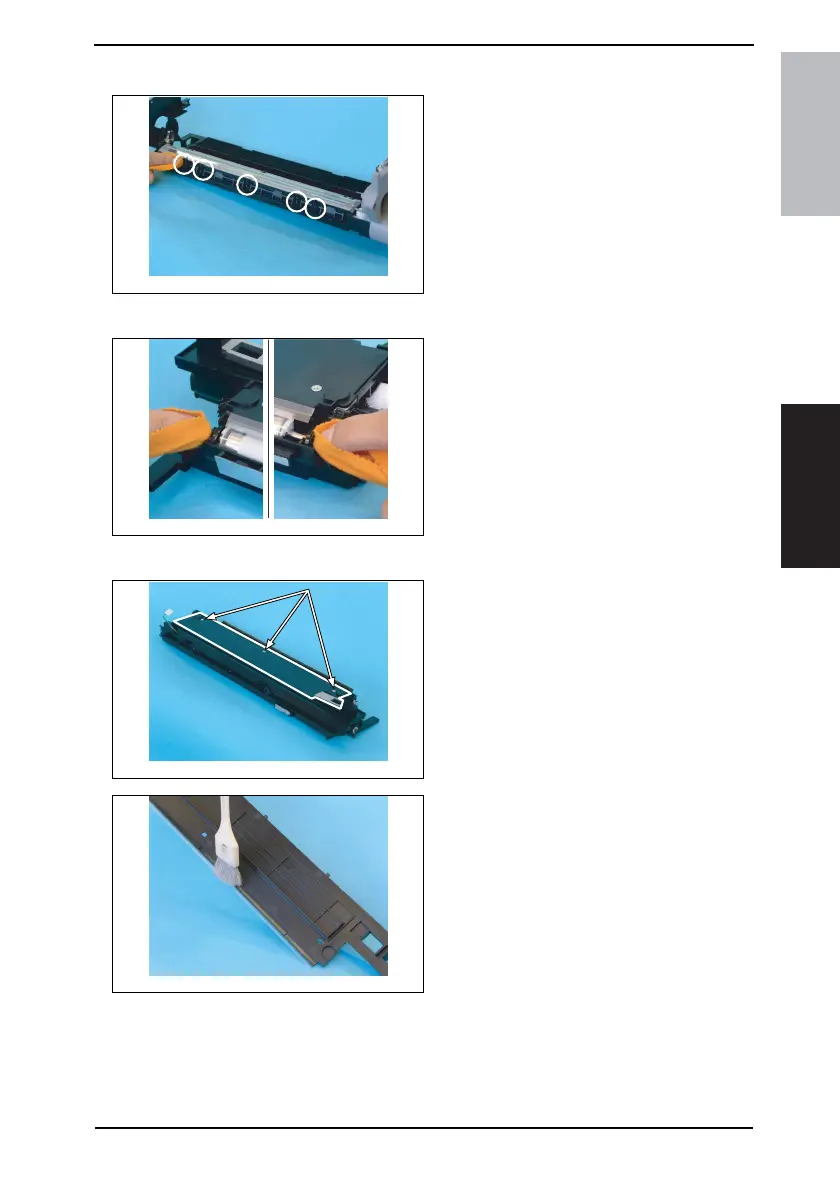
3.3.9 Cleaning of the PC Drum Paper Separator Fingers
1. Using a soft cloth dampened with
alcohol, wipe the five Paper Separa-
tor Fingers clean of dirt.
3.3.10 Cleaning of the Ds Collars
1. Using a soft cloth dampened with
alcohol, wipe the two Ds Collars
clean of dirt.
3.3.11 Cleaning of the Developer Scattering Prevention Plate
1. Remove three screws and the Devel-
oper Scattering Prevention Plate.
Precautions for Installation of the
Developer Scattering Prevention Plate
• When securing the Developer Scat-
tering Prevention Plate, tighten
screws in the order of one on one
edge, one at the center, and one on
the other edge.
2. Using a brush, whisk dust and dirt off
the surface of the Developer Scatter-
ing Prevention Plate.
4035D033AA
4035D034AA
4035D035AA
4035D036AA










 To Next Page