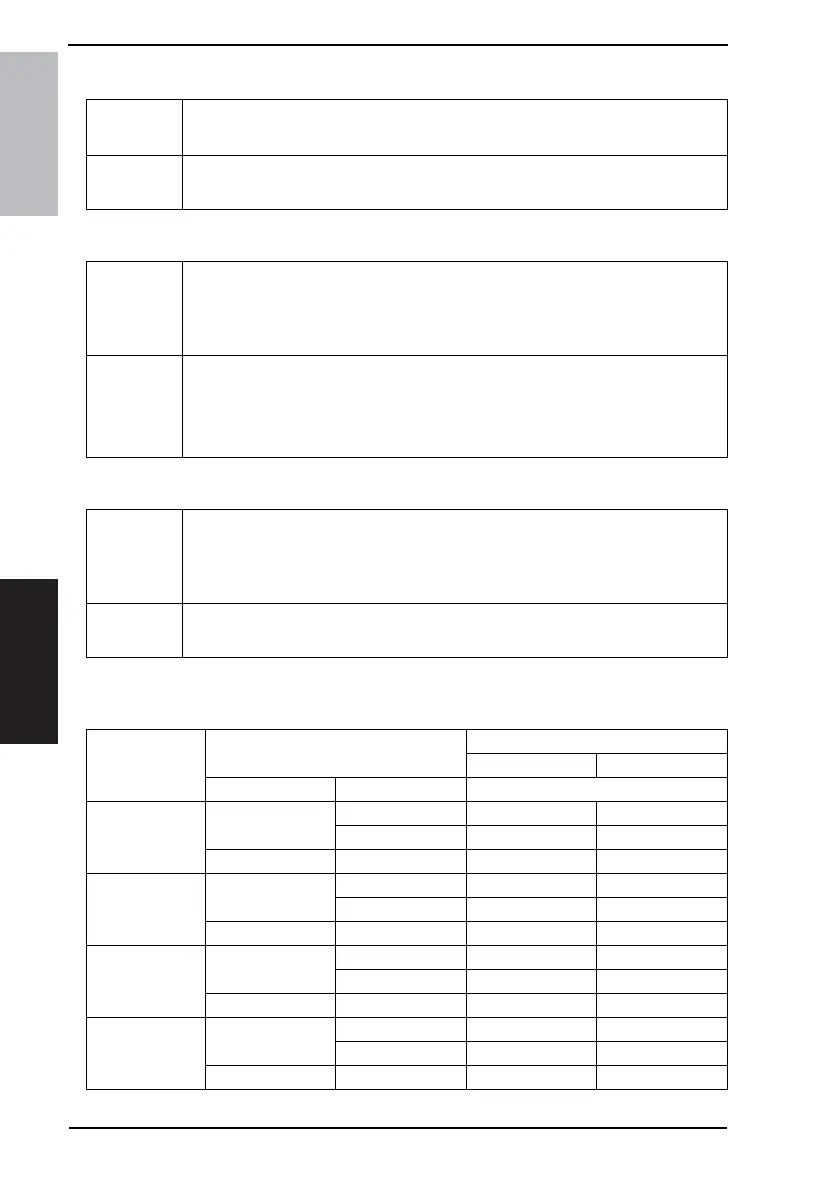
10. Service Mode Field Service Ver. 1.0 Apr. 2005
84
ineo 161
ineo 210
Adjustment / Setting
D. ID ADJUST
E. VG ADJUST
F. FUSER TEMP. Ad (PLAIN)
<Temperature table for adjusting fusing temperature for plain paper>
For ineo 161
Purpose/Use To set the image density by varying Vg and Vb on the engine side.
✽ Used when the image density is high or low.
Setting/
Procedure
• The default setting is “0.”
Setting range: -3 to +3
Purpose/Use To adjust image density by varying Vg with changing sensitivities as the PC Drum is
used for an extended period of time.
✽ When image problems (fog, void) occur
✽ When the PC Drum Unit has been replaced
Setting/
Procedure
• The default setting is “0.”
Increase the setting value to eliminate void.
Decrease the setting value to eliminate fog.
Setting range: -2 to +2
Purpose/Use To set the temperature of the Fusing Roller for each type of paper, thereby making up
for fusing performance that changes with the operating environment or type of paper.
✽ When fusing failure occurs
✽ When the type of paper is changed
Setting/
Procedure
• The default setting is “0.”
Setting range: -1 to +2
Setting value
Paper width
Mode selected in Service’s Choice
Mode 1 Mode 3
CD FD Fusing Heater Lamp temperature
2
251 mm or more
361 mm or more 200 °C190 °C
360 mm or less 200 °C190 °C
250 mm or less – 200 °C185 °C
1
251 mm or more
361 mm or more 200 °C180 °C
360 mm or less 200 °C180 °C
250 mm or less – 190 °C175 °C
0 (default value)
251 mm or more
361 mm or more 190 °C170 °C
360 mm or less 190 °C170 °C
250 mm or less – 180 °C165 °C
-1
251 mm or more
361 mm or more 180 °C160 °C
360 mm or less 180 °C160 °C
250 mm or less – 170 °C155 °C










 To Next Page