11
SD12 - Getting Started
1-11
Once a channel is assigned, all of the controls for that channel which are not displayed within the channel strip itself can be accessed
via secondary pop-ups, displayed by touching inside the relevant area of the channel. These pop-ups include controls such as input and
output routing and signal processing parameters.
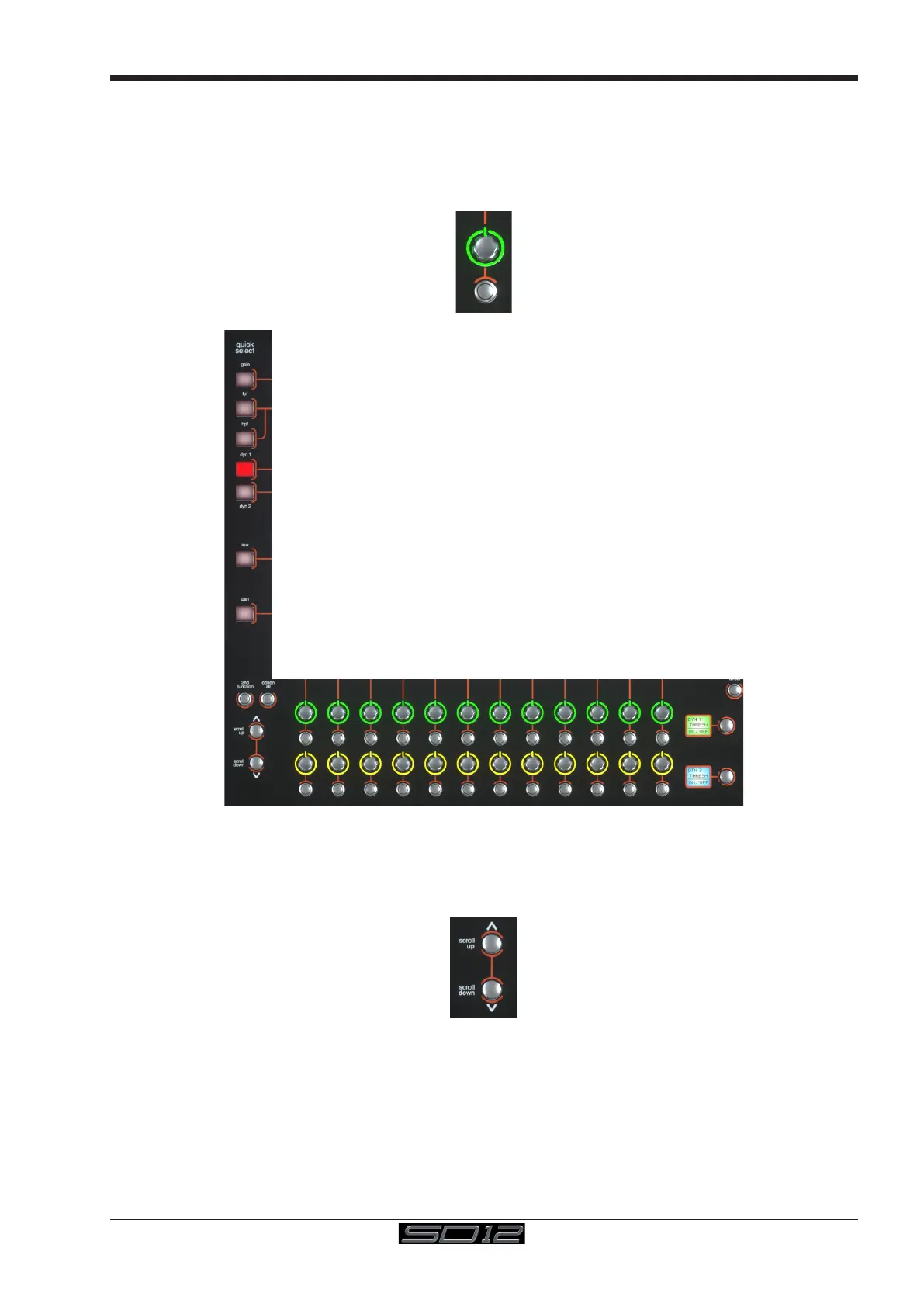
A number of the physical rotary encoders on the control surface can be assigned to different on-screen pots. In order to ensure that it is
clear which function is assigned to which encoder, the assigned on-screen pot will have a coloured ring around it which will be reected
in the colour of the light around the base of the encoder on the control surface
The 2 rows of twelve encoders and buttons immediately below the touchscreen (shown above) refer to the channels with which they are
aligned.
Pressing one of the Quick Select buttons on the left of the screen will assign the selected function to the top row of these controls
below the screen. Six aux sends can be displayed in the Channel Strip panel at any one time. If more than six aux sends have been
created in the session, the scroll button outside the bottom left-hand corner of the screen can be used to scroll the display through the
remaining auxilaries.



 To Next Page