AIR_Manual_506a_ENG_rev_1.pdf Page 55/96
NAVIGATION TO A STANDARD WAYPOINT
If the current Waypoint is
set as a start
waypoint, the navigation is managed in
standard cylinder mode and the Digifly AIR
will guide you providing constant information
about your position, distance, direction,
required glide ratio and expected arrival
height above the current Waypoint cylinder
and to the arrival Waypoint cylinder (goal).
When you get near the Waypoint cylinder
(100mts), the flight recorder rate is
automatically set to one data point per second (oversample).
Cylinder validation: when you enter a cylinder the Digifly AIR will alert you with a sound and you will see a
message of “
” (or “
” if it is the arrival Waypoint), then the flight recorder rate returns to the
setup value (
).
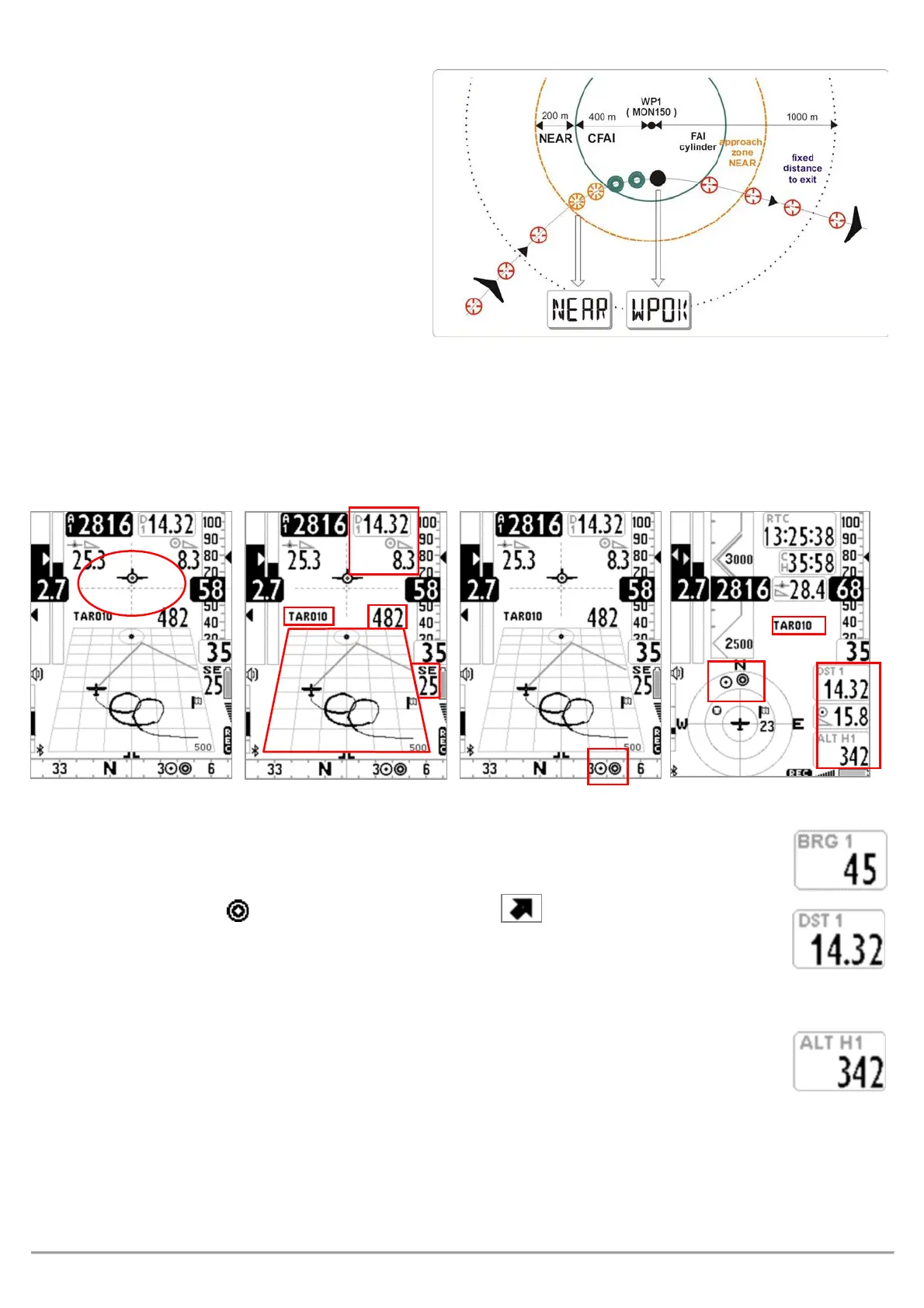
If the navigation is activated the following functions are visible:
DIRECTION, DISTANCE & HEIGHT OVER THE CURRENT WAYPOINT
(
):
hows direction to the current waypoint cylinder along the optimized route. It is
represented by the icon on the compass and with the "follow me" icon.
(
):
Shows the distance to the current cylinder waypoint along the optimized route.
It can be displayed in km or in mi; go to
.
(
):
Shows the estimated arrival height to the current cylinder waypoint along the
optimized route. This height is calculated using the following information :
o ALT A1 : current barometric altitude A1
o DST 1 : distance to the current cylinder waypoint along the optimized route
o Waypoint Altitude
o Average Efficiency, which is updated in real time while gliding and stored while thermalling, to change the
average time (in seconds) modify the
ADVANCED SETUP \ n.9 EFFA
parameter.



 To Next Page