AIR_Manual_506a_ENG_rev_1.pdf Page 58/96
NAVIGATION TO THE START WAYPOINT (GATE)
The current Waypoint is managed as a Start waypoint only if its parameter
has the value “
” (Start of
Speed Section - see 9.5).
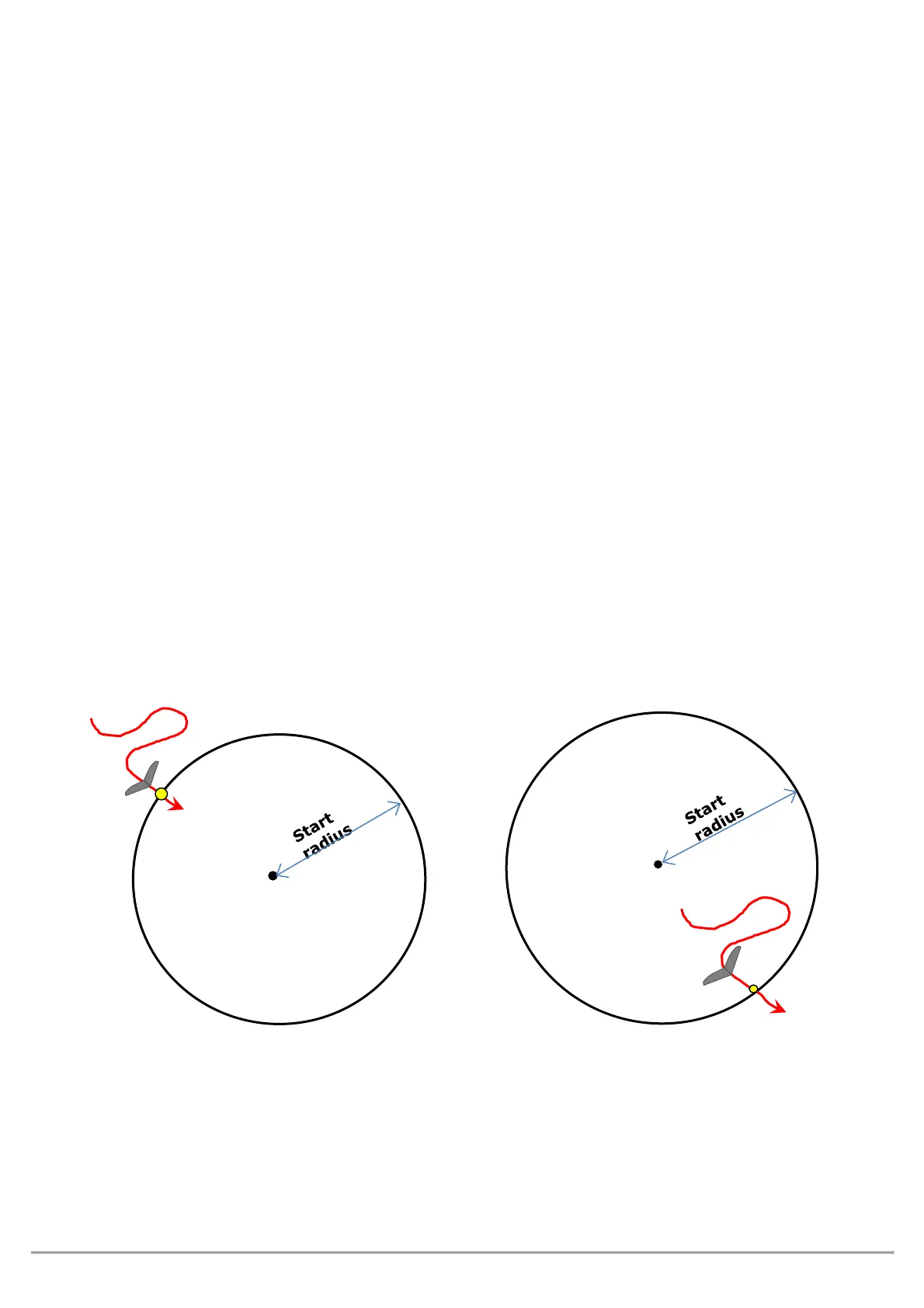
The crossing direction of the Start Waypoint line is established by its parameter
“
” = Entry start Waypoint (Entry) , “
” = Exit Start Waypoint
(Exit)
(see 9.5).
When the first start gate time is 10 minutes away, a message appears on the screen: "
" followed
by a double beep.
When the time to the start gate is
, the “
” message appears on the screen, followed by a
double beep, telling the pilot that the gate is open and he can now go through the start waypoint (IN or OUT
depending on the selected option).
When you go through the start waypoint before the gate is opened, the value of the distance to the cylinder line
is shown in reverse mode (white on black background) so that you know you’re on the other side of the circle.
The instrument guides us constantly towards the border of the “start waypoint”, until it gets crossed correctly
when it opens. When this happens the "
" message appears, followed by a bitonal sound.
= start validation entering the cylinder
= start validation exiting the cylinder.
___________________________________________________________________
ENTRY START GATE ( IN ) EXIT START GATE ( OUT )
side



 To Next Page