FRONT PANEL KEYS AND INDICATORS
22
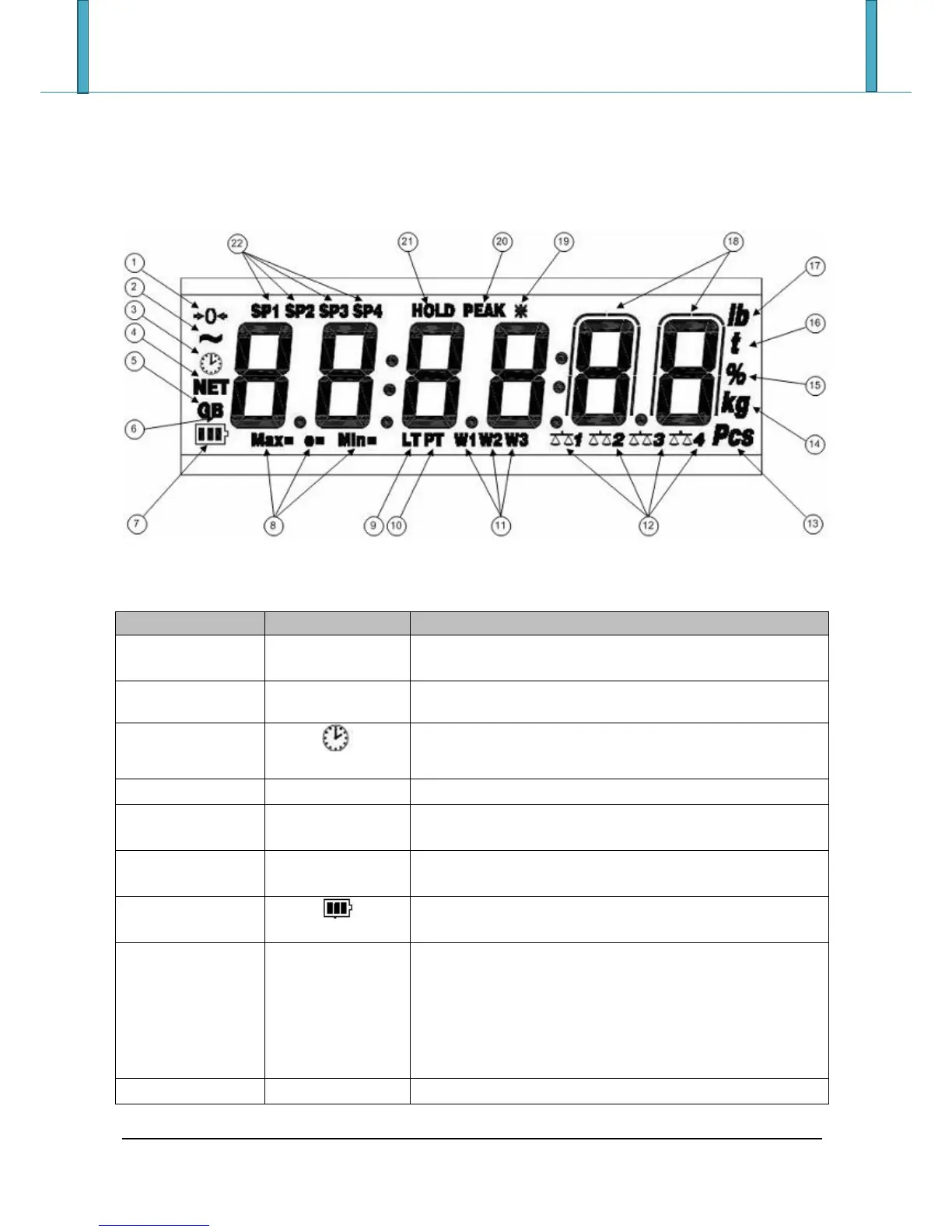
5.7 SYMBOLS ON THE LCD DISPLAY
The LCD display has symbols which show the indicator’s functioning status; you will find the description for
each symbol below.
The weight detected on the weighing system is near zero,
within the interval of –1/4 ÷ +1/4 of the division.
The time is being shown on the display, in the “HH:MM:SS”
format.
The displayed weight is a net weight.
The displayed value is a gross weight, if the Italian or English
language is selected in the print configuration.
The displayed value is a gross weight, if the German, French
or Spanish language is selected in the print configuration.
Indicates the battery charge level: see the section “LOW
BATTERY WARNING”.
When viewing the metric information, it identifies the
indicated capacity range.
When viewing the metric information, it identifies the
indicated minimum weigh range.
When viewing the metric information, it identifies the
indicated division range.
The locked tare is enabled.







 To Next Page