Page 48
AIM 2 Operation Manual
Dish Type
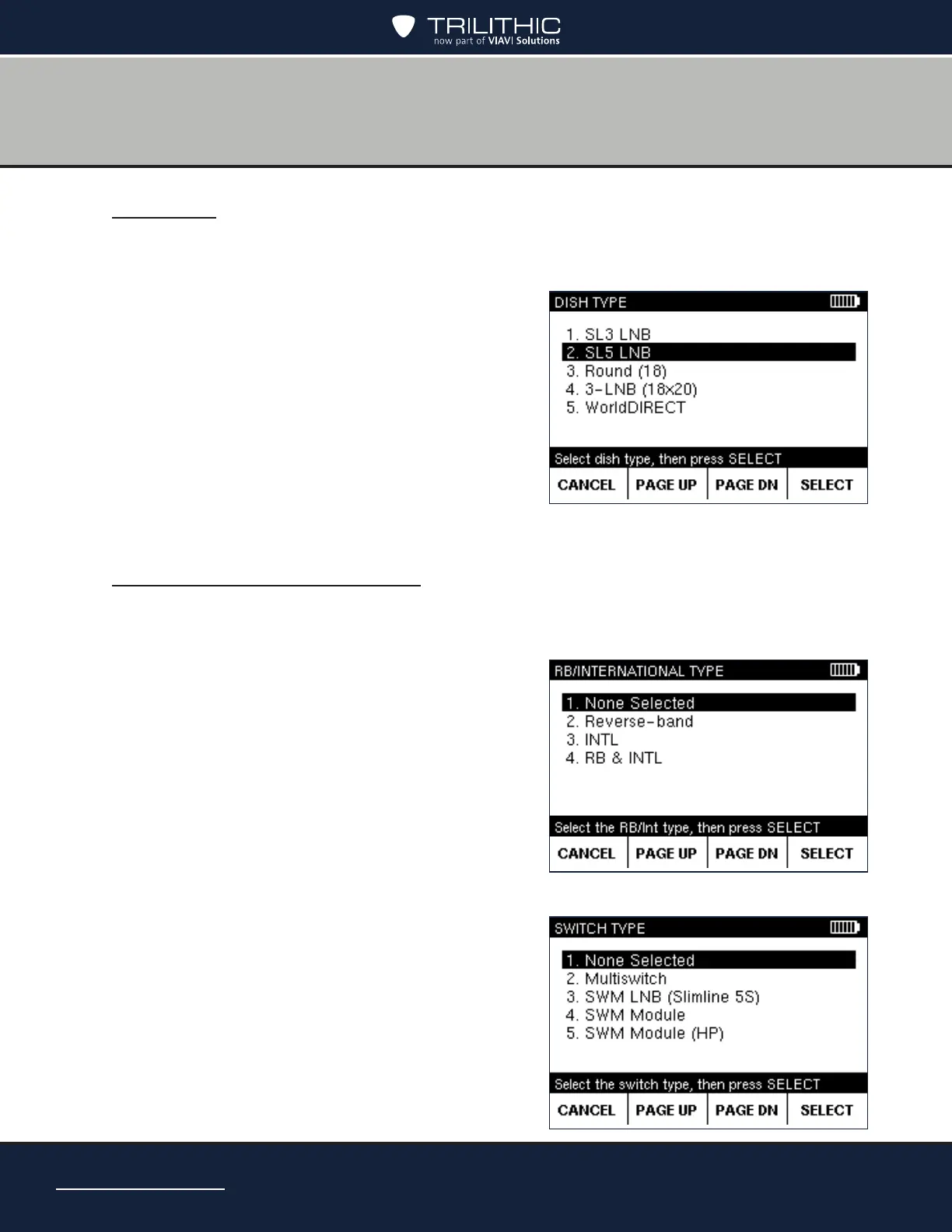
1. On the MODIFY JOB SETUP screen, select Dish Type and press SELECT to go to the
DISH TYPE screen.
• You also can press the number for an option
to highlight it.
• To scroll quickly through the dish types,
press PAGE UP or PAGE DN softkeys.
To exit without saving changes, press
CANCEL.
2. When nished, press SELECT to return to the
MODIFY JOB SETUP screen.
Reverse / International LNB
1. On the MODIFY JOB SETUP screen, select RB/INTL (Reverse Band / International)
and press SELECT to go to the RB/INTERNATIONAL screen.
2. Select the type of LNB for the job and press
SELECT.
• You also can press the number for an option
to highlight it.
• To exit without saving changes, press
CANCEL.
3. Select the type of switch for the job and press
SELECT.
4. If the SWiM LNB is a module, you may also
have to select the channel conguration.
5. When nished, press SELECT to return to the
MODIFY JOB SETUP screen.


 To Next Page