Page 57
AIM 2 Operation Manual
Task F. Fine Azimuth Adjustment (Slimline ODUs Only)
1. Loosen the ODU’s azimuth lock-down screws.
2. Turn the ODU’s azimuth jack screw
counterclockwise 2 turns.
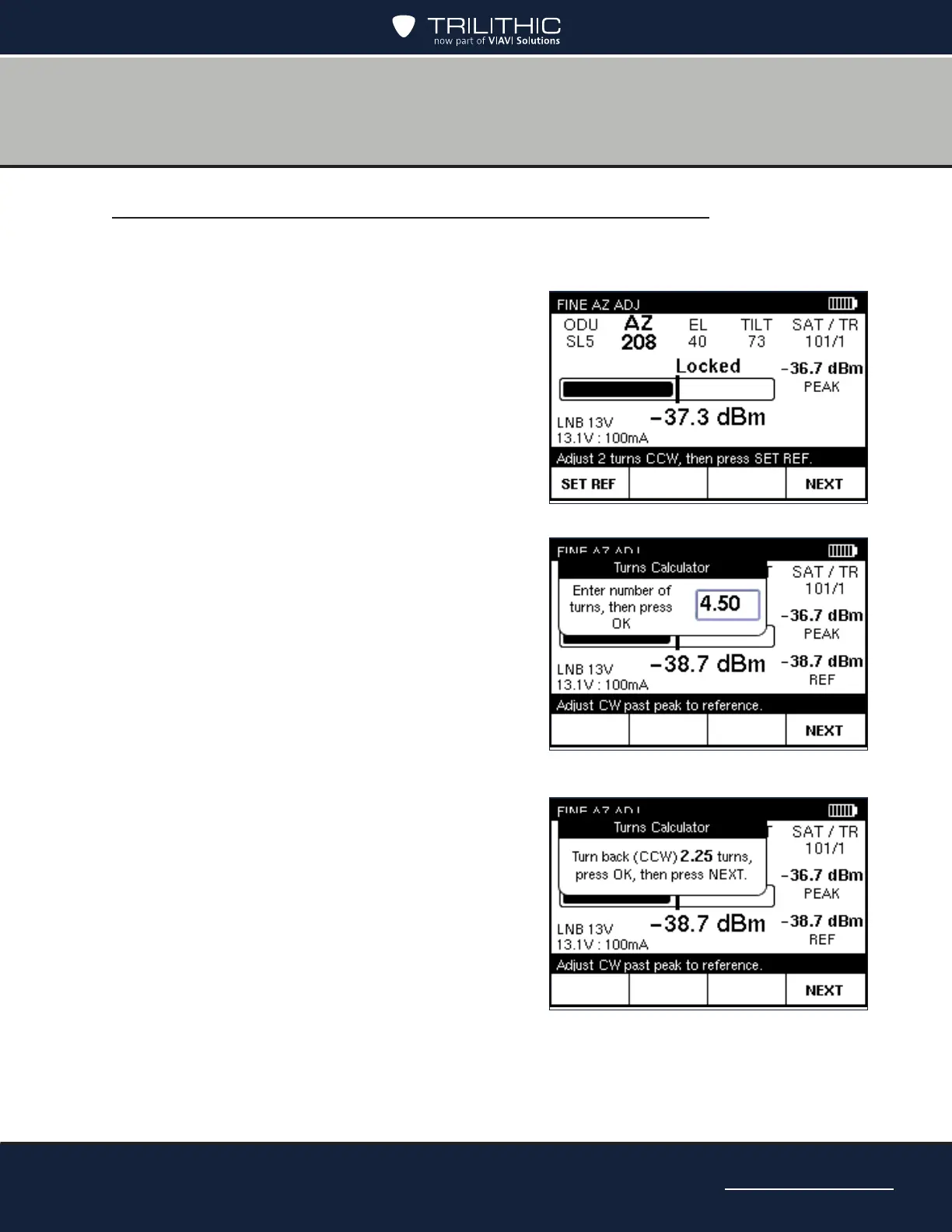
3. On the FINE AZ ADJ screen, press SET
REF to set the reference value. The AIM
sounds a conrmation tone and displays the
reference value.
4. Zero out the readout dial on the azimuth
jack screw.
5. Turn the azimuth jack screw clockwise
until the meter begins to sound a series of
beeps, indicating that the reference value
is within 1 dB. Continue turning until the
meter sounds a conrmation tone and
the displayed signal power matches the
reference value (about 4 turns).
6. Refer to the ODU’s dial and use the AIM’s
numeric keypad to enter the number of turns
it took to return to the reference value (e.g.
4.50 for four and a half turns). Then press
OK.
7. Zero out the readout dial on the azimuth
jack screw.
8. Refer to the AIM screen and turn the
azimuth jack screw counterclockwise the
number of turns indicated on the AIM
screen.
9. Tighten the azimuth lock-down screws.
10. Press OK and then NEXT to continue


 To Next Page