Page 100
AIM 2 Operation Manual
Transferring Records
You can transfer records from your AIM to a PC using a USB ash drive. You also can transfer
records from a USB ash drive to the AIM (see page 92). You can transfer:
• An individual record
• All records for a selected account
• All records for all accounts
• All records of a selected type (EIV, EIV Plus,
Guided Mode, Transponder Surveys, or
Screenshots).
When transferring records between the AIM and a
USB ash drive, you can choose from two options:
• To retain a copy of the records on the device
you are transferring from, select Copy.
• To permanently delete the records from the
device you are transferring from, select Move.
Transferring records from the AIM to
a USB ash drive
1. Insert the USB ash drive in the appropriate
USB connector on the meter.
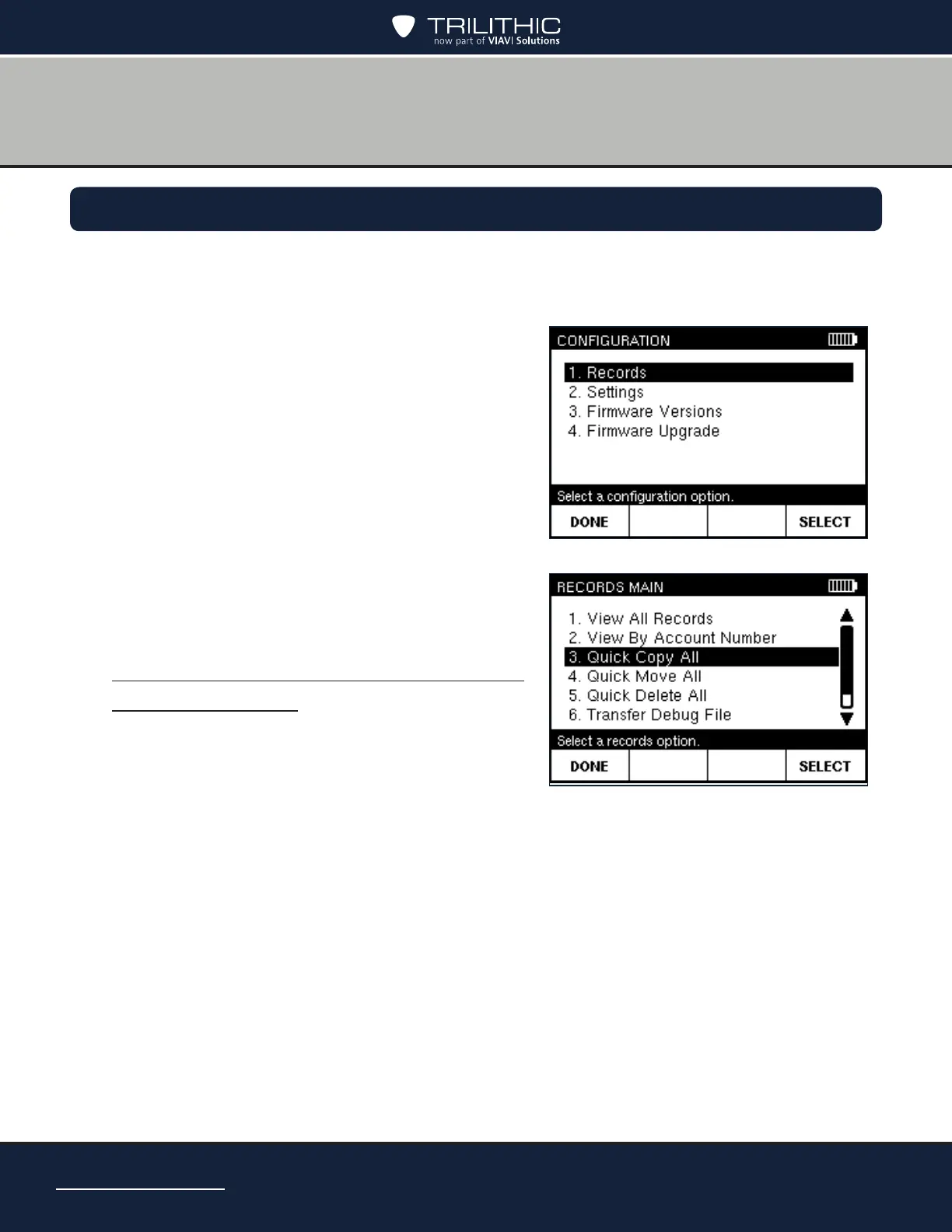
2. Press CONFIG to go to the
CONFIGURATION screen.
3. Highlight Records and press SELECT to go to the RECORDS MAIN screen. Then
highlight one of the following options:
• To transfer all records on the AIM or records of a selected type, highlight
Quick Copy All or Quick Move All and press SELECT. Go to Step 4.
• To transfer an individual record, highlight View All Records and press
SELECT. Go to Step 5.
• To transfer all records for an account, highlight View By Account Number
and press SELECT. Go to Step 6.


 To Next Page