Danish Interpretation Systems User Manual
# Menu Settings Description
8.
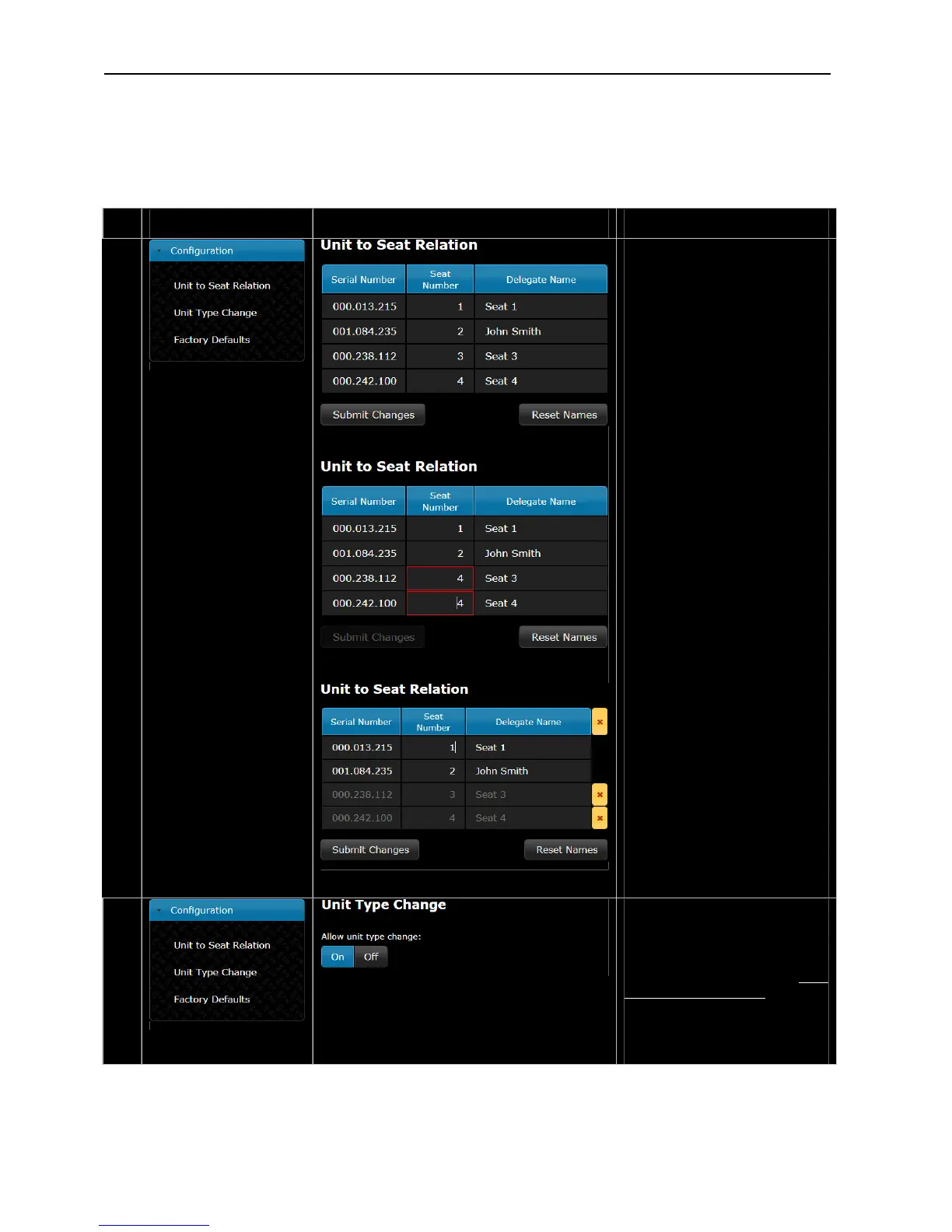
Uni toSeatRelation–t
All units connected are shown in
this list with ‘Serial Number’ and
‘SeatNumber’.
When a unit is connected for the
first time, it will be assigned the
next‘SeatNumber’andassigneda
‘DelegateName’ in the format ‘Seat
x’, where ‘x’ is the assigned seat
number. The assigned ‘Delegate
Name’canbechangedtoshowthe
actual name of the delegate placed
intheseat.
After assigning names, the ‘Submit
Changes’hastobeactivated.
The ‘Seat Number’ can be changed
aswell.Ifthesamenumberistyped
into two seats, it is marked with a
redframeandthe‘SubmitChanges’
buttonisdisabled.The‘Seat
Number’isanumericalintherange
1to65535.
Whenthemousecurserismovedto
aseatnumberfield,theredlight
ring in the microphone in the
corresponding conference unit is
flashinguntilthecurserismovedto
another field or ‘Submit Changes’
has been activated. This feature
makesiteasytore‐numberthe
units.
Ifunitsaredisconnectedtheyare
marked with a yellow indication in
thelist.Theunitscanberemoved
from the list either individually or
allbyclickingtheyellowbutton.
The‘ResetNames’buttondelete all
assigneddelegatenames.
9.
UnitTypeChange–
Whensetto‘On’,itispossibleto
change the unit type of the
connected conference units as
specified in section ‘6.2.4
Configurationoftheunit’.
Whensetto‘Off’theunittypeis
lockedandcannotbechangedon
theunit.
User Manual DDS 5900
28



 To Next Page