Danish Interpretation Systems User Manual
# Menu Settings Description
10.
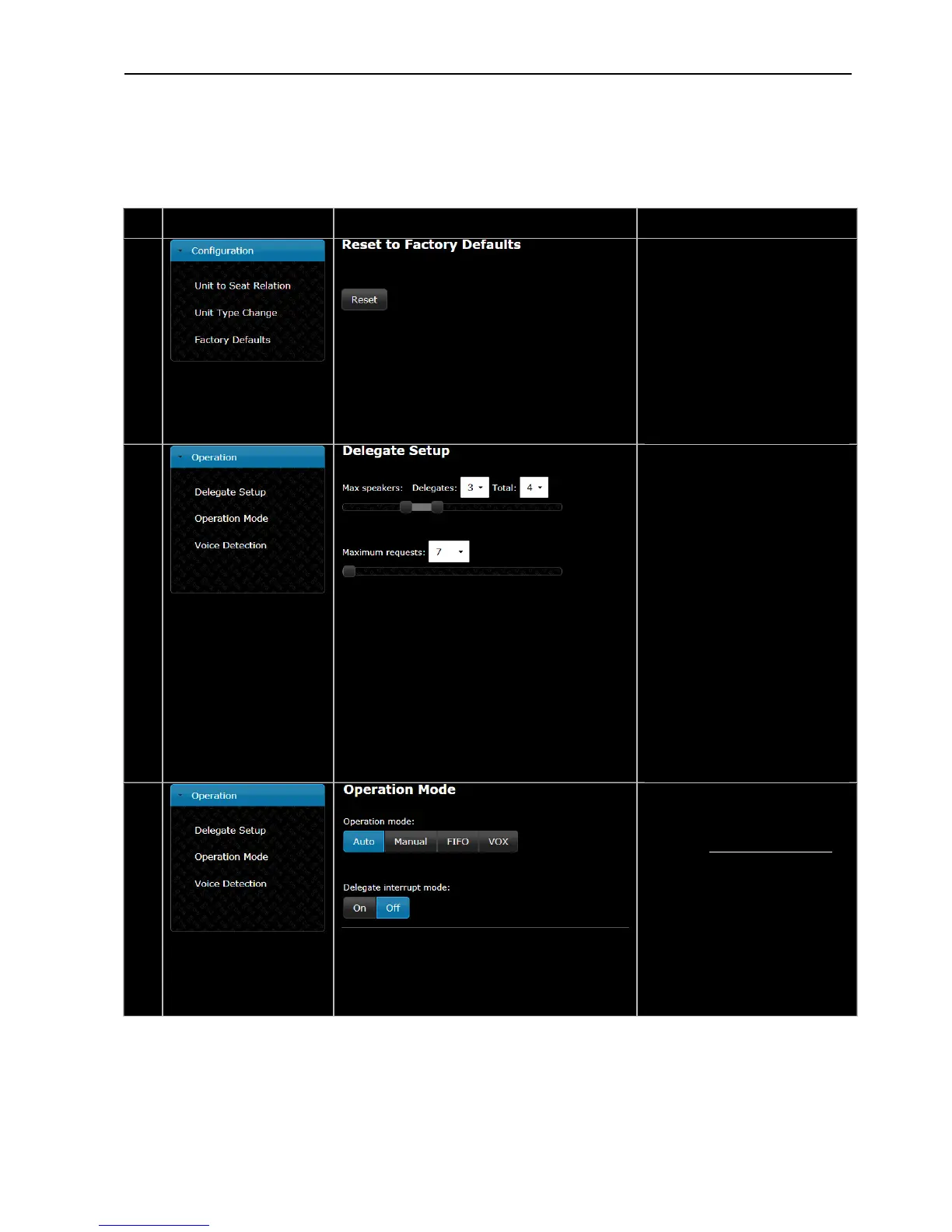
ResettoFactoryDefaults–
When the reset button is activated,
thesettingsintheCU5905arereset
tofactorydefault.
Whendoingthisfromabrowser,
the IP and security settings aren’t
changed.
To reset IP settings and security
settings, use ‘Factory defaults’ on
the interactive menu on the CU
5905.
11.
DelegateSetup–
Thenumberof‘Maxspeakers:Total’
definesthemaximumnumberof
conference units, which can speak
atthesametime.Thisincludesboth
dele teandch irmanunits.ga a
The number of ‘Max speakers:
Delegates’ defines the maximum
number of Delegate conference
units,whichareallowedtospeakat
thesametime.
PleaseobservethataChairmanUnit
canalways be switched ONaslong
asthenumbersetin‘Max.Speakers:
Total’arenotexceeded.
‘Maximum requests’ defines how
manydelegatesrequestingtospeak
which can be inserted into the
‘Request‘list.
12.
Operation mode–
Used for switching between the
operation modes. Please refer to
thesection‘5.7OperationModes’.
Delegateinterruptmode–
Whensetto‘On’adelegatewill
interruptanother delegate,who
is speaking, if the number of
delegates speaking has reached
the number specified in the
setting ‘Max speakers:
Delegates’.
User Manual DDS 5900
29



 To Next Page