56
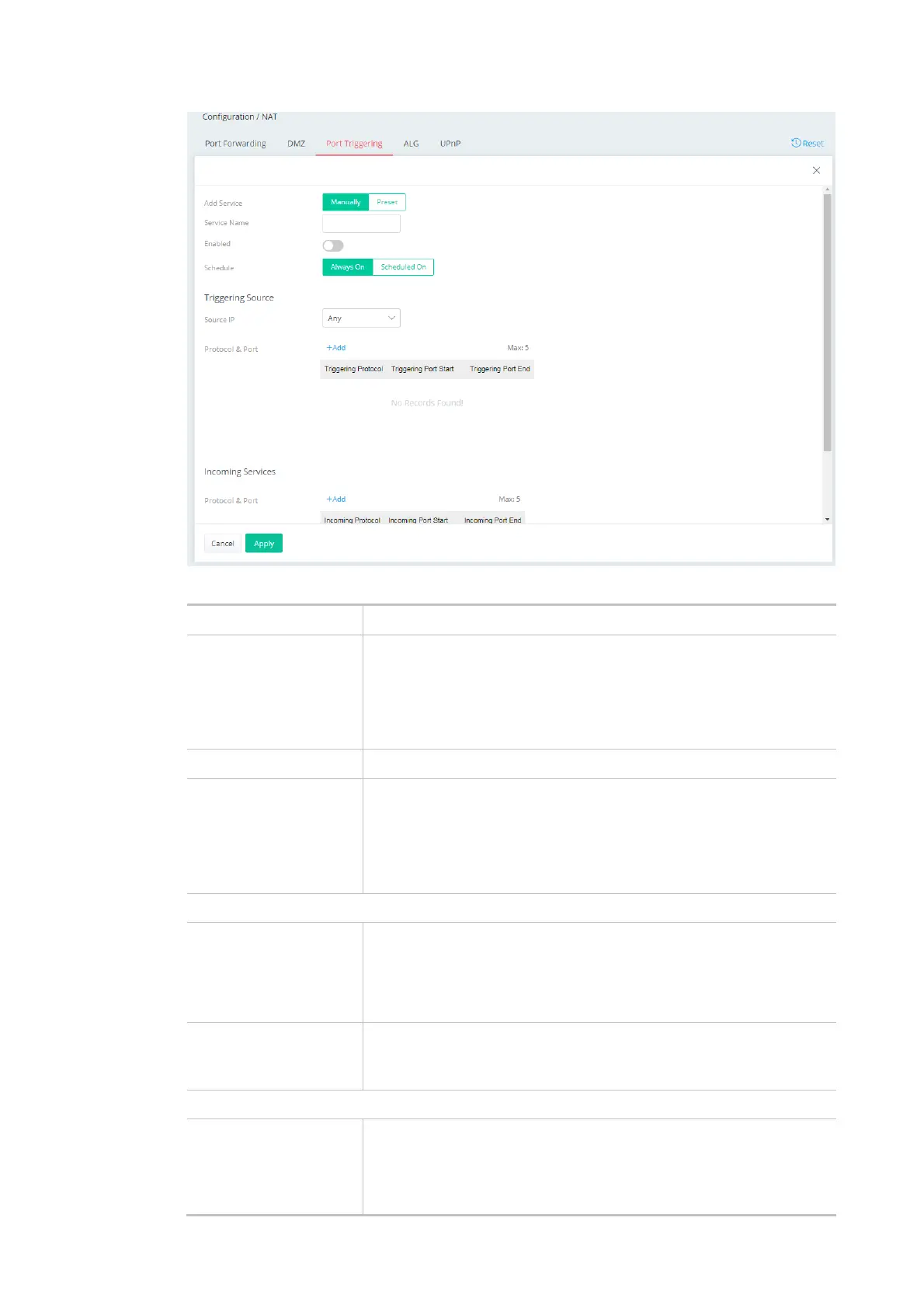
Available settings are explained as follows:
Item Description
Add Service Select from list of predefined service, or manually configure triggering
and incoming protocols and ports.
Manually - If selected, self-define the service name.
Preset - If selected, various services will be offered for you to choose
as the service name.
Enabled Switch the toggle to enable or disable the function of port triggering.
Schedule Vigor router can perform the port triggering all the time or on a
certain date and time.
Always On - The function of port triggering is running all the time.
Scheduled On - The function of port triggering is activated based on
the schedule profile.
Triggering Source
Source IP Any - Any source IP will be forwarded to a LAN.
IP Address - Set a range of IP addresses forwarded to a LAN.
IP Object - Use the drop down list to specify an IP object profile.
IP Group - Use the drop down list to specify an IP group profile.
Protocol & Port +Add - Click to set port numbers (start and end) for the specified
protocol (TCP, UDP or TCP/UDP) for the outgoing data (that this rule
monitors).
Incoming Services
Protocol & Port +Add - Click to set port numbers (start and end) for the specified
protocol (TCP, UDP or TCP/UDP) for the incoming data.
Incoming Protocol - The protocol(s) of the incoming traffic.
TCP-open port(s) to TCP traffic.



 To Next Page