3-15
MODEL 424 DYNOWARE RT UPGRADE WITH EDDY CURRENT BRAKE
DynoWare RT Installation
Version 5 DynoWare RT Upgrade for Model 424x Dynamometers Installation Guide
INSTALLING THE EDDY CURRENT BRAKE DRIVER—ABOVE GROUND DYNOS
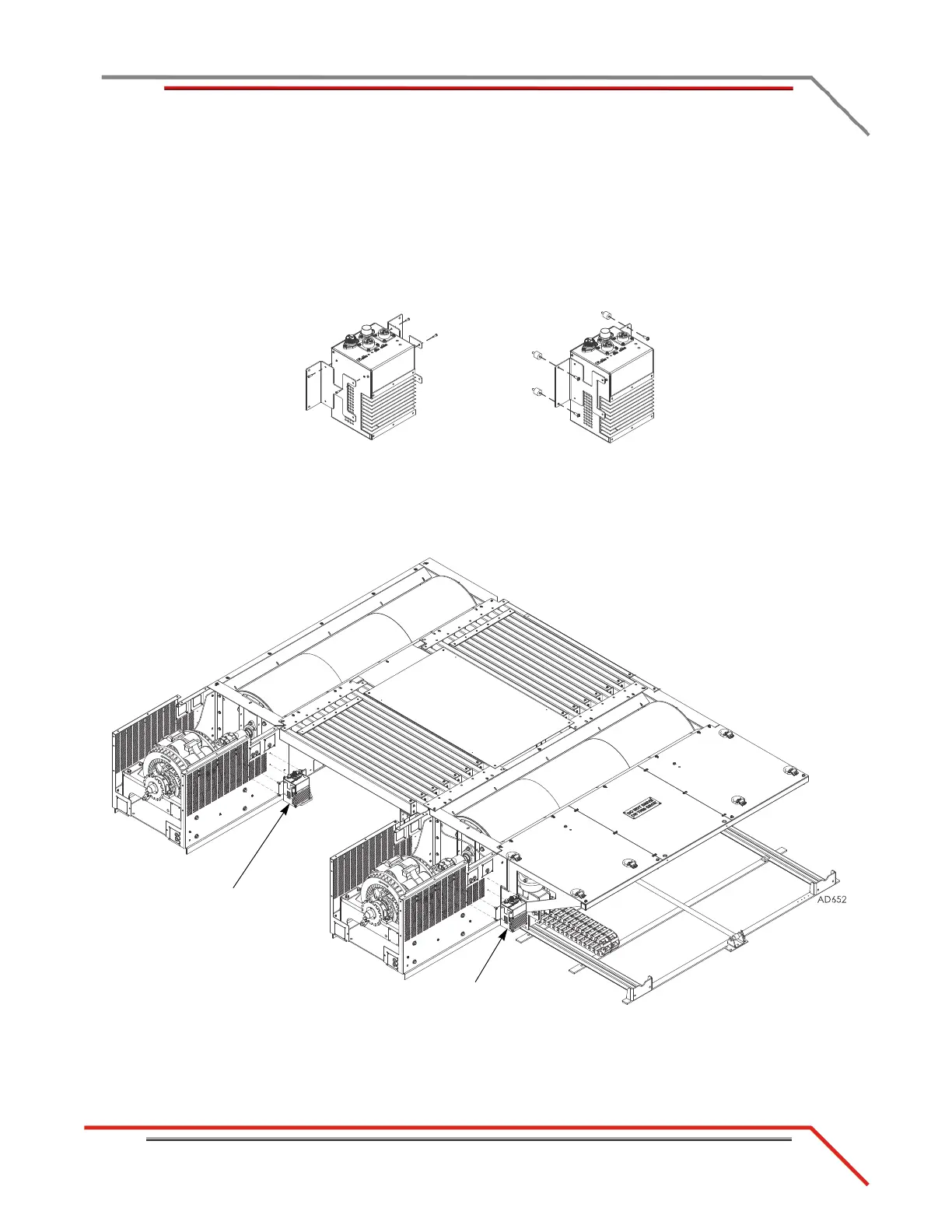
Install the eddy current brake driver on both the stationary and 4WD dyno.
1 Secure the mounting brackets to the eddy current brake driver using two
4-40 x 1/4-inch screws each.
2 Secure the four bumpers to the mounting brackets using four 8-32 x 3/8-inch
screws.
Figure 3-11: Install the Mounting Brackets and Bumpers
3 Install the eddy current brake driver to the cover using four 8-32 nuts.
Figure 3-12: Install the Eddy Current Brake Driver—Above Ground
install bumpers
install mounting
brackets
eddy current brake
driver
eddy current brake
driver



 To Next Page