CHAPTER 3
DynoWare RT Installation
DynoWare RT Upgrade for Model 424x Dynamometers Installation Guide
3-12
DYNOWARE RT INSTALLATION
Use the following instructions to install the DynoWare RT electronics and wiring.
You will need the following parts:
• 134490301 Nut, 8-32, with Lock Washer (8)
• 1904004 Screw, 4-40 x 1/4", PH-Phil (8)
• 21200068 Eddy Current Brake Driver Bracket (4)
• 21600085 Speed Pickup Card Inner Bracket (2)
• 21600086 Speed Pickup Card Outer Bracket (2)
• 22300009 Split Disk (4)
• 22400016 Split Hub (4)
• 36562094 Screw, 1/4-20 x 1-1/8", Socket-Head (4)
• 66400019 Eddy Current Brake Driver (2)
• 68300002 Speed Pickup Card (2)
• 8-32 X .5 SCREW Screw, Mach 8-32 x 1/2" (24)
• A10Z 2-304A Bumper, 3/8 x 1/2L (8)
• DM150-011-004 Nut, 3/8-16, Hex (4)
• DM150-019-012 Bolt, 3/8-16 x 1", Hex (4)
INSTALLING THE SPLIT DISK AND SPEED PICKUP CARD
Use the following instructions to install the split disk and speed pickup card on the
stationary and 4WD dynos for both above ground and in ground installations.
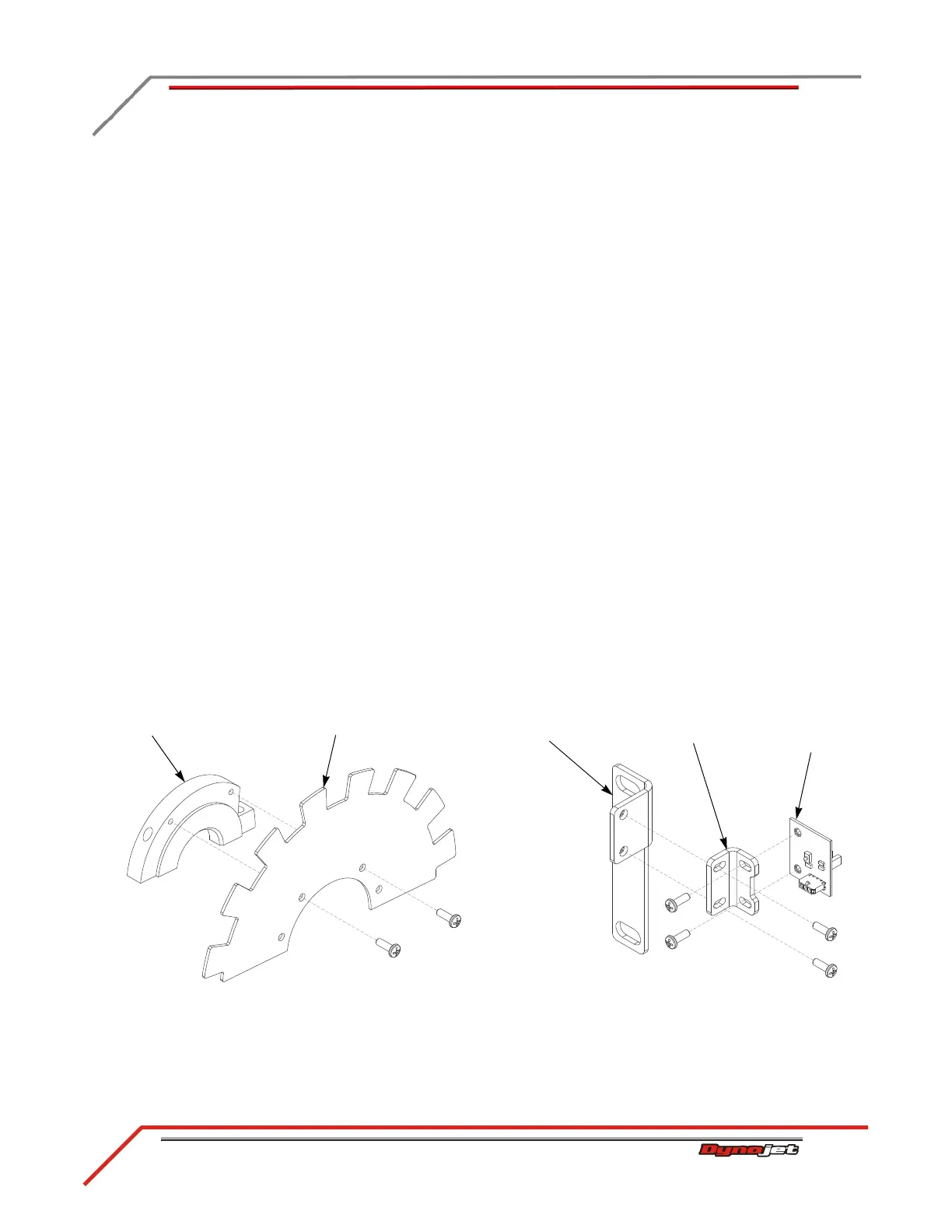
1 Secure the split hub to the split disk using two 8-32 screws each.
2 Secure the speed pickup card to the outer bracket using two 8-32 screws.
3 Secure the outer bracket and card to the inner bracket using two 8-32 screws.
Figure 3-8: Secure the Split Hub to the Split Disk and the Speed Pickup Card to Bracket
speed pickup disk
outer bracket
speed pickup
card
split hub
inner bracket



 To Next Page