10
Chapter 1 Introduction
●
Functions
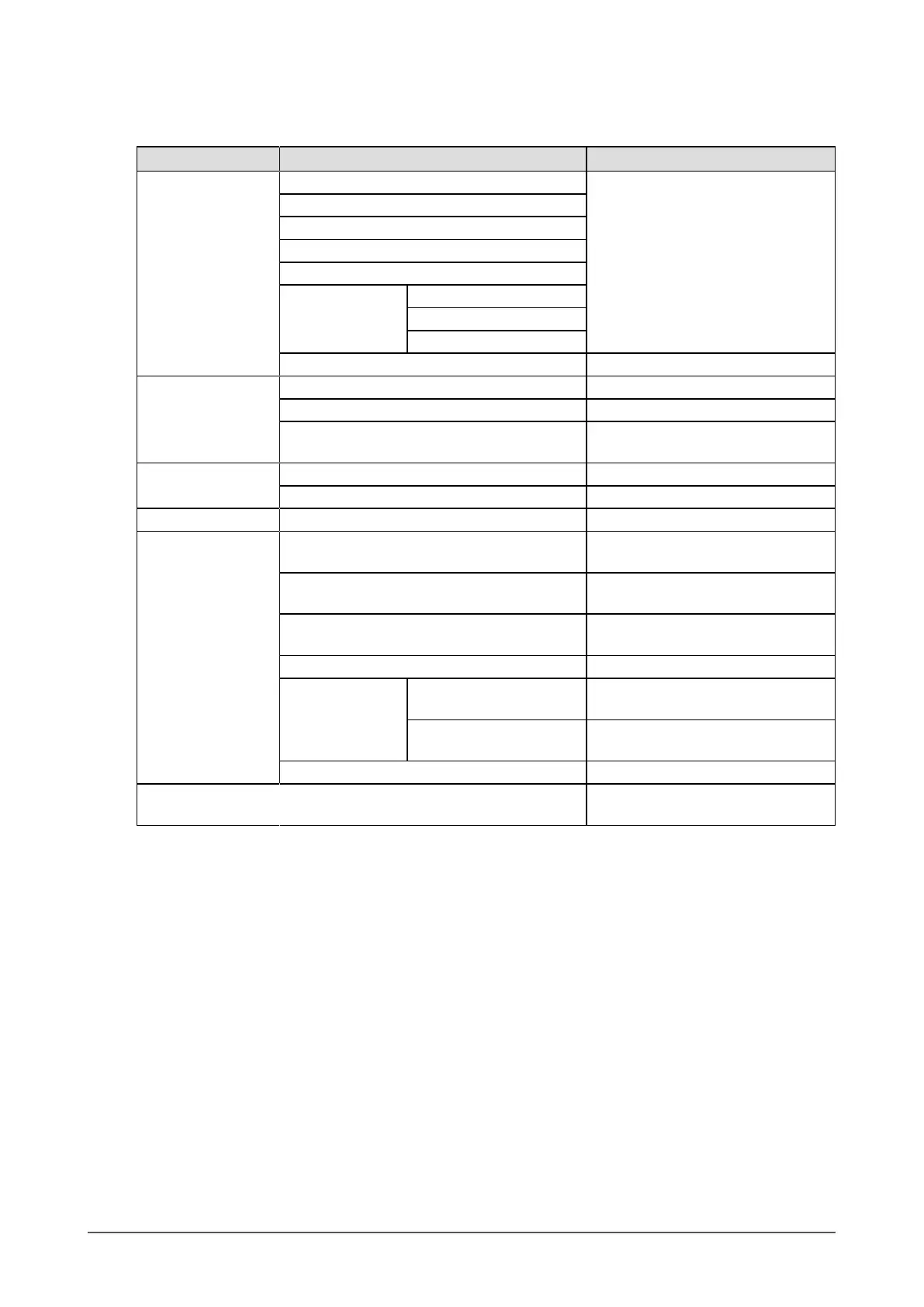
The following table shows the Setting menu and the setting items of each menu.
Main Menu Item Reference
Color Brightness “2-3.AdjustingColor”(page13)
BlackLevel
Contrast
Temperature
Gamma
AdvancedSettings Gain
*1
ContrastEnhancer
Turbo240
*2
ColorReset “3-9.ResettingtoDefault”(page25)
Screen ScreenSize “2-4.SelectingScreenSize”(page19)
ColorSpace
*3
“Tosetcolorspace”(page20)
Smoothing “Tomodifyblurredcharactersorlines”
(page19)
Sound Source
*3
“Toselectthesoundsource”(page21)
SoundLevel “Toadjustthesoundlevel”(page22)
PowerManager PowerSave “4-1.SettingPowerSaving”(page26)
MonitorSettings AutoEcoView “4-2.Enabling/DisablingAutomatic
BrightnessAdjustment”(page27)
PowerIndicator “3-2.SettingthePowerIndicator”
(page22)
RearLogoLight “3-3.SettingtheLogoDisplayonthe
BackoftheMonitor”(page22)
Language “3-4.SettingLanguage”(page23)
MenuSettings Logo “3-5.ShowingandHidingtheEIZO
Logo”(page23)
MenuPosition “3-6.ChangingSettingMenuDisplay
Position”(page23)
Reset “3-9.ResettingtoDefault”(page25)
Information “7-4.ShowingMonitorInformation”
(page39)
*1 This function can be adjusted with User1, User2, and User3.
*2 This function can be adjusted with User1, User2, User3, and RTS.
*3 These functions are not available with DVI signal input.












 To Next Page