7
Chapter 1 Introduction
1-2. Controls and Functions
19
9 10 1311 12
15
14
5 6 7
8
41 2 3
16
17
18
20
Settingmenu
*1
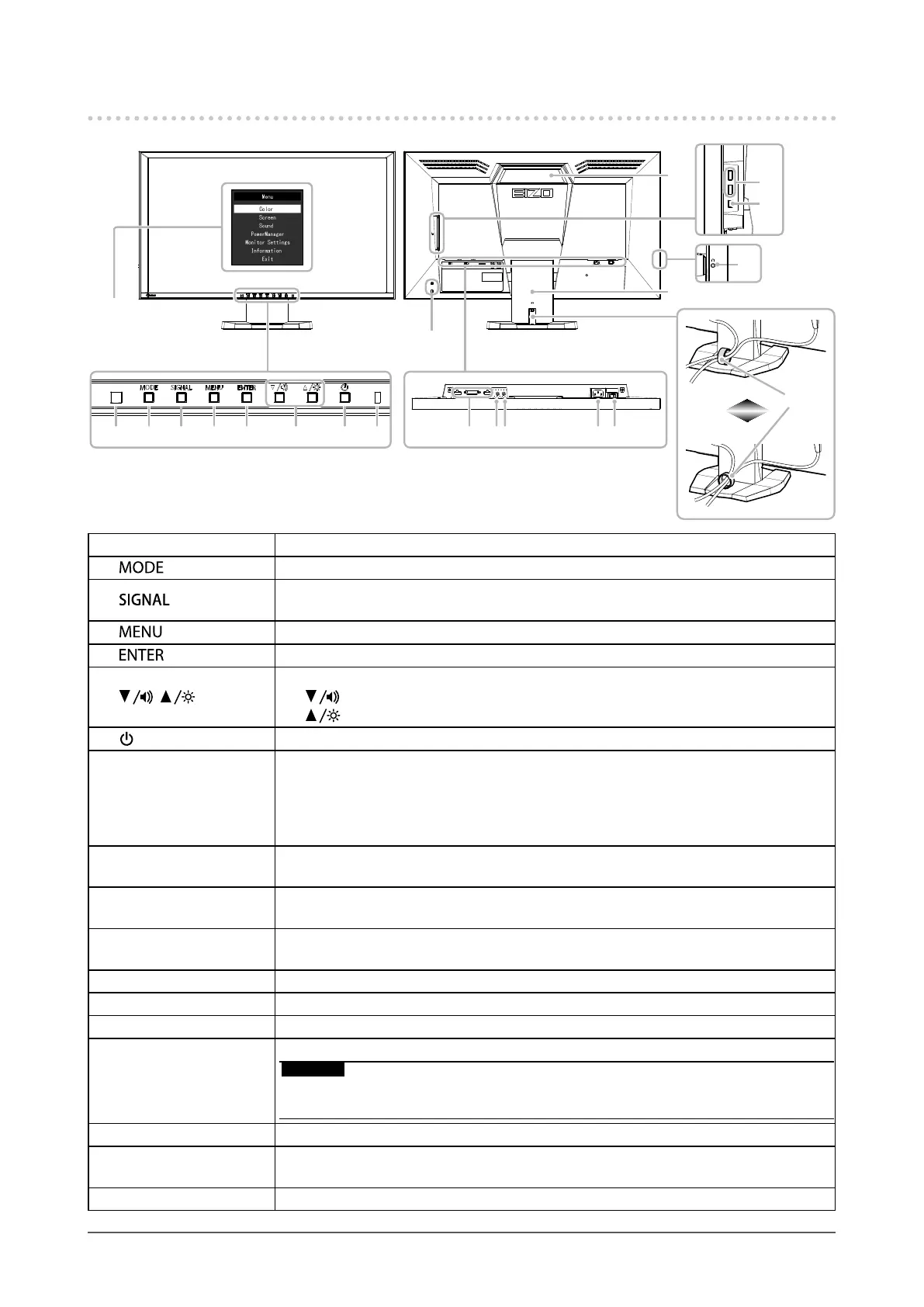
1. Ambient light sensor Detectsambientbrightness(AutoEcoViewfunction(page27)).
2.
button ChangestheColorMode(page13).
3.
button
Switchesinputsignalsfordisplay(page29).
DisplayPort→DVI→HDMI
4.
button ShowstheSettingmenuorhidesthedisplayedmenu(page9).
5.
button Determinesanitemonthemenuscreen,andsavesadjustedvalues(page9).
6.
, buttons
• Providesthemenuselectionaswellastheadjustmentandsettingofafunction.
• button: Displaysthevolumeadjustmentmenu(page21).
button: Displaysthebrightnessadjustmentmenu(page15).
7.
button Turnsthepoweronoroff.
8. Power Indicator
Indicatesthemonitor’soperationstatus.
Blue: Operating
Orange: Powersavingmode
OFF: Mainpoweroff
9. Input signal
connectors
Left:DisplayPortconnector/Center:DVI-Dconnector/Right:HDMIconnector
ConnectsexternaldevicessuchasaPC.
10. Line input connector
(Stereominijack)
ConnectsexternaldevicessuchasaPC.
11. Line output connector
(Stereominijack)
Connectsaspeakerwithabuilt-inamplier(page29).
12. Power connector Connectsthepowercord.
13. Main power switch Turnsthemainpoweronoroff.
14. Security lock slot ComplieswithKensington’sMicroSaversecuritysystem.
15. Handle
Handleusedfortransportation.
Attention
• Firmly grasp and hold the bottom of the monitor while grabbing the handle, and convey the
monitor carefully so as not to drop it.
16. USB port (Down) ConnectsaperipheralUSBdevice.
17. USB port (Up)
ConnectstheUSBcabletousesoftwarethatneedsaUSBconnection,ortousethe
USBhubfunction(page37).
18. Headphone jack Connectstheheadphones.












 To Next Page