25/03/19 09:00
–10
°
1.5 bar
CH Pump Overrun
1 2
T10
BMS
32
°
52
Operation
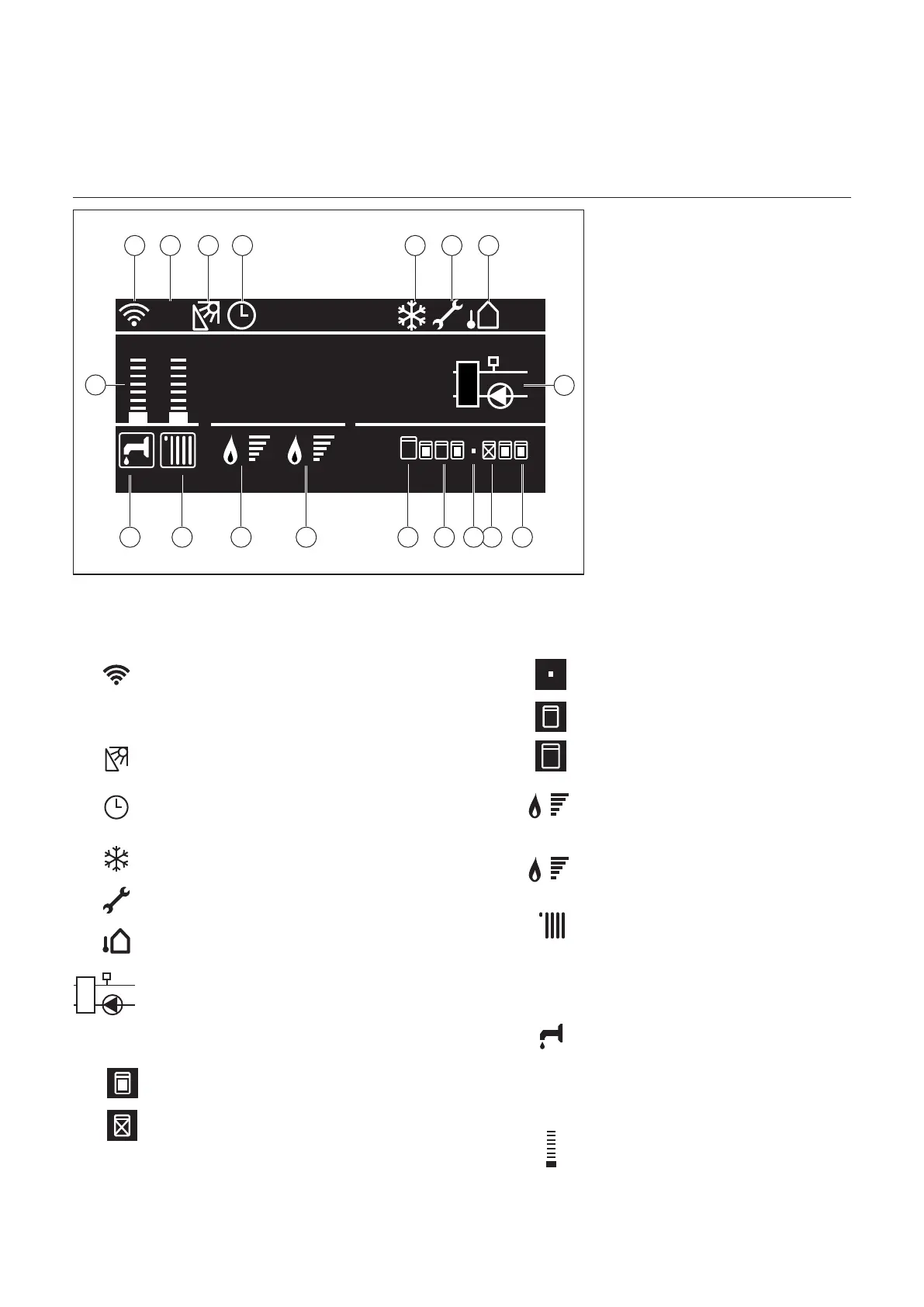
Description of display
Theboilerhasapilot-control.This
control takes care of most of the
manualsettingsbutalsoprovides
numerous settings to adjust the control
exactly to the installation and user
requirements.
Display
TheLCDscreenhasabacklight.
Activatethedisplayrstbeforeitwill
accept an action. The light is activated
bypushingoneofthebuttons.
Cascade symbols are not visible
in case of a single boiler or when
no bus communication cable is
connected.
Screen explanation
1. WIFI Gateway presence and status
2. Building Management System detected
3. Solar Manger presence
4. Operation Mode = TIME BASED
on the «zone to Show» zone
5. Pump Continuous function
6. Maintenance Warning present
7. Outdoor Temperature
8. System Pump status
T10 means T10 is present. When
the pump symbol is ashing, the
relay on block 1 contact 3 is closed.
9. Slaveboileron(heatingmode)
10.Slaveboilerinerrormode
11.Noslaveboilerconnected
12.Slaveboilerinstandbymode
13.Masterboiler
14. Engine 2 Flame presence and power
Slave engine (if present) is active.
15. Engine 1 Flame presence and power
Main engine is active.
16.DHWenableandheatingrequest
Boiler or Cascade system controls
Central Heating. If there is a square
around the symbol, then the system
is active for Central Heating.
17.CHenableandheatingrequest
Boiler or Cascade system controls
Domestic Hot Water. When there
is a square around the symbol, then
the system is active for Domestic
Hot Water.
18. CH/DHW actual SetPoint relative level
T10
1 2 3
1416
4
1517 12 910
5 6 7
8
18
13 11



 To Next Page