80
Commissioning
Weather compensation
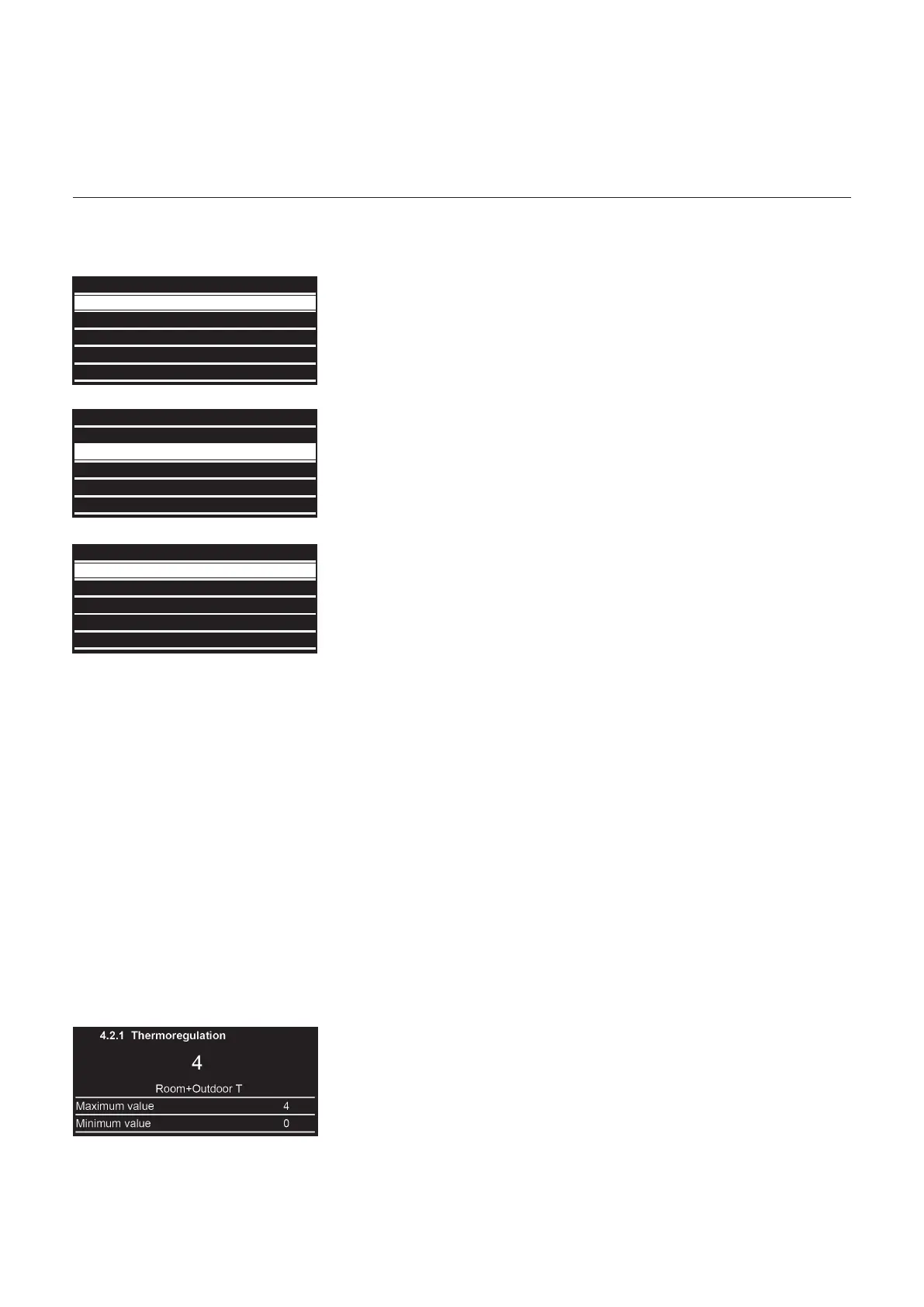
Select thermoregulation type
Tosettheboilertoweathercompensation,pleasesetparameter4.2.1to3withanON/OFForeBuscontroller.
1 Use “+” to go down and “–” to go
up to highlight the Parameters Zone
you want to set. In this case
Zone 1 Parameters.
Press OK.
2 Use “+” to go down and “–” to go
up to highlight
4.2 Z1 Settings.
Press OK.
3 Use “+” to go down and “–” to go
up to highlight
4.2.1 Thermoregulation.
Press OK.
4 Makeachoisebetween5:
0 Fix Flow T
Room thermostat with xed ow temperature
(Tstart58°C)
1
, every 16 min ±4 K)
1)
= Factory setting at high temperature level
1 Basic Thermoreg
Room thermostat with automatic ow temperature adaptation
2 Room T Only
Pure room temperature control with room sensor
Theowtemperatureiscontrolledasafunctionoftheroomtemperature
setpoint, the current room temperature and its current course. A slight
increase in the room temperature, for example, immediately reduces the
owtemperature.
3 Outdoor T Only
Weather compensated control with outdoor sensor
Theowtemperatureiscalculatedviatheheatingcurveasafunctionofthe
current outdoor temperature. This type of control requires that the heating
characteristic is set correctly, as the control system does not take room
temperature into account in this setting.
4 Room + Outdoor T
Weather and room temperature control with outdoor and room sensor
The deviation of the room temperature from the setpoint is recorded and
taken into account during temperature control. In this way, any external heat
generatedcanbetakenintoaccountandamoreconstantroomtemperature
becomespossible.
Theinuenceofthedeviationissetproportionally.Thebetterthereference
room is (unaltered room temperature, correct installation location, etc.), the
higherthevaluecanbeset.
Example:
Approx. 4: Good reference room
Approx.1:Unfavourablereferenceroom
0 Network
4 Zone1 Parameters
5 Zone2 Parameters
6 Zone3 Parameters
24 Commercial boiler
0 Network
4.1 S/W Changeover
4.2 Settings
4.0 Setpoint
4.3 Diagnostics
4.2.1 Thermoregulation 0
4.2.2 Slope 1.5
4.2.4 Room Influence Proportional 10
4.2.0 Zone temperature range 1
4.2.3 Offset 0



 To Next Page