7 Devices
iConnect Installation Manual
49
Partitioned systems
If your system is partitioned, each keyfob is assigned to arm and disarm one partition or the whole system. Therefore,
keyfob functionality in partitioned systems is defined by its partition set – see p. 49, 7.4.3 Partition Set.
Alternatively, you can program these buttons to control a specific HA unit or PGM output.
To program buttons B1 and B2:
1. From the Programming menu, select Devices, Keyfobs [912].
2. Select the keyfob you want to program.
3. From the keyfob’s sub-menu, select either B1 Assign [#4] or B2 Assign [#5].
4. Select the HA unit you want the button to control (01-16, or 30 for PGM output) or enter 00 to program
the button’s default function; then press .
7.4.3. Partition Set
In partitioned systems, each keyfob shall be assigned to one partition or to full arming.
To program the Partition Set option:
1. From the main menu, select Devices, Keyfobs [912]
2. Select the Keyfob you want to program.
3. From the Keyfob sub-menu, select Partition Set [#6]; the current Partition Set setting is displayed.
Partition Set Description
123 (F + P1 + P2) The Keyfob is assigned to both partitions and
full arming.
2 (P1) The Keyfob is assigned to partition 1.
3 (P2) The Keyfob is assigned to partition 2.
Table 7-2: Keyfob Partition Set
4. Use the keys 1, 2, and 3 to toggle the current setting.
Note: If you assign the Keyfob to both partitions, assign it to the full arming also.
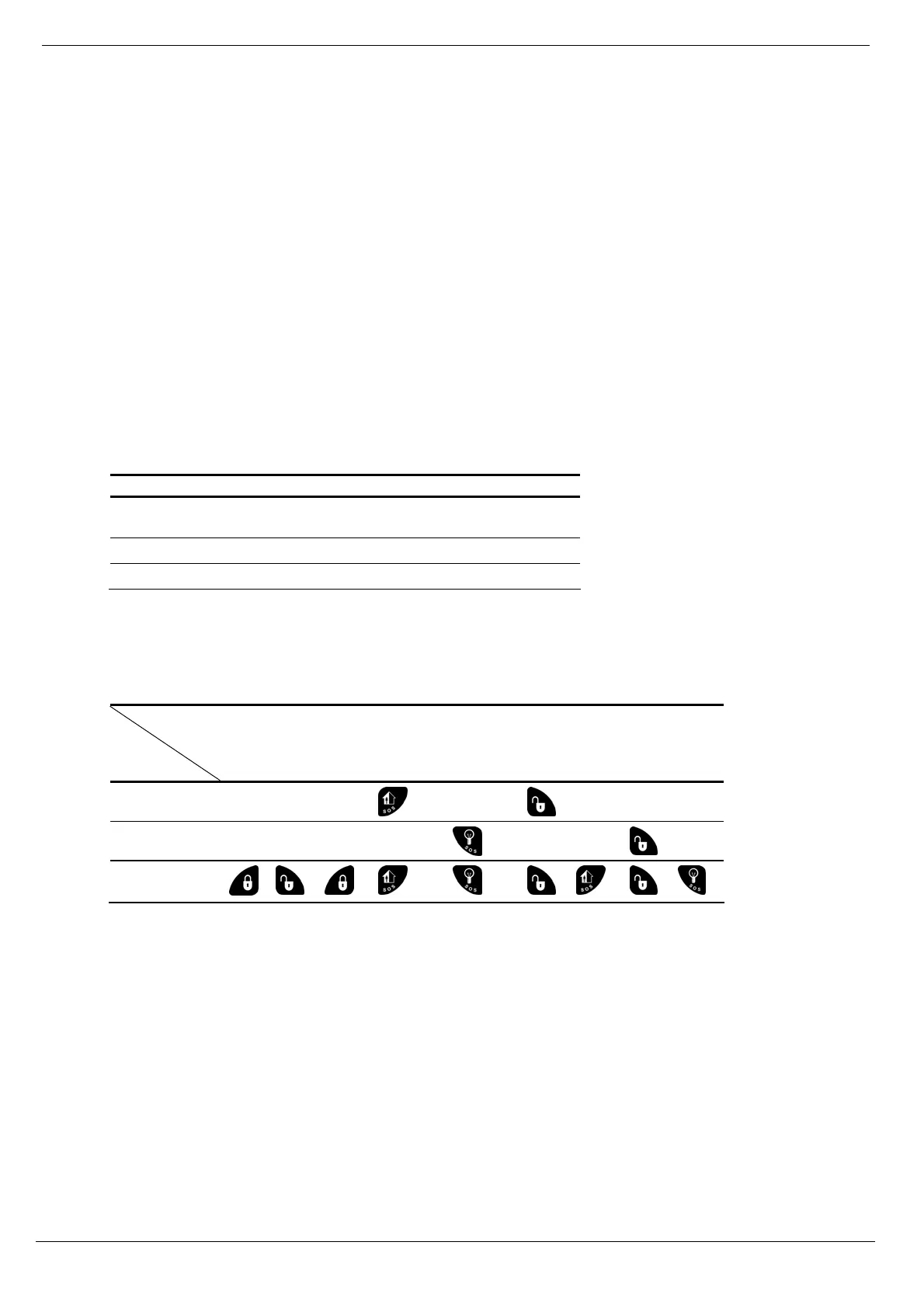
Button functionality is then as follows:
Function
Partition
set
Full
Arm
Disarm the
Whole
System
Arm P1 Arm P2 Disarm P1 Disarm P2
P1 only
P2 only
Whole system
(P1 and P2)
→ →
→
Table 7-3: Keyfob Arming and Disarming in Partitioned systems
Example 1: The keyfob is assigned to Partition 1. To Arm Partition 1, press B1 button. To disarm Partition 1, press the
Disarm button.
Example 2: The keyfob is assigned to both partitions. To Arm Partition 1, press B1 button. To disarm Partition 1, press
the Disarm button, and then press B1.
7.5. Keypads
The system supports up to four wireless keypads, including Wireless Terminals EL-2724 and EL-2640 keypads. For
information on descriptor editing and deletion, see p. 43, 7.1 Device Descriptors, and p. 43, 7.2.2 Deleting Wireless
Devices. See p. 109, Wireless Terminal (EL-2724), and p. 111, Wireless Keypad (EL-2640) for registration and battery
replacement procedure. The EL-2724 LEDs functionality is described in Table 7-4.
Note: Wireless Terminal EL-2724 does not support partitioning.



 To Next Page