20
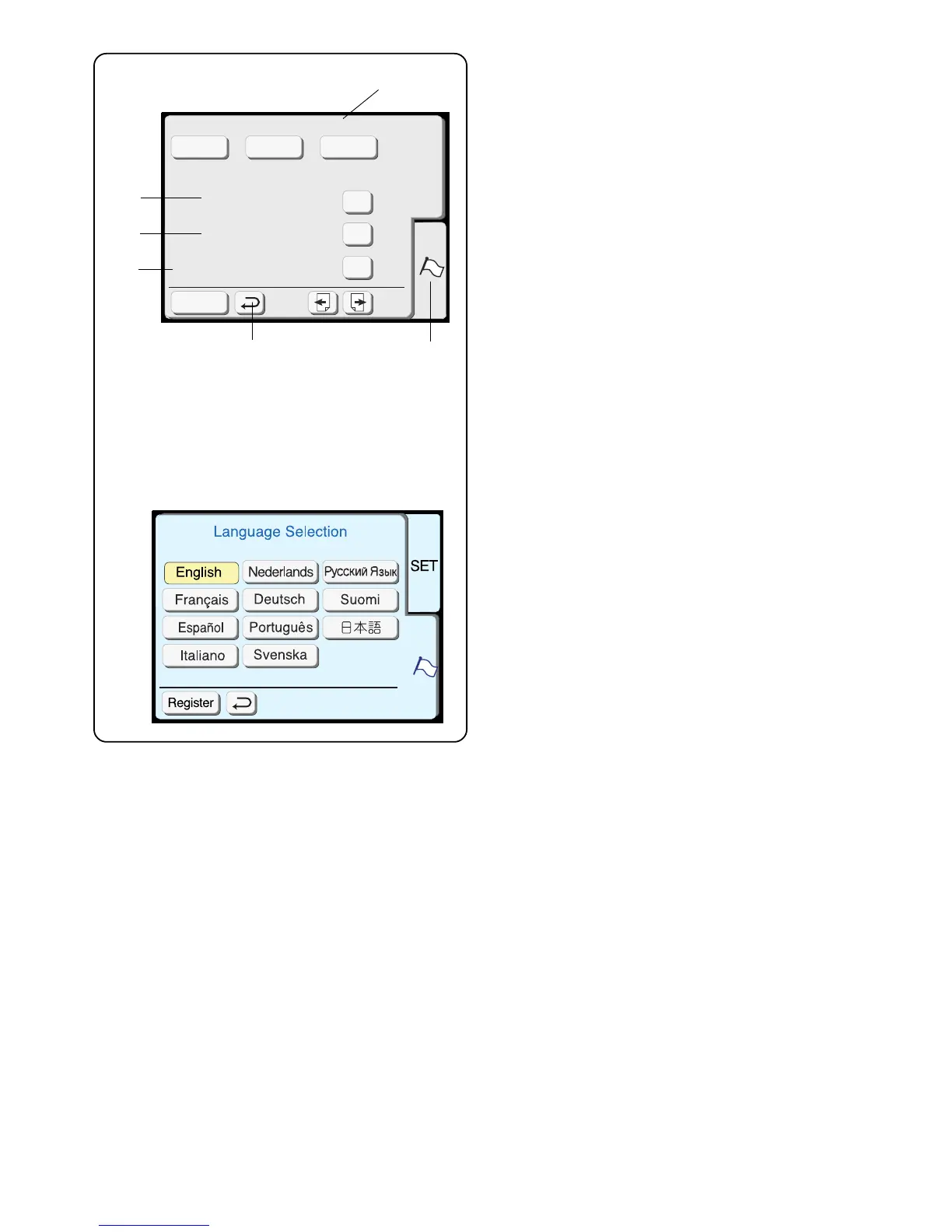
11. Select thread brand
Choose from three popular brands of embroidery
thread. The default thread brand is Robison-Anton
®
.
Touch the key that represents the brand of thread
you use most commonly. The color code and name
for that brand of thread will be displayed in the LCD
screen after selecting a design.
Format
If the built-in memory or PC design card does not
function because the memory bank is damaged, you
must re-enable by formatting the memory.
NOTE: Formatting will erase all stored data.
12. Built-in memory
Touch “Yes” key next to Built-in memory.
13. ATA PC design card (or Compact Flash)
Touch “Yes” key next to ATA PC card.
14. Reset to factory defaults
Touch this key to return everything, except language,
to the default settings (same settings as when you
purchased the machine).
15. Language selection
Touch the language key to open the language
selection window.
Touch the key that represents the language you
desire.
Touch the “Register” key to save your personal settings
and exit the set preferences window. If you touch the
“Return” key (16), you will exit the set preference window
but the new setting(s) will not be saved.
Reset all to defaults
Format
Built-in Memory
ATA PC Card
SET
Register
Madeira Mettler
Yes
Yes
Yes
Thread selection
Robison-
Anton
12
13
14
11
15
16


 To Next Page