MODEL 1000 SEP 2005
INSTALLATION AND SETUP
3-43
(b) Another option is to use a Direct Serial Connect Cable (P/N 3-2350-068), or fabricate
one like it.
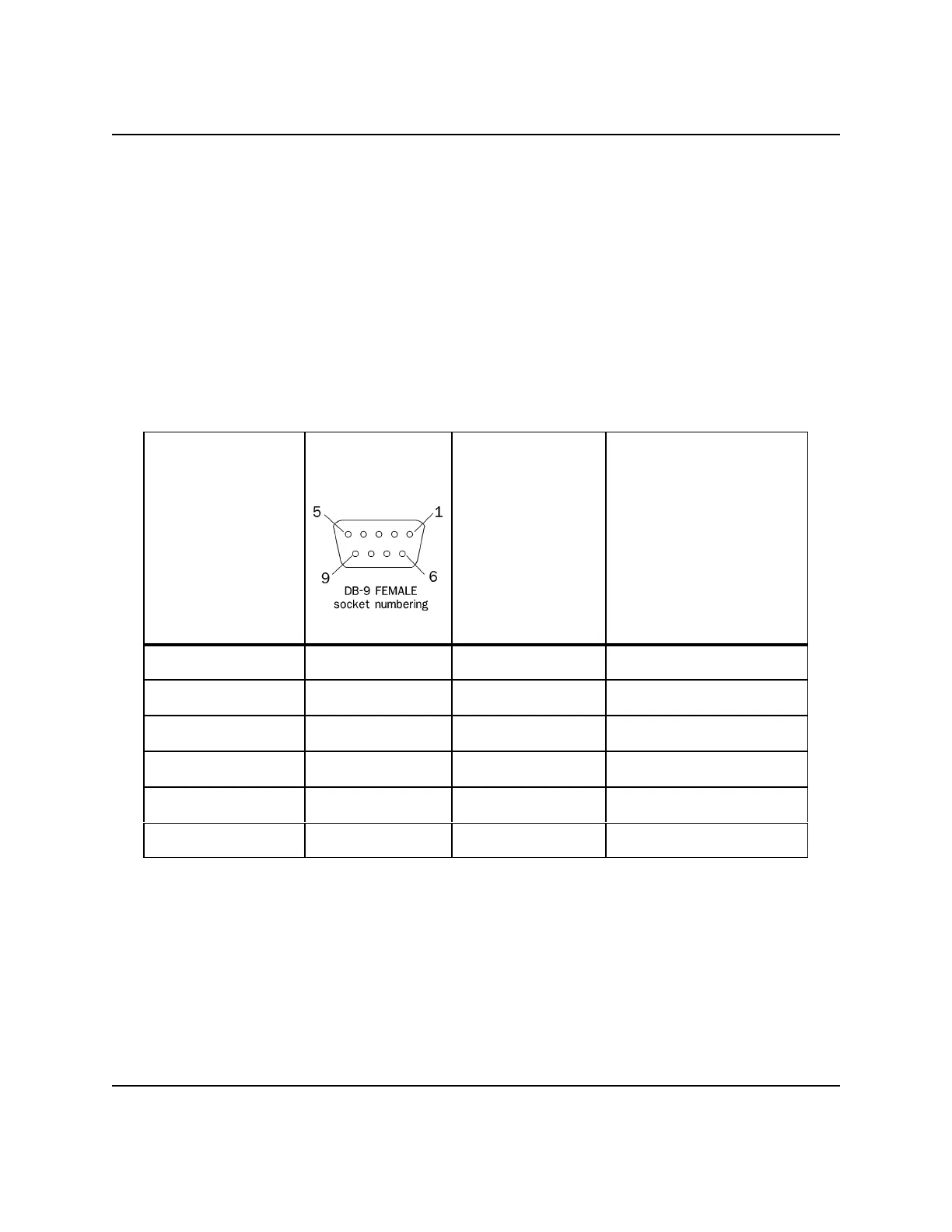
- Connect the DB-9 female plug end to the DB-9 male serial port on the PC.
- Connect the cable's exposed leads to the GC serial port on the TB.
- When the DB-9 female plug of the cable is connected to a standard PC, its six
leads will be configured for RS-232 as shown in Table 3-4.
Table 3-4. Direct serial connect cable, P/N 3-2350-068
Function at PC’s
serial port
Pin number of
the female DB-9
plug
Exposed
lead
color
Connect exposed leads
to one of GC
Controller RS-232
serial COM ports on
Terminal Board (TB)
for field wiring:
(J5, J6, J10, or J11)
pin number...
DCD (RLSD) 1 red 1 - DCD (RLSD)
IN OUT
S (RxD) 2 white 2 - S (TxD)
OUT IN
S (TxD) 3 black 3 - S (TxD)
GND 5 green 5 - GND
RTS 7 blue 8 - CTS
CTS 8 brown 7 - RTS
(c) Still another option is to fabricate a serial cable and its plug-ends by following
guidelines provided in Appendix A, this manual.



 To Next Page