PACSystems VersaMax Genius Network Interface User Manual Section 2
GFK-1535D Jan 2023
Installation 37
2.10.3 Overriding a Network Configuration
The NIU can also be configured via a message from the network. A
network configuration can be set up to deliberately disable the auto-
configuration function. If autoconfiguration has previously been disabled
by a network configuration, you can restore the autoconfiguration
function by following the steps below.
1.
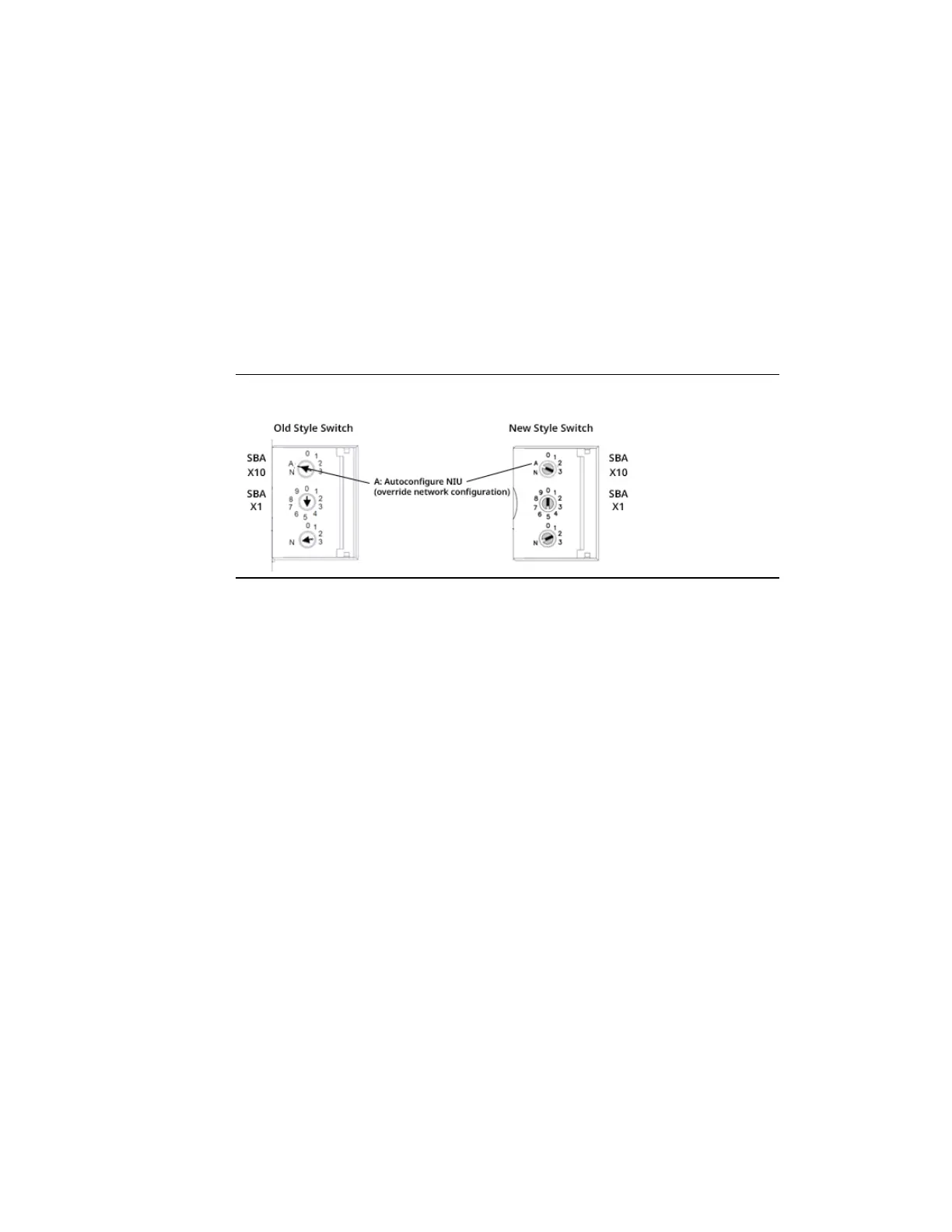
Set the upper SBA select switch (SBAx10) on the NIU to the A
position.
Figure 31: Overriding a Network Configuration
2.
Cycle power.
3.
Reset the upper SBA switch to select the tens digit of the SBA.
4.
Cycle power again.
Changing the SBA to a normal SBA does not disable autoconfiguration
again. Once autoconfiguration has been enabled, it cannot be disabled
manually. A configuration message sent to the NIU over the network or
from the configuration tool disables autoconfiguration.
2.10.4 Re-enabling Network Configuration
To re-enable a network configuration that has been overridden as
described above:
1.
Set the SBA select switches on the NIU to a valid address between
0 and 31.
2.
Cycle power.



 To Next Page
 Loading...