PACSystems VersaMax Genius Network Interface User Manual Section 4
GFK-1535D Jan 2023
Configuration 78
4.4 Autoconfiguration of the Genius NIU and
I/O Station
Autoconfiguration is done by the NIU itself. It provides a default
configuration for the NIU and I/O Station and does not require the use of
a programmer. I/O modules that have software-configurable features
always use their default settings when autoconfigured.
During autoconfiguration, the NIU determines which modules are
installed and automatically creates a default configuration for the I/O
station.
Once this autoconfiguration is complete as described below, the NIU
retains this configuration until it is either cleared or a configuration is
downloaded using the programmer.
4.4.1 Autoconfiguration Sequence
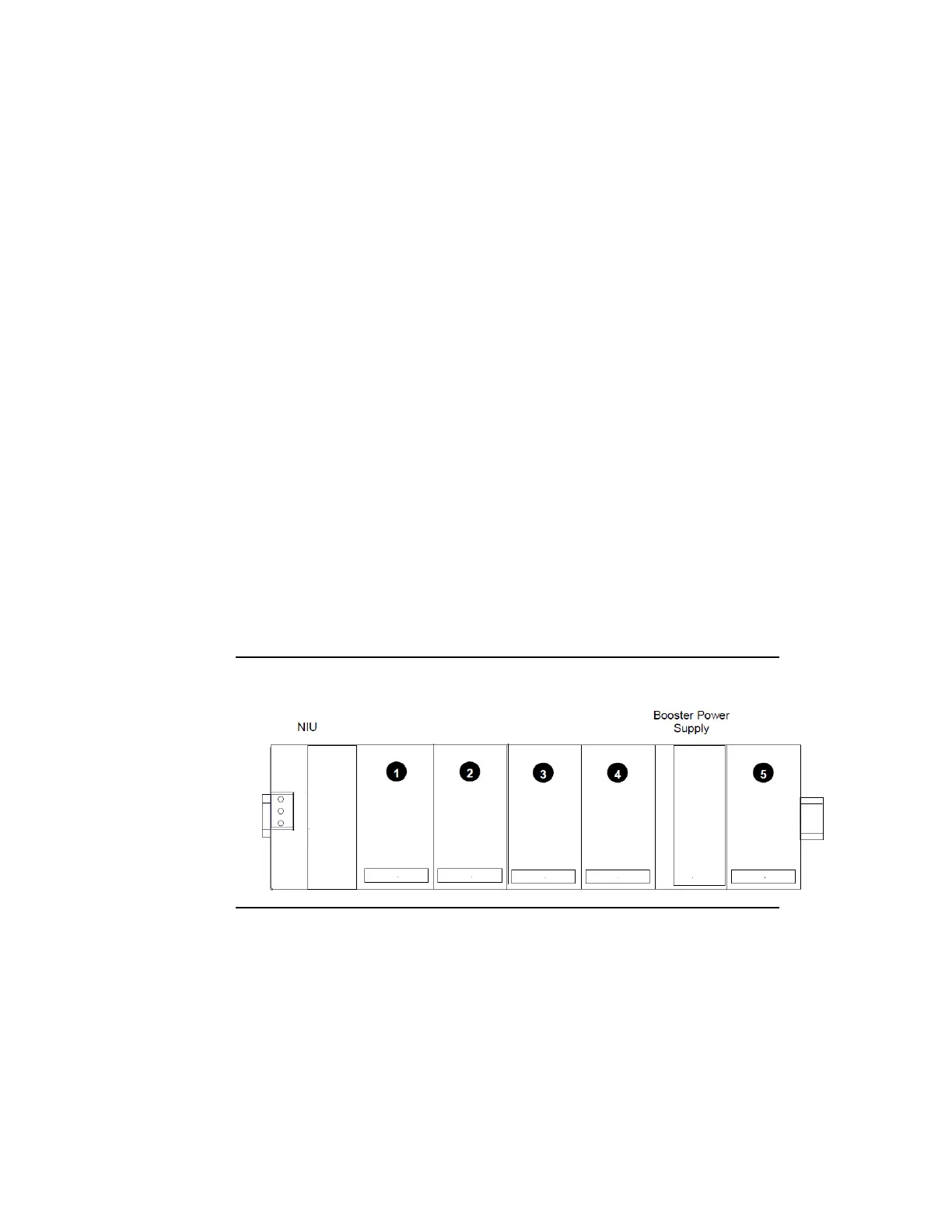
Each module is considered to occupy a “slot”. The position immediately to
the right of the NIU is called slot #1. Booster power supplies do not count
as occupying slots.
Figure 57: Example Autoconfiguration Sequence
Autoconfiguration starts at slot 1 of rack 0 (the main rack) and continues
in the same order the modules occupy in the I/O Station.
Autoconfiguration stops at the first empty slot or faulted module. For
example, if there are modules in slots 1, 2, 3, 5, and 6 but slot 4 is empty,
the modules in slots 5 and 6 are not autoconfigured.
For the autoconfiguration process to work as expected, any booster
power supplies in the I/O Station must be powered up at the same time
or before the main power supply.




 To Next Page