PACSystems VersaMax Genius Network Interface User Manual Section 2
GFK-1535D Jan 2023
Installation 28
2.6.4 Connecting the Expansion Cable: Single-
ended
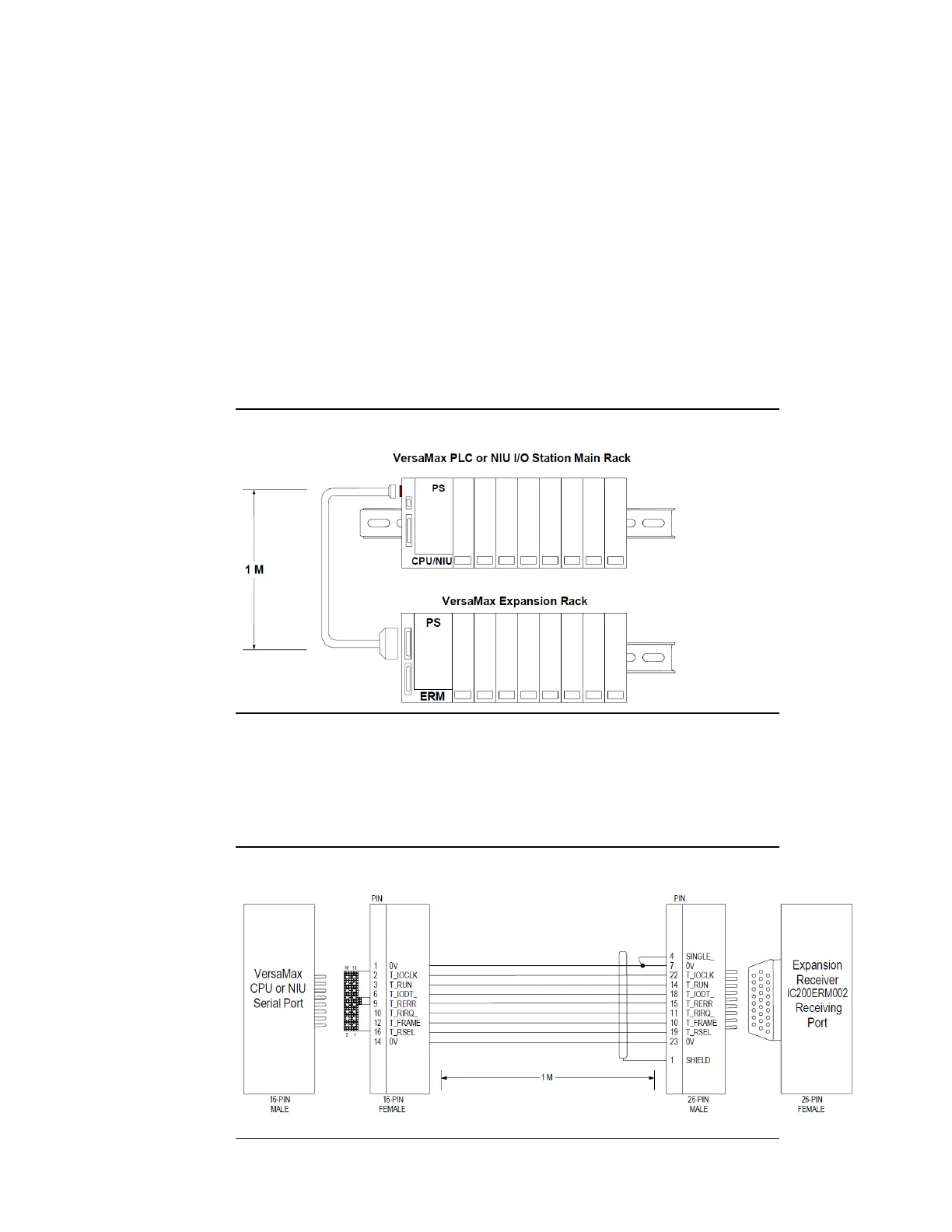
For a system with one non-isolated expansion rack (IC200ERM002) and
NO Expansion Transmitter, connect the expansion cable from the serial
port on the VersaMax NIU to the Expansion Receiver as shown below. The
maximum cable length is one meter. Cables cannot be fabricated for this
type of installation; cable IC200CBL600 must be ordered separately.
Note: Do not disconnect an expansion cable while the system is operating. It will cause
momentary disruptions in bus communications.
Figure 21: Single-Ended Expansion Cable
No Terminator Plug is needed in a single-ended installation; however, it
will not impede system operation if installed.
Single-Ended Inter-Rack Connection (IC200CBL600)
Figure 22: IC200CBL600 Single-Ended Connection




 To Next Page