PACSystems VersaMax Genius Network Interface User Manual Section 2
GFK-1535D Jan 2023
Installation 33
2.9 Setting the SBA and Baud Rate
1.
Open the clear protective door by pulling upward at the
indentation in the side of the NIU.
2.
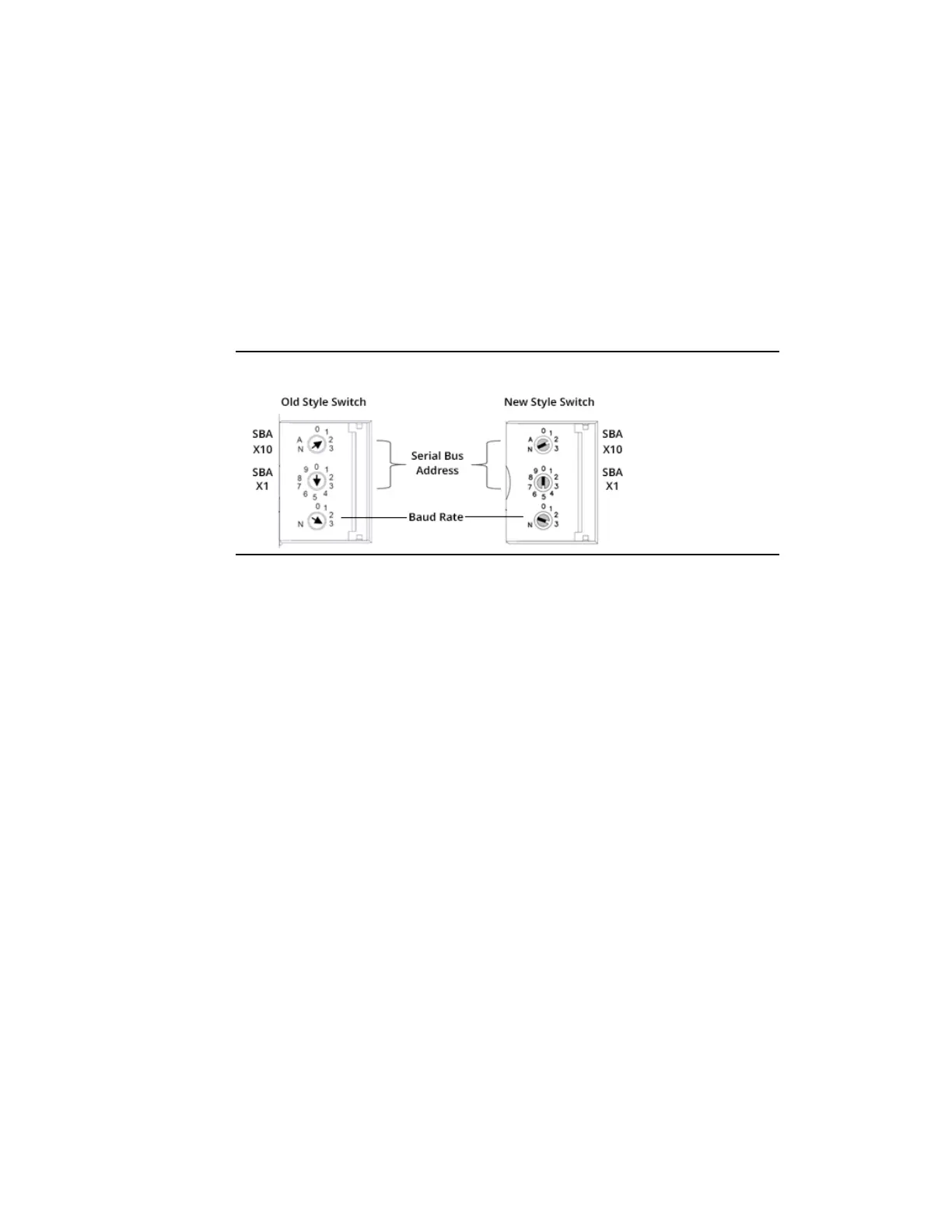
Use a 2.44 mm (3/32 in) flat screwdriver to adjust the rotary
switches. (Refer to Section 2.10, Special Switch Settings on the NIU if
the NIU is being configured using datagrams or for information
about upgrading the NIU firmware).
Figure 27: Setting SBA and Baud Rate
3.
Select the serial bus address with the two upper rotary switches,
SBA X10 (for the tens digit) and SBA X1(for the ones digit). Each
device on a bus must have a unique serial bus address in the
range of 0 - 31.
4.
Select the baud rate to match that used by the other devices on
the bus by setting the bottom rotary switch: (3) 153.6 Kbaud
extended, (2) 153.6 Kbaud standard, (1) 76.8 Kbaud, or (0) 38.4
Kbaud.
5.
Cycle power to the NIU after changing the switch settings.


 To Next Page
 Loading...
