PACSystems VersaMax Genius Network Interface User Manual Section 4
GFK-1535D Jan 2023
Configuration 64
•
Configure the type of expansion racks that are used(non-expanded,
single-ended expanded, or multi-rack expanded). This automatically
adds the appropriate types of expansion transmitter modules to the
main rack. An icon for the expansion transmitter does not appear
under the main rack.
•
Add the expansion racks (if used).
•
Configure the power supplies.
•
Configure the Genius NIU’s operating parameters.
•
For each location of the station:
•
Add a carrier for the module.
•
Add the module to the carrier.
•
Configure the module’s operating parameters.
•
Save the configuration file.
•
Download the configuration to the NIU.
4.3.3 Create a New VersaMax Genius Target
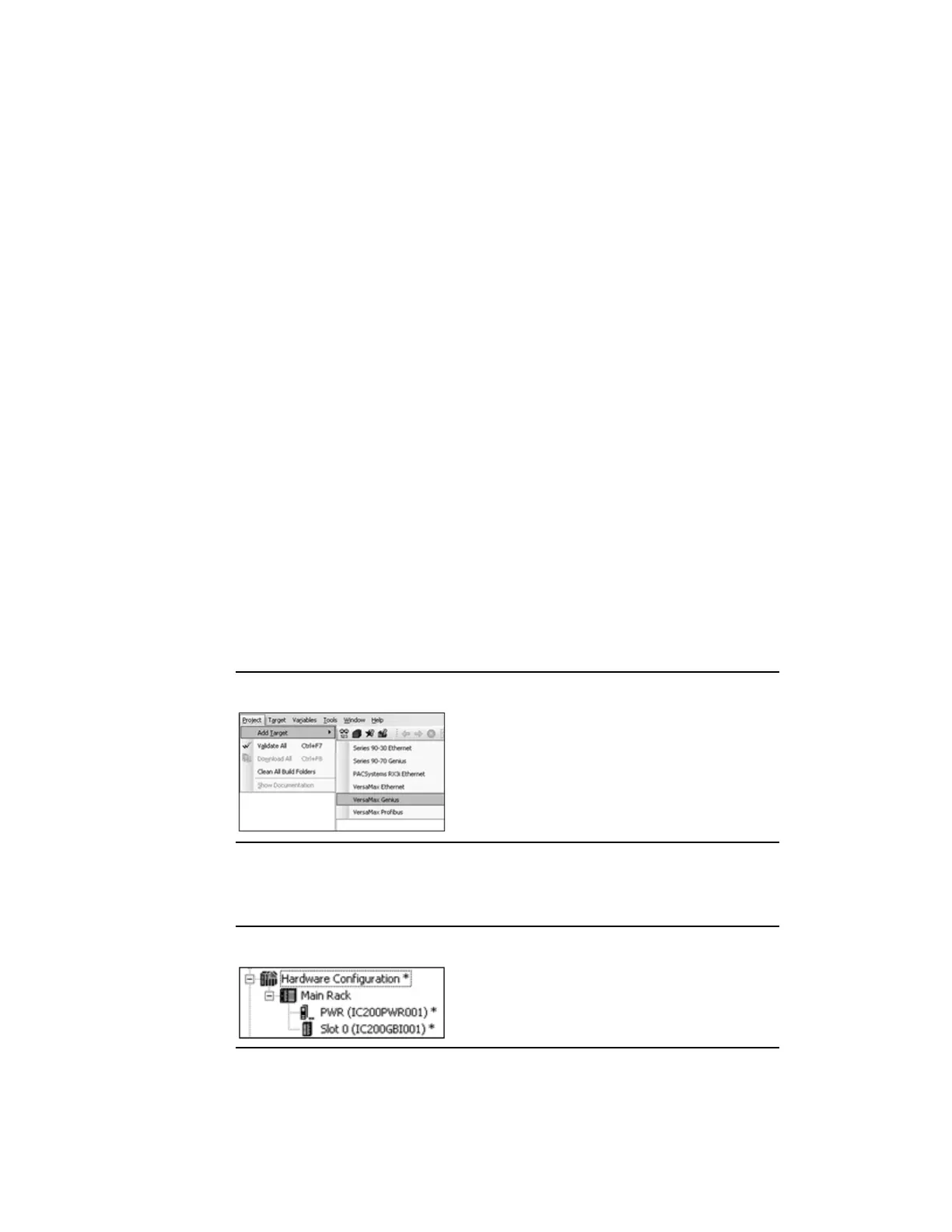
To configure a VersaMax Genius I/O Station using PAC Machine Edition,
create a new VersaMax Genius target:
Figure 42: Creating a VersaMax Genius Target
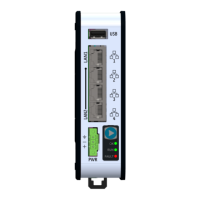
In the Navigator, a Main Rack appears with a default Power Supply and
Genius
NIU in Slot 0:
Figure 43: New Main Rack




 To Next Page