PACSystems VersaMax Genius Network Interface User Manual Section 2
GFK-1535D Jan 2023
Installation 26
2.6.3 Connecting the Expansion Cable: RS-485
Differential
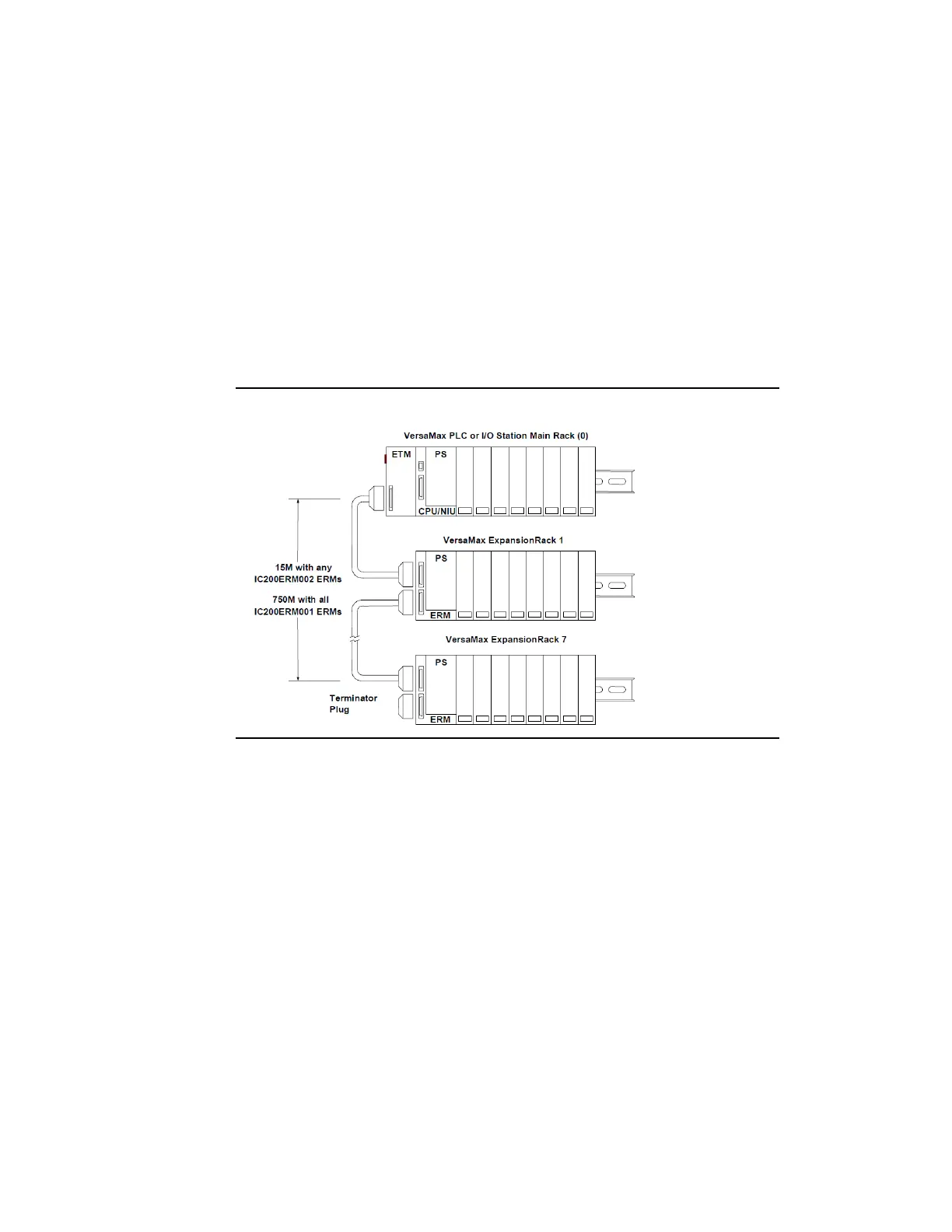
For a multiple-rack expansion system, connect the cable from the
expansion port on the Expansion Transmitter to the Expansion Receivers
as shown below. If all the Expansion Receivers are the Isolated type
(IC200ERM001), the maximum overall cable length is 750 meters. If the
expansion bus includes non-isolated Expansion Receivers (IC200ERM002),
the maximum overall cable length is 15 meters.
Figure 19: Connecting Expansion Cable(s)
Install the Terminator Plug (supplied with the Expansion Transmitter
module) into the lower port on the last Expansion Receiver. Spare
Terminator Plugs can be purchased separately as part number
IC200ACC201 (Qty 2).
Note: Do not disconnect an expansion cable while the system is operating. It will cause
momentary disruptions in bus communications.




 To Next Page