PACSystems VersaMax Genius Network Interface User Manual Section 4
GFK-1535D Jan 2023
Configuration 66
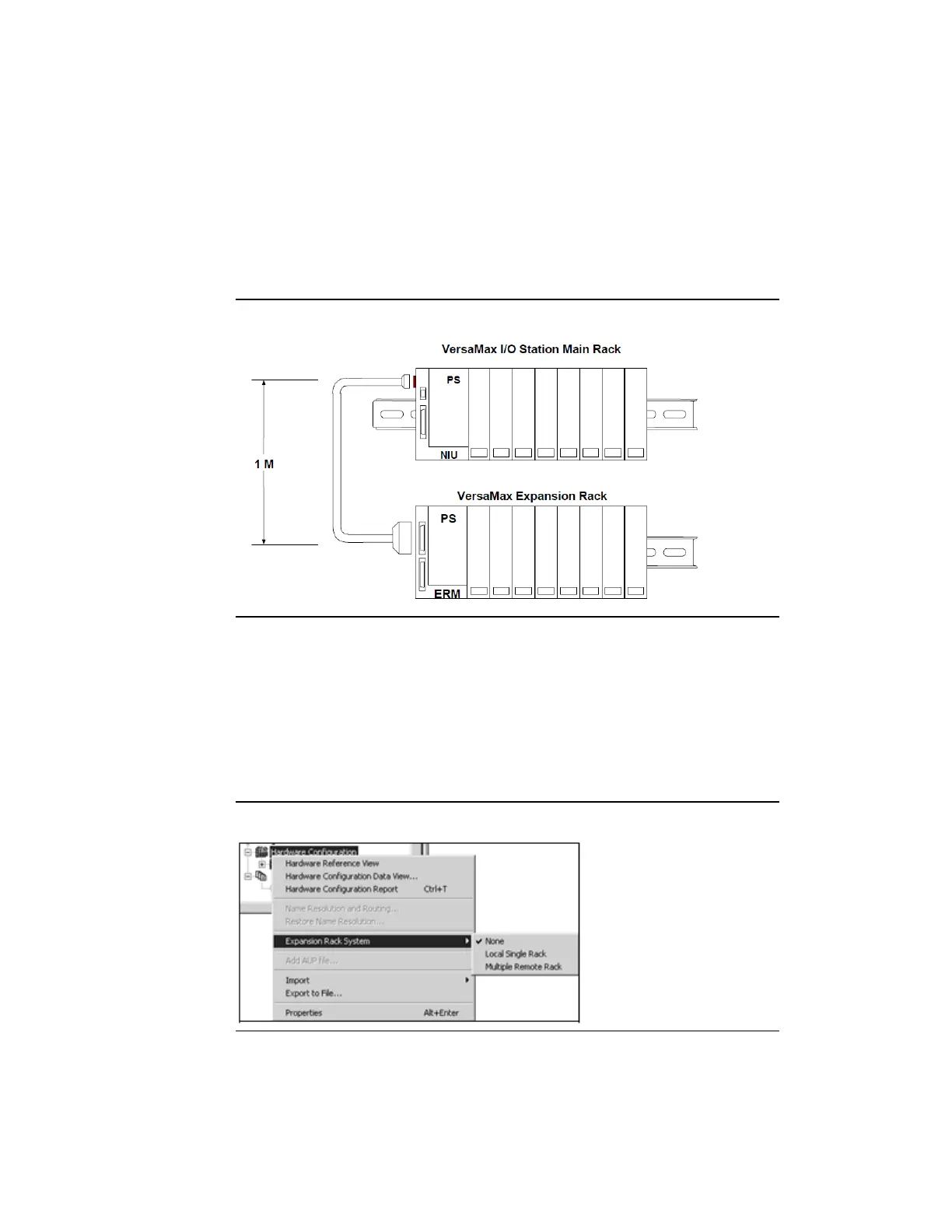
Single Expansion Rack: When an I/O Station will contain just one
expansion rack, you are not required to attach an Expansion Transmitter
Module (IC200BTM001) to the NIU. Instead, you may attach the
expansion cable directly to the NIU and place a non-isolated Expansion
Receiver Module (IC200ERM002) in slot 0 of the expansion rack as shown
in the figure below. For this case, the expansion rack must be configured
as rack 1, and the length of the expansion cable is limited to 1 meter.
Figure 45: Single Expansion Rack
To configure the type of Expansion Racks that will be used by the I/O
station, right-click on the target’s Hardware Configuration node in the
Navigator window and select Expansion Rack System. If the station does
not use any expansion racks, select None. If the station uses a Single
Expansion Rack as described above, select Local Single Rack. If the station
uses multiple expansion racks, select Multiple Remote Rack.
Figure 46: Configuring Expansion Racks



 To Next Page