EasyManua.ls Logo

Endress+Hauser Micropilot FMR56 - User Manual

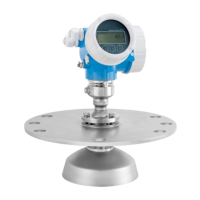
Endress+Hauser Micropilot FMR56
198 pages
Print Icon
To Next Page IconTo Next Page
Loading...
Products Solutions Services
Operating Instructions
Micropilot FMR56, FMR57
FOUNDATION Fieldbus
Free space radar
BA01123F/00/EN/03.16
71344036
01.01.zz (Device firmware)
AUTHORIZED DISTRIBUTOR:
InstrumentsAndControl.com
Houston, Texas USA
sales@InstrumentsAndControl.com
832-615-3588

Table of Contents

Other manuals for Endress+Hauser Micropilot FMR56

Questions and Answers

  • L
    Lisa BlackburnAug 20, 2025
    What to do if Endress+Hauser Micropilot FMR56 measured value is incorrect?
    • G
      gomezpeterAug 20, 2025
      If the measured distance matches the real distance, this indicates a calibration error. You should check and adjust the Empty calibration parameter, Full calibration parameter and linearization if necessary. If the measured distance does not match the real distance, it may be due to interference echo, in this case, carry out tank mapping.
  • J
    James HillAug 22, 2025
    What to do if Endress+Hauser Micropilot FMR56 Measuring Instruments shows "Communication error"?
    • C
      cohendavidAug 22, 2025
      If your Endress+Hauser Measuring Instruments displays a "Communication error" message upon starting or connecting the display, it could be due to electromagnetic interference. Check the grounding of the device. Another potential cause is a broken display cable or display plug, in which case, you should exchange the display.
  • C
    Christine JacksonAug 25, 2025
    How to fix Endress+Hauser Measuring Instruments device that does not respond?
    • B
      Bryan ChambersAug 25, 2025
      If your Endress+Hauser Measuring Instruments device isn't responding, first ensure the correct voltage is connected. Then, check that all cables are making solid electrical contact with their respective terminals.
  • L
    Lonnie WebbAug 26, 2025
    What to do if measured value of Endress+Hauser Micropilot FMR56 Measuring Instruments is incorrect?
    • G
      Grant DuncanAug 26, 2025
      If the measured value of your Endress+Hauser Measuring Instruments is incorrect, there might be a calibration error. Check and adjust the Empty calibration or Full calibration if necessary. Also, verify and adjust the linearization settings.
  • M
    Melissa MontgomeryAug 28, 2025
    How to fix invisible values on Endress+Hauser Micropilot FMR56 Measuring Instruments display?
    • X
      xmeyerAug 28, 2025
      If the values on the display of your Endress+Hauser Measuring Instruments are invisible, try the following: * Increase the contrast by pressing the indicated buttons simultaneously. * Decrease the contrast by pressing the indicated buttons simultaneously. Also, ensure the display cable plug is correctly connected. If the issue persists, the display may be defective and require replacement.
  • B
    Bonnie McneilAug 30, 2025
    Why does Endress+Hauser Micropilot FMR56 display a level when the tank is empty?
    • S
      Samantha MooreAug 30, 2025
      If your Endress+Hauser Measuring Instruments displays a level when the tank is empty, it's likely due to interference echo. Perform a mapping over the entire measuring range while the silo is empty.
  • M
    Matthew ArnoldSep 1, 2025
    What causes sporadic jumps in measured value of Endress+Hauser Measuring Instruments?
    • A
      anthonykingSep 1, 2025
      If, during filling, emptying, or measurement, the measured value of your Endress+Hauser Measuring Instruments jumps sporadically to a higher level, it could be due to a weakened signal or strong build-up. Try the following: * Carry out tank mapping. * Increase integration time. Also, optimize the antenna alignment. If needed, select a better mounting position and/or larger antenna, and clean the antenna.
  • S
    stephenshenrySep 3, 2025
    How to troubleshoot 'Communication error' on Endress+Hauser Micropilot FMR56?
    • J
      John GrantSep 3, 2025
      If your Endress+Hauser Measuring Instruments shows "Communication error" when starting or connecting the display, it might be due to electromagnetic interference. Check the grounding of the device. Alternatively, the display cable or plug could be broken, requiring you to exchange the display.
  • P
    Paul DominguezSep 5, 2025
    Why is there no change of measured value on filling / emptying with Endress+Hauser Measuring Instruments?
    • B
      bpetersonSep 5, 2025
      If there's no change in the measured value on your Endress+Hauser Measuring Instruments during filling or emptying, it's likely due to interference echoes. To resolve this: * Carry out tank mapping. * Align the antenna towards the solid surface. * Clean the antenna. Consider selecting a better mounting position and/or a larger antenna if necessary.
  • M
    Meghan KramerSep 7, 2025
    Why do measured values jump to higher levels on Endress+Hauser Measuring Instruments?
    • S
      sdominguezSep 7, 2025
      If the measured values of your Endress+Hauser Measuring Instruments jump to higher levels and remain there, it could be due to build-up or strong condensate formation. Consider periodic cleaning, carry out tank mapping, increase integration time, and optimize antenna alignment. If necessary, select a better mounting position and/or larger antenna.

Endress+Hauser Micropilot FMR56 Specifications

General IconGeneral
BrandEndress+Hauser
ModelMicropilot FMR56
CategoryMeasuring Instruments
LanguageEnglish

Related product manuals