THIS DOCUMENT CONTAINS CONFIDENTIAL INFORMATION PROPRIETARY TO ENERGATE INC. NO PART OF ITS CONTENTS MAY BE DISCLOSED OR CONVEYED TO,
USED BY, OR COPIED TO A THIRD PARTY WITHOUT PRIOR WRITTEN CONSENT BY ENERGATE INC. PRINTED COPIES WILL BE CONSIDERED UNCONTROLLED.
AW000873-G 50
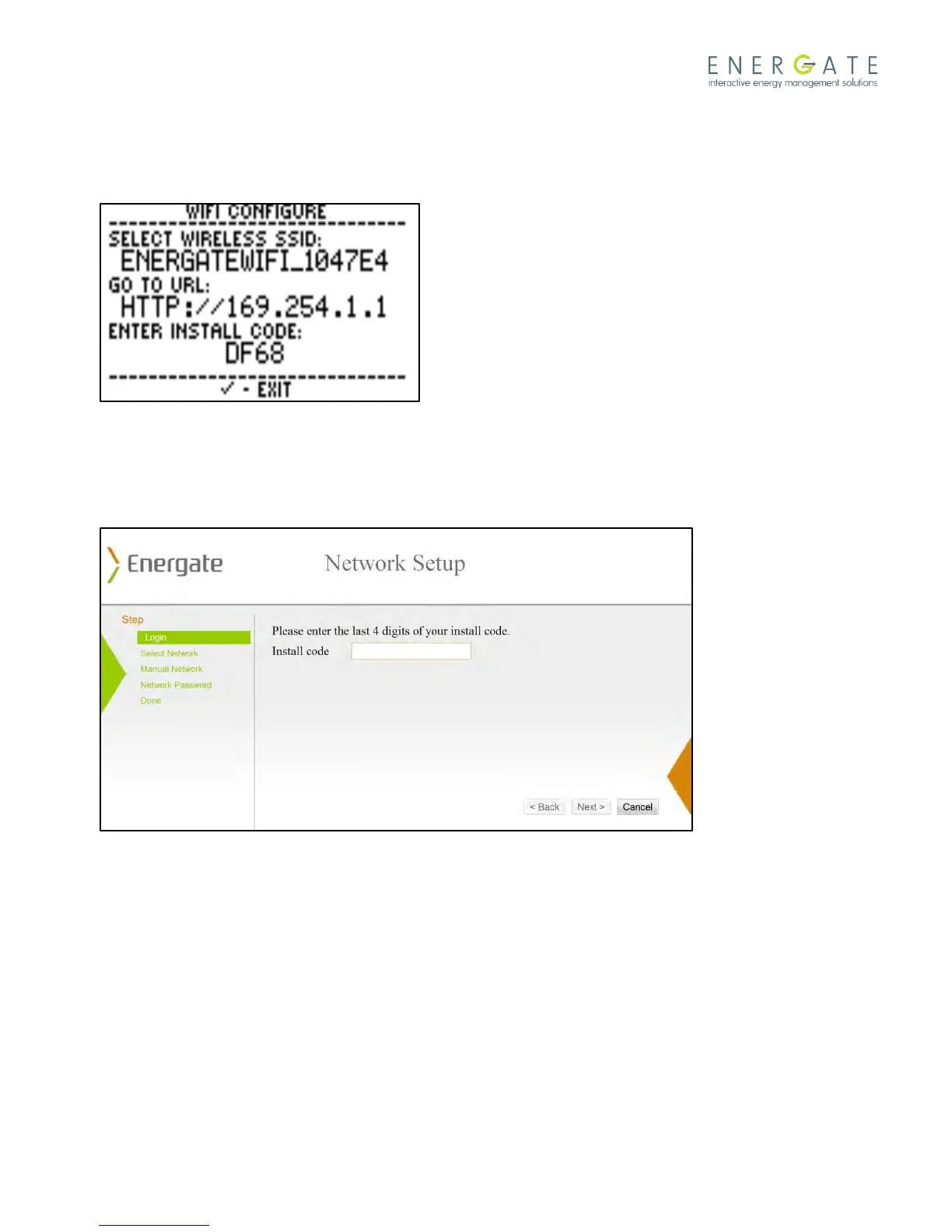
4. While the thermostat is in ADHOC mode you will see the following screen that shows the wireless SSID, URL and
Install Code as shown below. Make note of the given information and ensure the thermostat remains in ADHOC
mode.
5. Using a laptop or any Wi-Fi enabled device, go to the list of wireless Wi-Fi networks and select the Energate Wi-
Fi network (which was recorded in step 4).
6. Enter the URL in the address field of your web browser and the following page should open.
7. Enter the last 4 digits of the thermostat install code in the provided space and click Next.
8. Select your wireless network from a list of wireless Wi-Fi networks.
9. Enter your network password when prompted and click Next. Your Foundation will automatically leave ADHOC
mode.
10. On the thermostat, select Link Info and verify that the thermostat has successfully connected to the Wi-Fi
network. The following screen should appear indicating that the connection is active.



 To Next Page