Configure tanks
Instruction manual Ensite Pro Configuration Tool Page 29
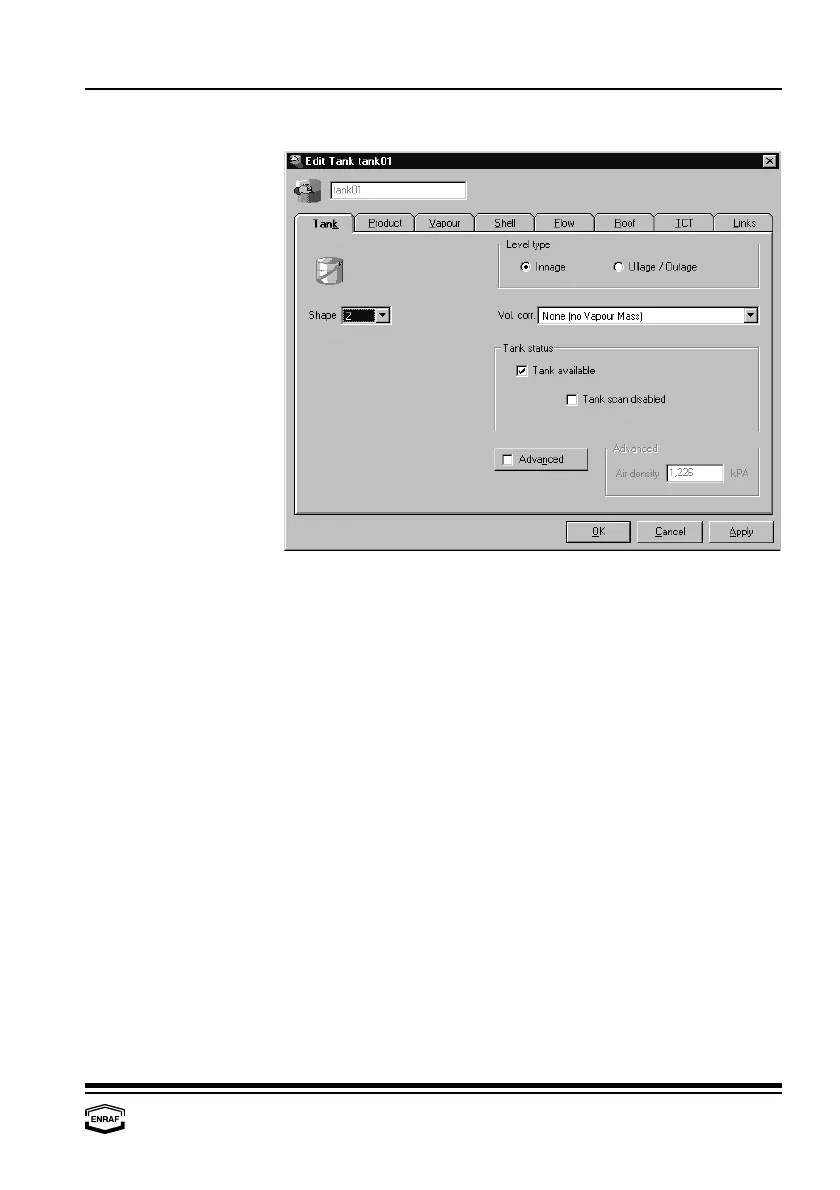
Tank
Shape
Select the tank shape, visualising icon for this tank.
0...7:
Enraf default
(0 = No shape defined, 1 = Cylindrical fixed
roof, 2 = Cylindrical with floating roof, 3 = Cylindrical with
internal floater, 4 = Spherical tank, 5 = Bullet,
6 = Underground bullet, 7 = Irregular cavern)
8...99:
reserved for future expansion by Enraf
100...255:
user defined tank shapes.
Create your own tank icon,
name it ‘TankShape<nr.>.ico’ and place it in the
‘\Pictures’-subdirectory.
Level type
Select: Innage or Ullage/Outage
Volume corr.
Select: - None (no Vapour Mass)
- S&W corr. (Liq. Mass from NSV; no Vap. Mass)
- Vapour calc. Liq/Vol Ratio ISO/TC28/SC-3-N
- Vapour calc. Molar Method ISO/TC28/SC-3-N
- Vapour calc. Method API research proj. 44
- Vapour calc. Molar Method ISO 6578
Tank status
Tank available
Check if available
Tank scan disabled
Check to disable



 To Next Page