Global settings
Page 14
Data in the fields ‘Dimensions’ and ‘Text’ can only be changed/set
after a new site has been created, all other data can also be
changed/set at a later stage.
Level and volume dimensions entered must be consistent with the
dimensions of the tank strap tables intend to use.
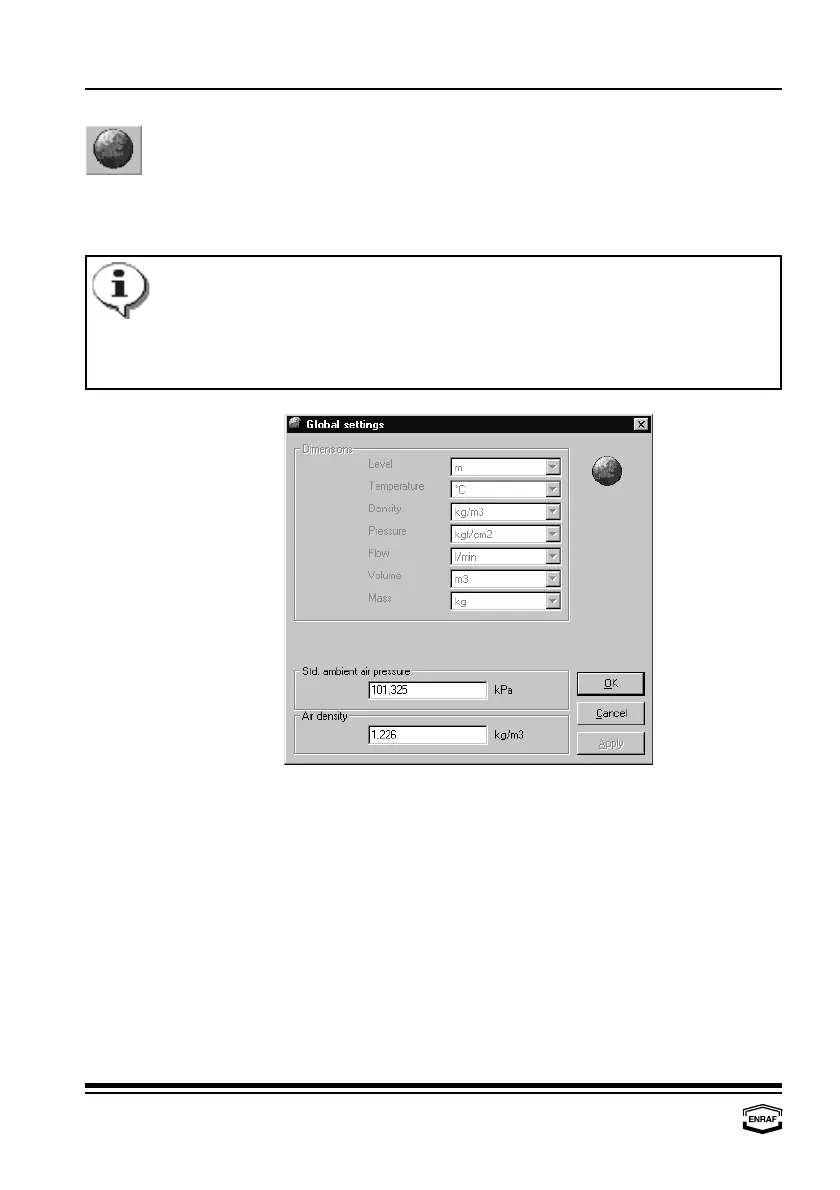
Global settings
This window automatically pops up after a site has been created. In
this window, global settings for the selected site can be programmed.
These global settings cover the way data is represented.
Dimensions
Level
Select: m, mm, ft, in, in/16, fis or 1/256 in
Temperature
Select: °C, °F
Density
Select: kg/m , °API, lbs/ft , dens60/60 or lbs/USgal
33
Pressure
Select: kgf/m , Pa, kPa or psi (lbf/in )
22
Flow
Select: m /min, m /h, l/min, bbls/min, bbls/h, USgal/min, Usgal/h
33
or UKgal/h
Volume
Select: l, m , USgal, bbls or UKgal
3
Mass
Select: kg, metric ton, USton, lbs or long ton
Std. ambient air pressure
Enter ambient air pressure in kPa (default = 101.325 kPa).
Air density
Enter air density in kg/m (default = 1.226 kg/m ).
33



 To Next Page