Configure CIU Prime
Instruction manual Ensite Pro Configuration Tool Page 39
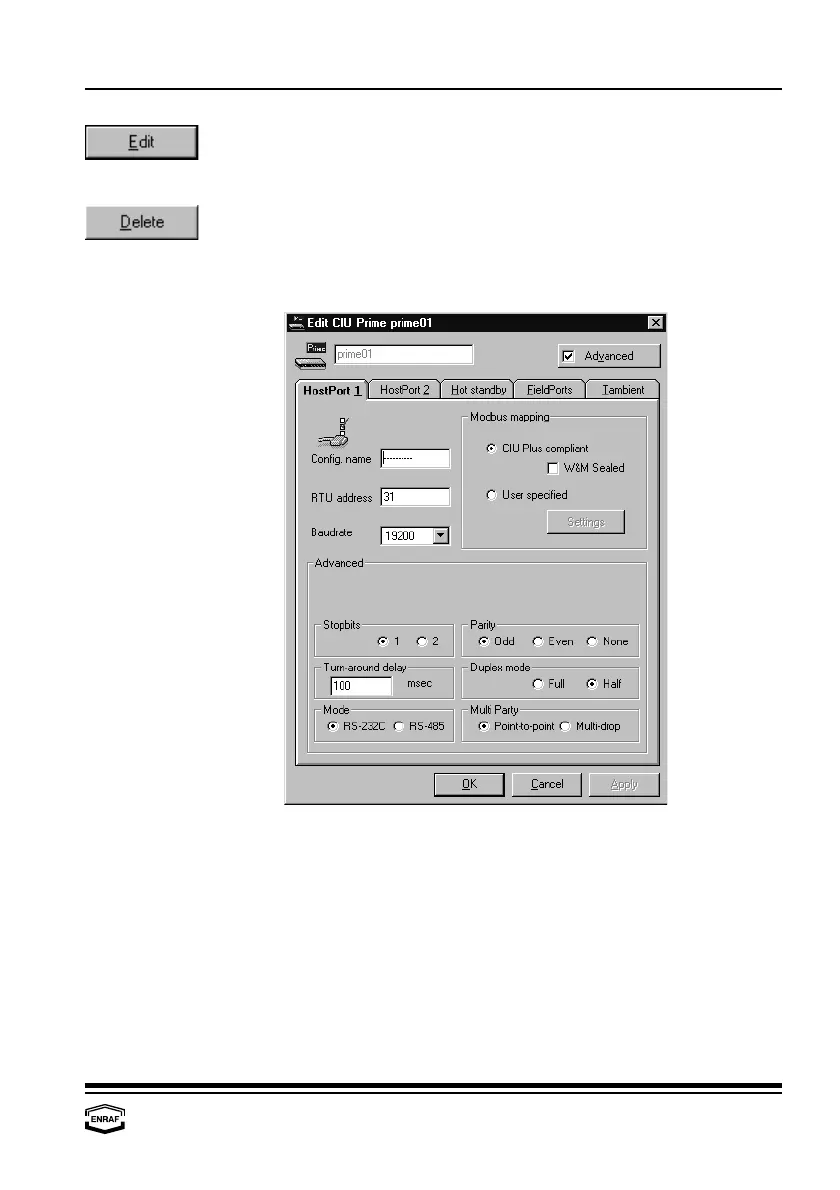
Press the ‘Edit’-button to edit data from the highlighted CIU Prime:
- HostPort 1 - Hot standby - Tambient
- HostPort 2 - FieldPorts
Press the ‘Delete’-button to remove the highlighted data input from the
list.
HostPort 1
Config. name
Enter the name of the connected device (up to 10 characters).
RTU address
Enter the RTU address (default = 31)
Baudrate
Select: 1200, 2400, 4800, 9600 or 19200
Modbus mapping
CIU Plus compliant
Select if a CIU Plus is connected to this port. All data will be filled in
on pre-defined positions.
W&M sealed
Check if applicable
User specified
Select if no CIU Plus is connected to this port. All data will be filled in
on user specified positions. Press the ‘Settings’-button to program
these positions (refer to the chapter ‘Modbus settings’).



 To Next Page