Communication setup
Instruction manual Ensite Pro Configuration Tool Page 59
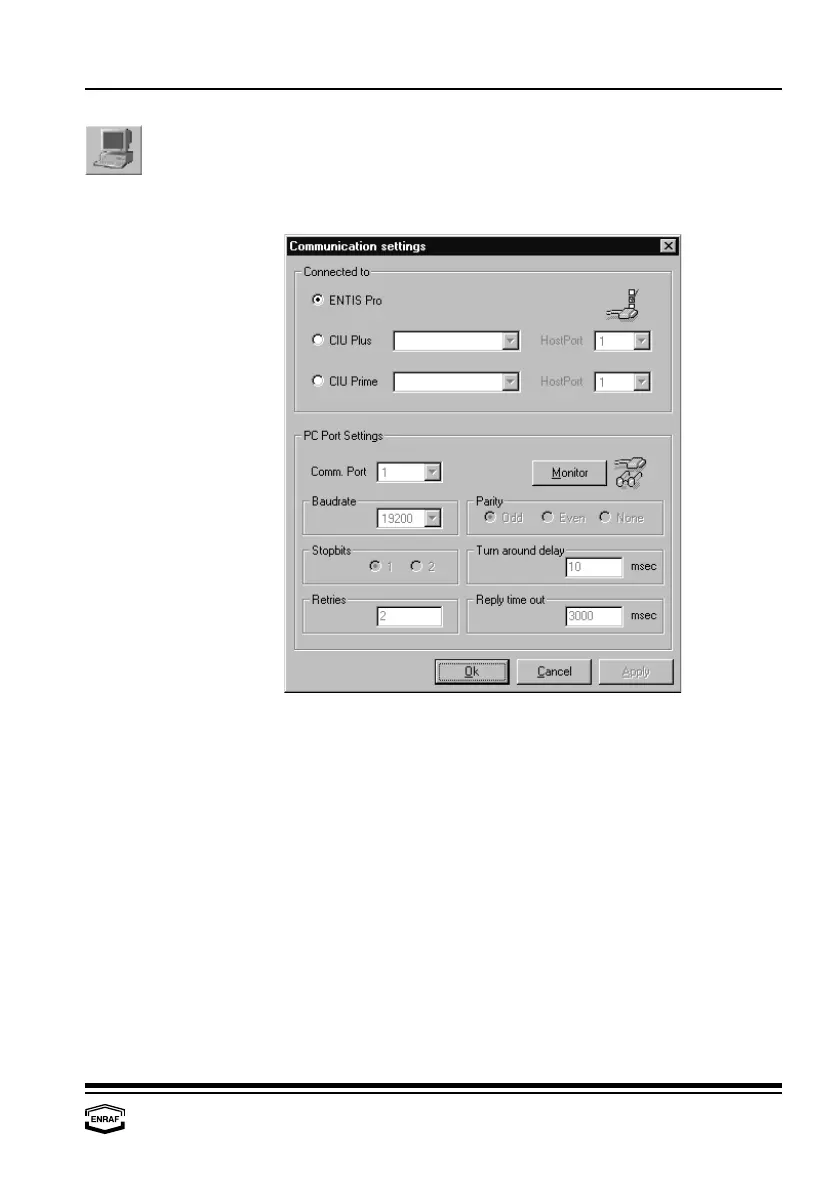
Communication setup
To be able to communicate via the configuration tool, communication
parameters must be set.
Connected to
Entis Pro
Select if connected to Entis Pro
CIU Plus
Select if connected to CIU Plus; select CIU Plus name
= HostPort
Select CIU Plus HostPort
CIU Prime
Select if connected to CIU Prime; select CIU Prime name
= HostPort
Select CIU Prime HostPort
PC Port Settings
Comm. port
Select communication port of PC where configuration tool is installed
Baudrate
Select: 1200, 2400, 4800, 9600, 19200 or 38400.
Parity
Select: Odd, Even or None
Stopbits
Select: 1 or 2
Turn around delay
Select reply waiting time in ms (default = 10 ms)
Retries
Enter the number of retries (default = 2)
Reply timeout
Enter the reply waiting time (default = 3000 ms)



 To Next Page