Configure CIU Prime
Instruction manual Ensite Pro Configuration Tool Page 45
If ‘RS-232C’ is selected, while in reality RS-485 hardware is applied,
communication can not be established.
Note 1
When a field communication fail occurs it is possible to maintain last
valid scan data in the CIU Prime database during a configurable
amount of time. The communication fail delay mechanism is reset on
the reception of data. A field communication fail can be caused by:
- modem delays bad cabling
- no answer because of a re
- initializing gauge
Note 2
When a data fail occurs it is possible to maintain the last valid scan
data in the CIU Prime database during a configurable amount of
time. The data fail mechanism is reset on the reception of valid data.
A data fail can be caused by:
- re-initialization of a gauge
- 802/811 digitizer failure
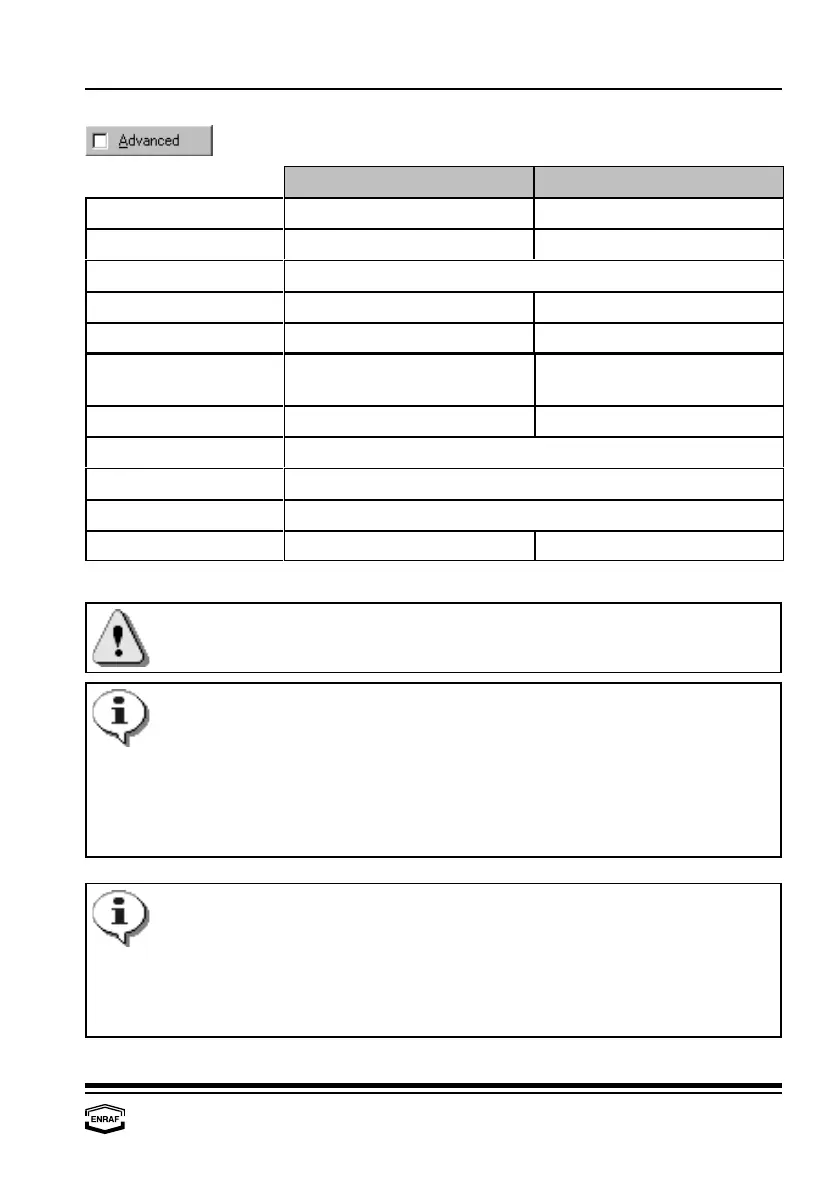
CIU-GPU BPM-GPU
- Stopbits
Select: 1 or 2 N.A.
- Parity
Select: Odd, Even or None N.A.
-Turn-around delay
Enter reply waiting time in ms (default = 20 ms)
- Handshake
Select: Full or Half N.A.
- Mode
Select: RS-232C or RS-485 Select: EN-BPM
- FieldPort time-out
Enter timeout in ms Enter timeout in ms
(default = 200 ms) (default = 75 ms)
- FieldPort sensitivity
N.A. Enter sensitivity (default = 7)
- FieldPort retries
Enter number of retries (default = 3)
-Communication fail delay
Enter a time between 0 and 255 seconds See note 1
- Data fail delay
Enter a time between 0 and 255 seconds See note 2
= Enabled
Check to enable N.A.



 To Next Page