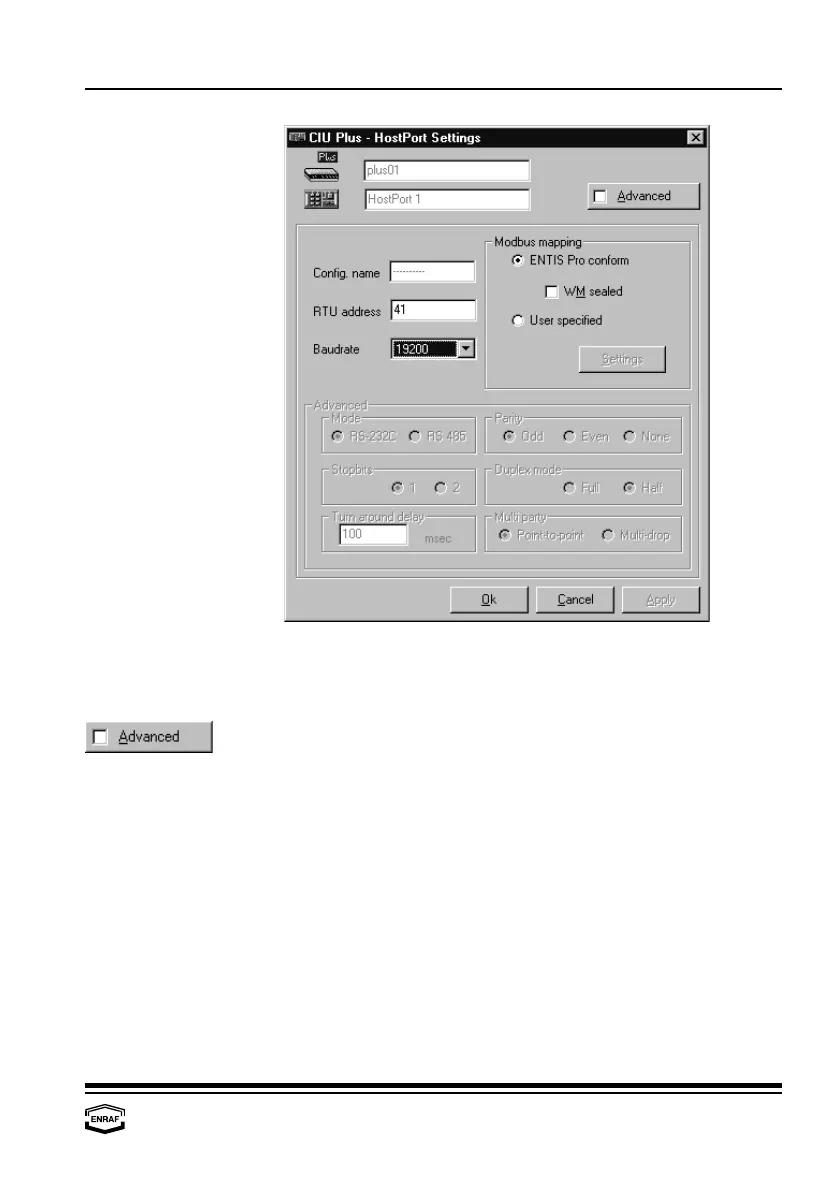
Configure CIU Plus
Instruction manual Ensite Pro Configuration Tool Page 49
Config. name Here the name of the connected device is displayed.
RTU address Here the RTU address of the HostPort is displayed (default = 41).
Baudrate Select: 1200, 2400, 4800, 9600 ,19200 or 38400.
Mode
Select: RS-232C or RS-485 (Check the hardware)
Parity
Select: Odd, Even or None
Stopbits
Select: 1 or 2
Duplex mode
Select: Full or Half
Turn around delay
Enter reply waiting time in ms (default = 100 ms)
Multi party
Select: Point-to-point or Multi-drop
Modbus mapping
Entis Pro conform
Select if Entis Pro is connected to this port. All data will be filled in on
pre-defined positions.
W&M sealed
Check if applicable
User specified
Select if Entis Pro is not connected to this port. All data will be filled in
on user specified positions. Press the ‘Settings’-button to program
Modbus settings.



 To Next Page