Envision One cDLM® User Manual
TS-MAM-EnvisionOneCDLMUserManual-V5.0-FN-EN , 2021-12-15
6 Printer Components
This chapter contains a comprehensive overview of the construction and the function of the printer. It should be
read when actually at the printer in order to get familiar with the printer in an optimal way.
6.1 Functional Description
During the build process, the model is built layer by layer. A mechanical system moves the build platform up so that
the cured material sticks to the build platform or to the previous layer.
Before starting the build process, certain calibrations must be performed at the factory.
The material is then directly poured into the material tray. The job is transferred to the printer through Envision One
RP® software or via USB drive. The build process begins.
After the build process has finished, the models are removed from the build platform using a scraper and treated
according to the corresponding Material Best Practice guide.
6.2 Construction of the Printer
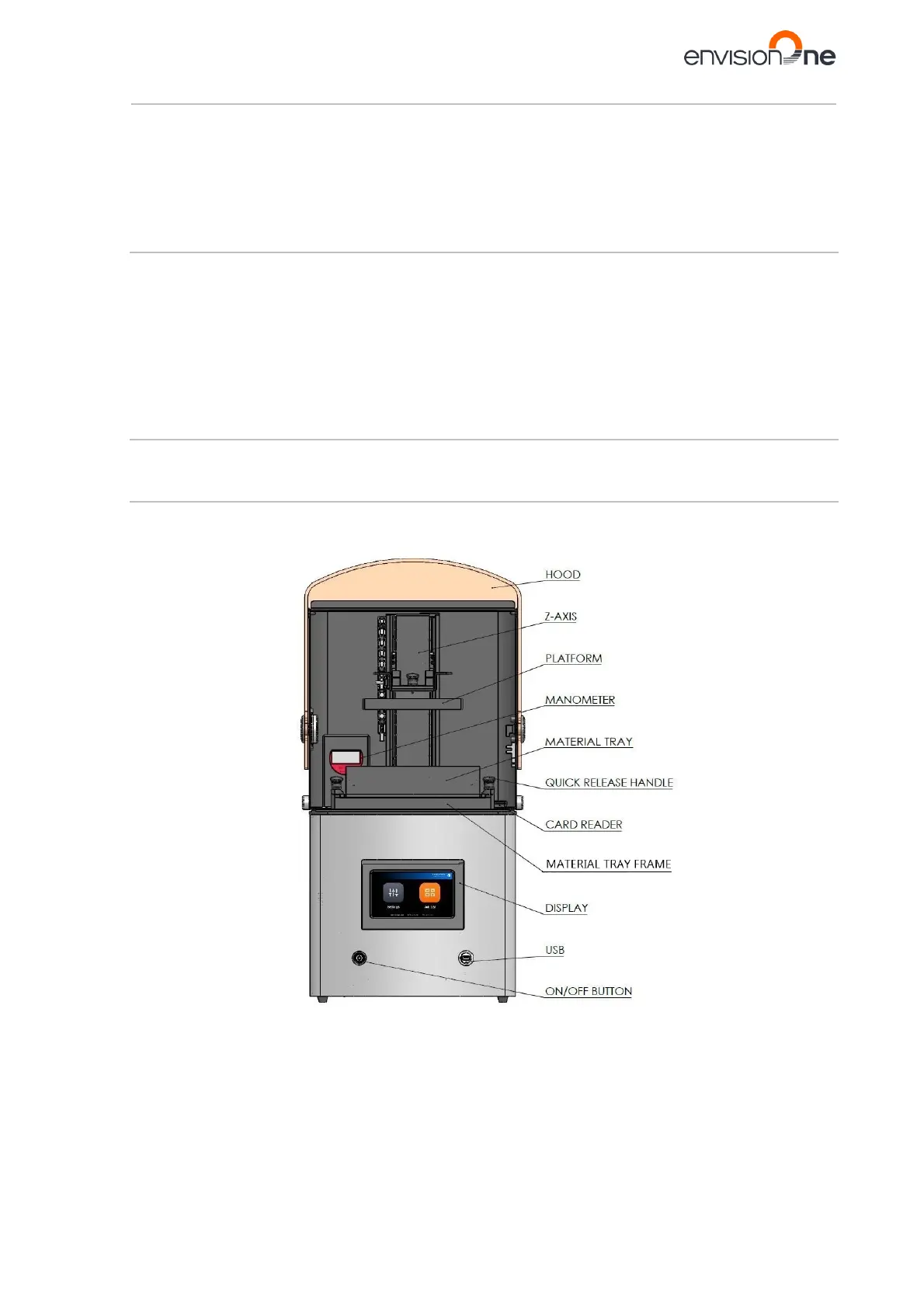
Figures below give an overview of the most important printer components and show their position on the printer.
6.2.1 Front View
Figure 3: Front view of the printer



 To Next Page