A
Document mat Blocks external light while scanning. Remove it when cleaning the
ADF or removing jammed originals.
B
Scanner glass Place originals that you cannot feed using the ADF.
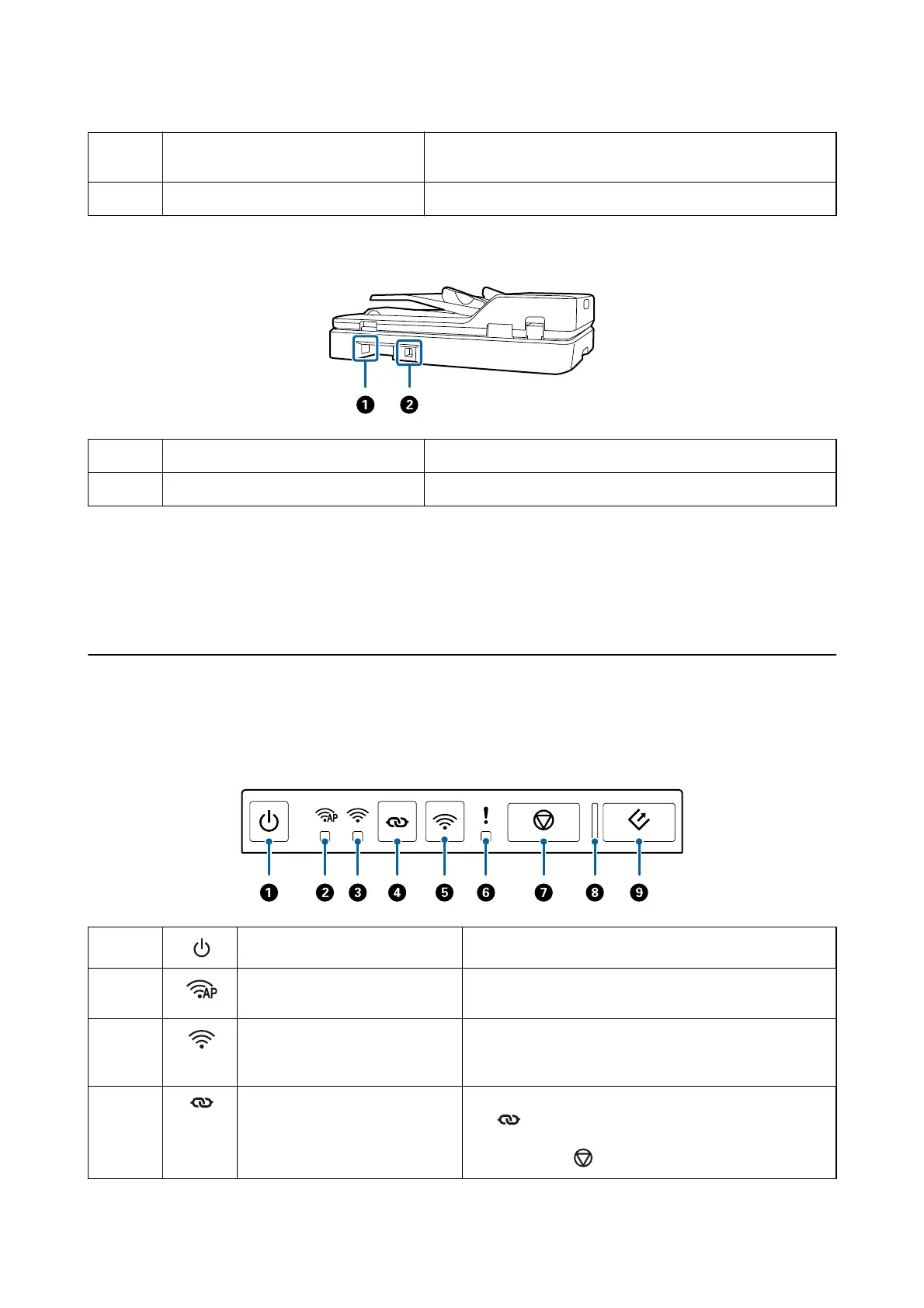
Back
A
AC inlet Connects the power cord.
B
USB port Connects a USB cable.
Related Information
& “Specications of Originals for Scanning from the ADF” on page 19
& “Cleaning the ADF” on page 63
Buttons and Lights on the Control Panel
Buttons
A
Power button Turns the scanner on or o.
B
AP mode light Indicates that the scanner is connected wirelessly in AP
mode.
C
Wi-Fi light Blue indicates that the scanner is connected to a wireless
(Wi-Fi) network. White indicates it is searching for an access
point.
D
Wi-Fi connect button Press the WPS button on the access point, and then press
the
button for more than three seconds to connect to a
Wi-Fi network. See the chapter “Network Settings” for more
details. Press the
button to cancel the settings.
User's Guide
Scanner Basics
13



 To Next Page