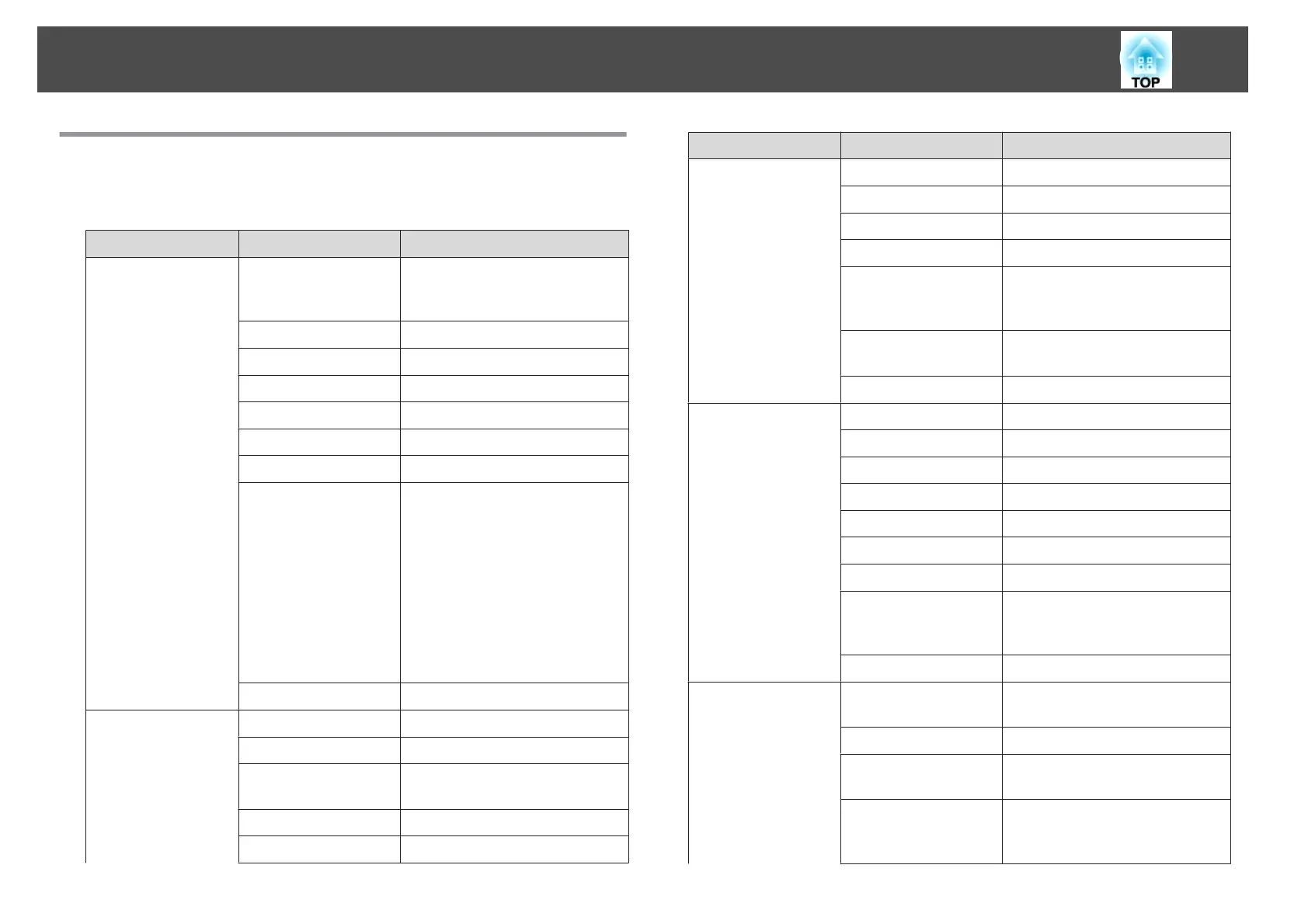
Configuration Menu Table
Settable items vary depending on the model being used and the image
signal and source being projected.
Top Menu Name Submenu Name Setting Values
Image menu
s p.65
Color Mode Dynamic, Presentation, Theatre,
Photo, sRGB, Blackboard,
Whiteboard, and Customized
Brightness -24 - 24
Contrast -24 - 24
Color Saturation -32 - 32
Tint -32 - 32
Sharpness -5 - 5
Abs. Color Temp. 5000K to 10000K
Color Adjustment Red: -16 to 16
Green: -16 to 16
Blue: -16 to 16
R: -64 to 64
G: -64 to 64
B: -64 to 64
C: -64 to 64
M: -64 to 64
Y: -64 to 64
Auto Iris On and Off
Signal menu
s p.66
Auto Setup On and Off
Resolution Auto, Wide, and Normal
Tracking Varies depending on the input
signal.
Sync. 0 - 31
Position Up, Down, Left, and Right
Top Menu Name Submenu Name Setting Values
Progressive Off, Video, and Film/Auto
Noise Reduction Off, NR1, and NR2
HDMI Video Range Auto, Normal, and Expanded
Input Signal Auto, RGB, and Component
Video Signal Auto, NTSC, NTSC4.43, PAL,
M-PAL, N-PAL, PAL60, and
SECAM
Aspect Normal, Auto, 4:3, 16:9, Full,
Zoom, and Native
Overscan Auto, Off, 4%, and 8%
Settings menu
s p.68
Keystone H/V-Keystone and Quick Corner
Split Screen -
Control Panel Lock Full Lock, Partial Lock, and Off
Pointer Shape Pointer 1, Pointer 2, Pointer 3
Power Consumption Normal and ECO
Volume 0 - 20
Remote Receiver Front/Rear, Front, Rear and Off
User Button Power Consumption, Info,
Progressive, Test Pattern, Multi-
screen, and Resolution
Test Pattern -
Extended menu
s p.69
Display Messages, Display Background,
Startup Screen, and A/V Mute
User's Logo -
Projection Front, Front/Ceiling, Rear, and
Rear/Ceiling
Operation Direct Power On, Sleep Mode,
Sleep Mode Timer, Trigger Out,
and High Altitude Mode
List of Functions
63



 To Next Page